________________________________________________________________________________________________________
1592025400 – Vers. 1.0 - 111
-
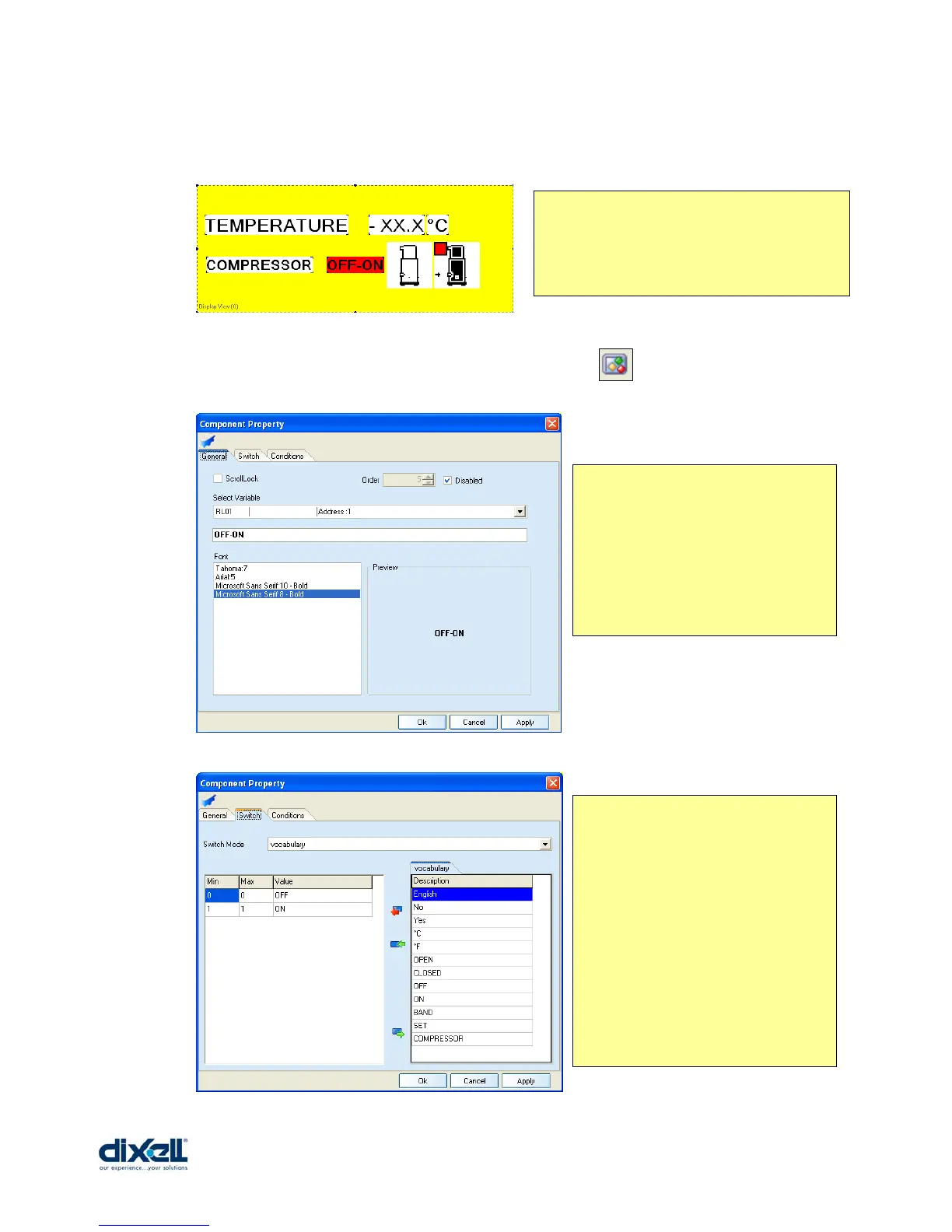
Now we have to add the compressor status; in the next example you can see how to do this
with a different solutions.
To add the “DxSwitchVarLabel” we have to click the icon and insert the control in the
stage. Then double click in the control to define the properties:
We can show the same result with:
- a “DxSwitchVarLabel”
- a “DxImage”
- a “DxAnimImage”
In the window “General” we have
defined:
- which variable is visualized
- comment about the meaning of the
variable
- font
In the window “Switch” we have
defined the following conditions:
- switch mode from vocabulary (see
pag.92 how to manage the vocabulary)
- the conditions:
If the value of the variable is = 0, the
display will visualize “OFF”
If the value of the variable is = 1, the
display will visualize “ON”
REMARK:
In any case the last condition is
considered as default.















 To Next Page