39
WN 059677 45532 - 11/2023
ES 250 PRO/ES 250 PRO FST
ES 400 PRO/ES 400 PRO FST
Mounting instructions
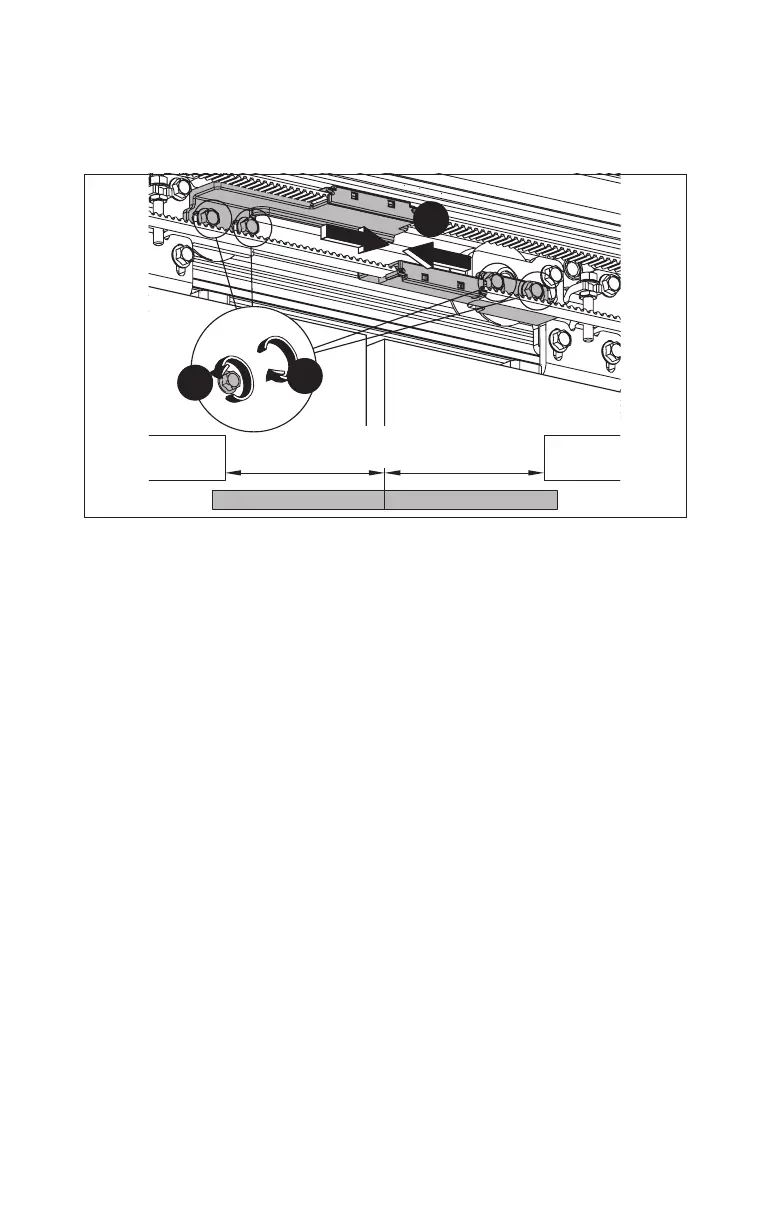
4.18 Position the main closing edge
1. Loosen the screws on the toothed belt engaging units.
Fig.64
1.
2.
3.
= =
2. Position the main closing edge in the middle of the opening width.
3. Tighten the screws on the toothed belt engaging units.
4.19 Mount the optional extension modules
If the main closing edge and secondary closing edge sensors are connected to the
SiAKextension module, 2 SiAKextension modulesare required. The DIP switch is
used to determine whether the main closing edge or secondary closing edge sensor
is connected via the corresponding SiAKextension module.
During commissioning, bridge terminals 5 and 6 on terminal blocks 1 and 2
respectively.
1. Mount the extension modules according to the accompanying manual.













 To Next Page