78
WN 059677 45532 - 11/2023
ES 250 PRO/ES 250 PRO FST
ES 400 PRO/ES 400 PRO FST
Mounting instructions
Perform network reset
1. Switch off the power supply
2. Remove the battery (if present)
3. Connect the battery (if present)
4. Switch on the power supply
13 Replace the battery
WARNING
Risk of injury due to heat generation, explosion, and fire
Improper handling of batteries (e.g. overheating, destruction, recharging,
use of the battery in other products) can cause heat generation,
explosion, and fire. This poses a risk of injury.
• Only use the battery types recommended and approved by
dormakaba.
• Observe warnings on the batteries.
• Only use batteries as intended.
• Keep out of reach of children.
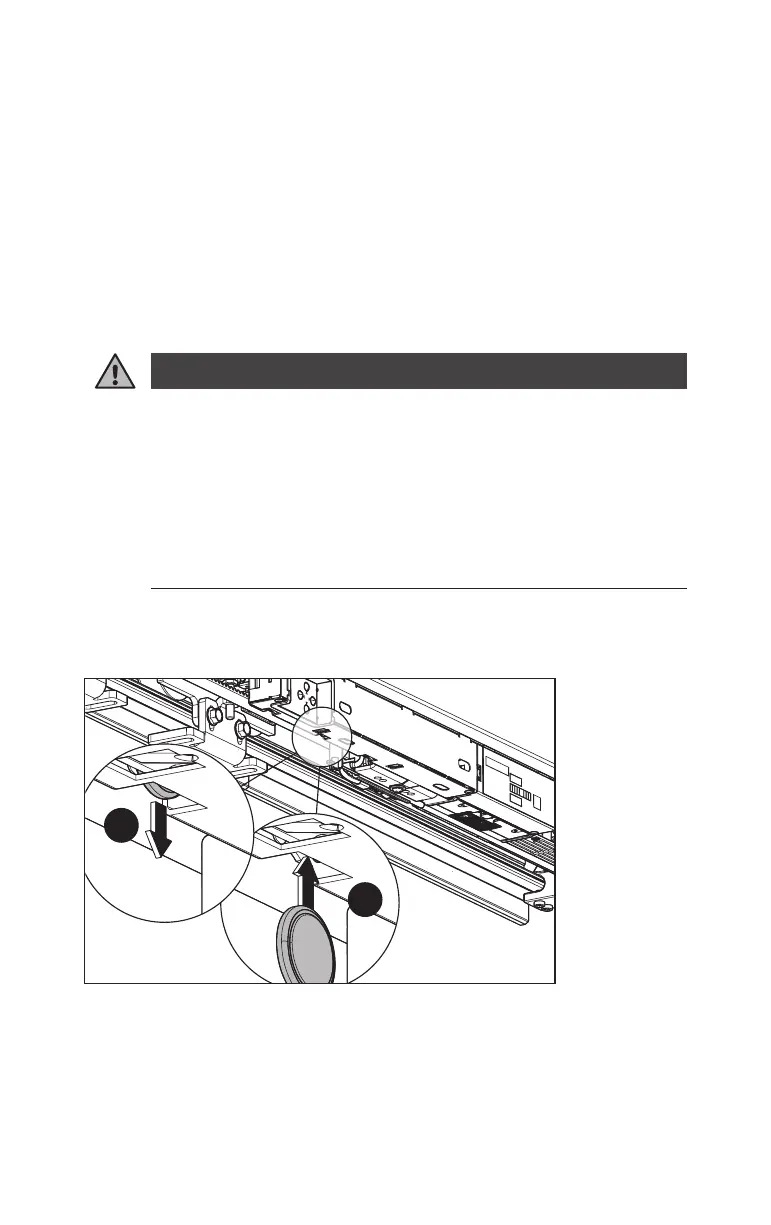
1. Remove the battery from the battery holder on the underside of the
DRIVEUNIT.
Fig.103
1.
2.
2. Insert a new CR1220 button cell battery into the battery holder.
3. If the battery was replaced while the control unit was in a de-energized state,
the real time clock must be reset via the OSI.













 To Next Page