40
WN 059677 45532 - 11/2023
ES 250 PRO/ES 250 PRO FST
ES 400 PRO/ES 400 PRO FST
Mounting instructions
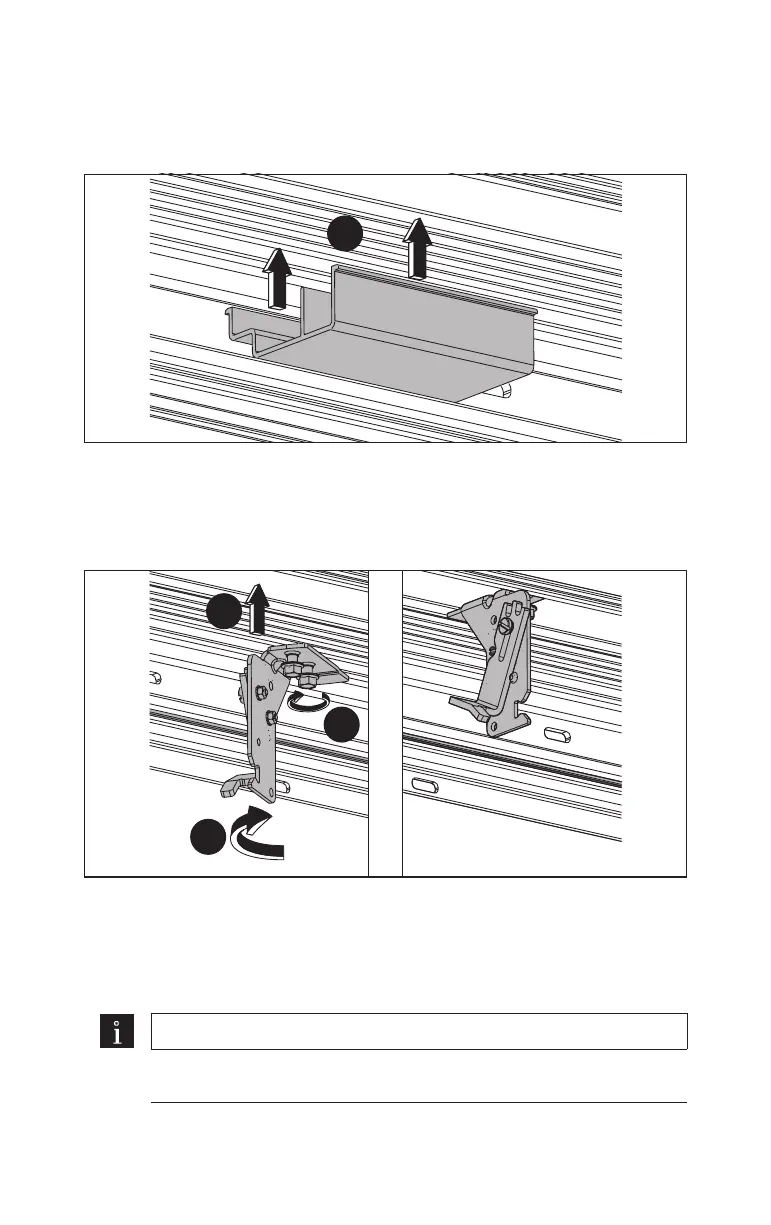
4.20 Mount the cable ducts
1. Clip the cable ducts into the operator profile from below.
Fig.65
1.
4.21 Mount the cover holders
Mount 1 cover holder on both ends and in the middle of the operator profile.
1. Insert the cover holders into the operator profile from below.
Fig.66
1.
3.
2.
2. Turn the cover holders so that the mounting bracket is perpendicular to the
profile.
3. Tighten the cover holders with both hexagon screws.
Note
For an operator length of more than 4.50 m, mount 2 additional cover
holders.













 To Next Page