System Overview
12
Instructions for Use Oxylog 2000 plus SW 1.n
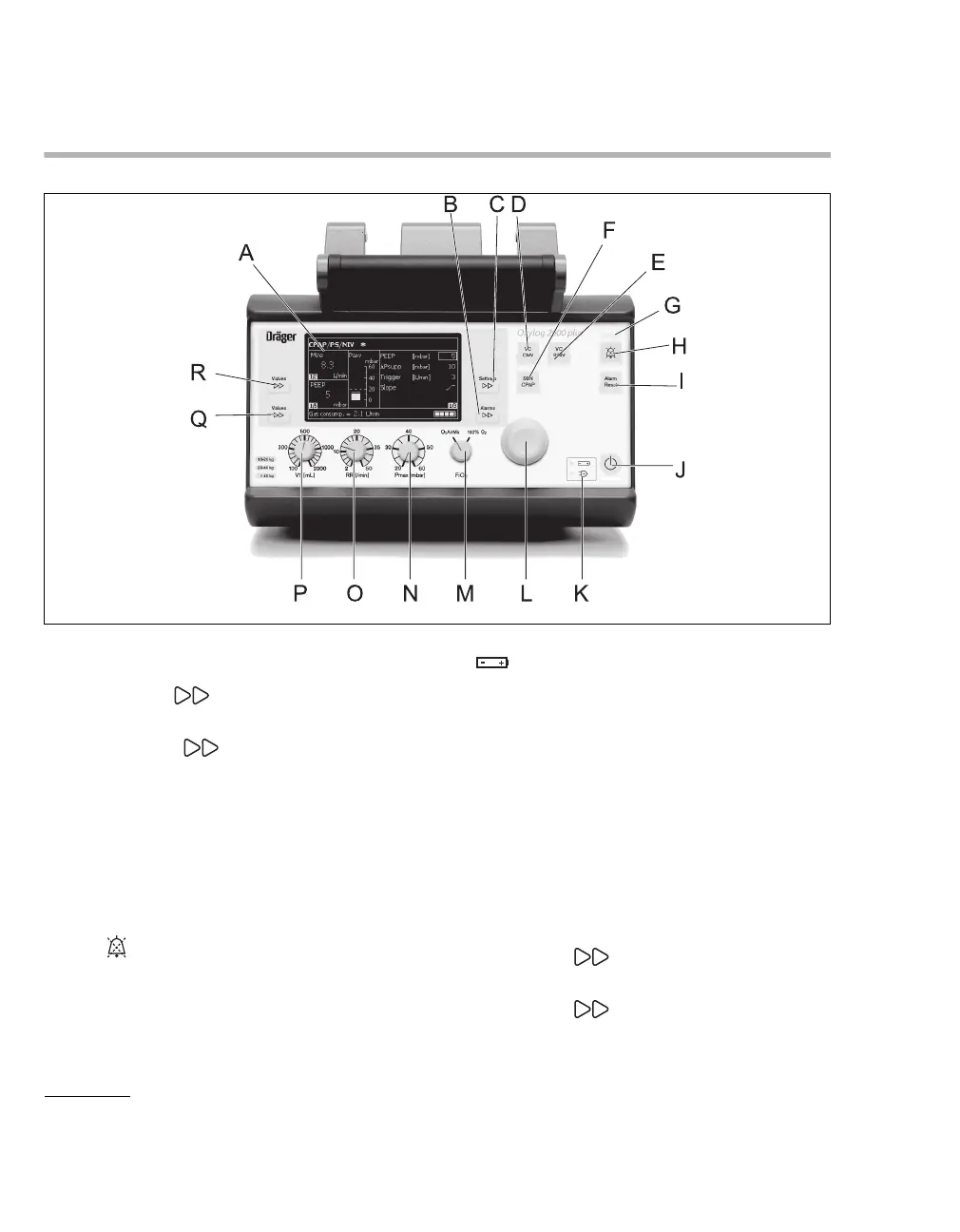
Front panel with all options
A Screen with screen pages for the specific
application
B Key Alarms for setting and displaying
alarm limits
C Key Settings for setting other
ventilation parameters on the screen
D Key for ventilation modes VC-CMV / VC-AC
E Key for ventilation modes VC-SIMV (PS)*
F Key for ventilation modes SpnCPAP (PS)*
G Red and yellow lights (LEDs) as alarm
indicators
H Key to suppress the audible alarm for
2 minutes
I Key Alarm Reset for acknowledging alarm
messages
J Start / Standby key
O
K Display symbols for the power supply
Charge status of the internal battery
N Mains power supply connected
L Central rotary knob for making selections /
settings and for confirming these
M Control knob for setting O
2 AirMix or 100% O2
FiO
2
N Control knob for setting the maximum
inspiratory pressure Pmax
O Control knob for setting the ventilation respira-
tory rate RR
P Control knob for setting the tidal volume VT
Q Key Values to select the displayed mea-
sured values
R Key Values to select the displayed mea-
sured MVe or VTe values
043
* VC-SIMV/PS and SpnCPAP/PS are optional features.



 To Next Page
 Loading...









