VigorPro5300 Series User’s Guide
211
R
R
e
e
s
s
t
t
o
o
r
r
e
e
C
C
o
o
n
n
f
f
i
i
g
g
u
u
r
r
a
a
t
t
i
i
o
o
n
n
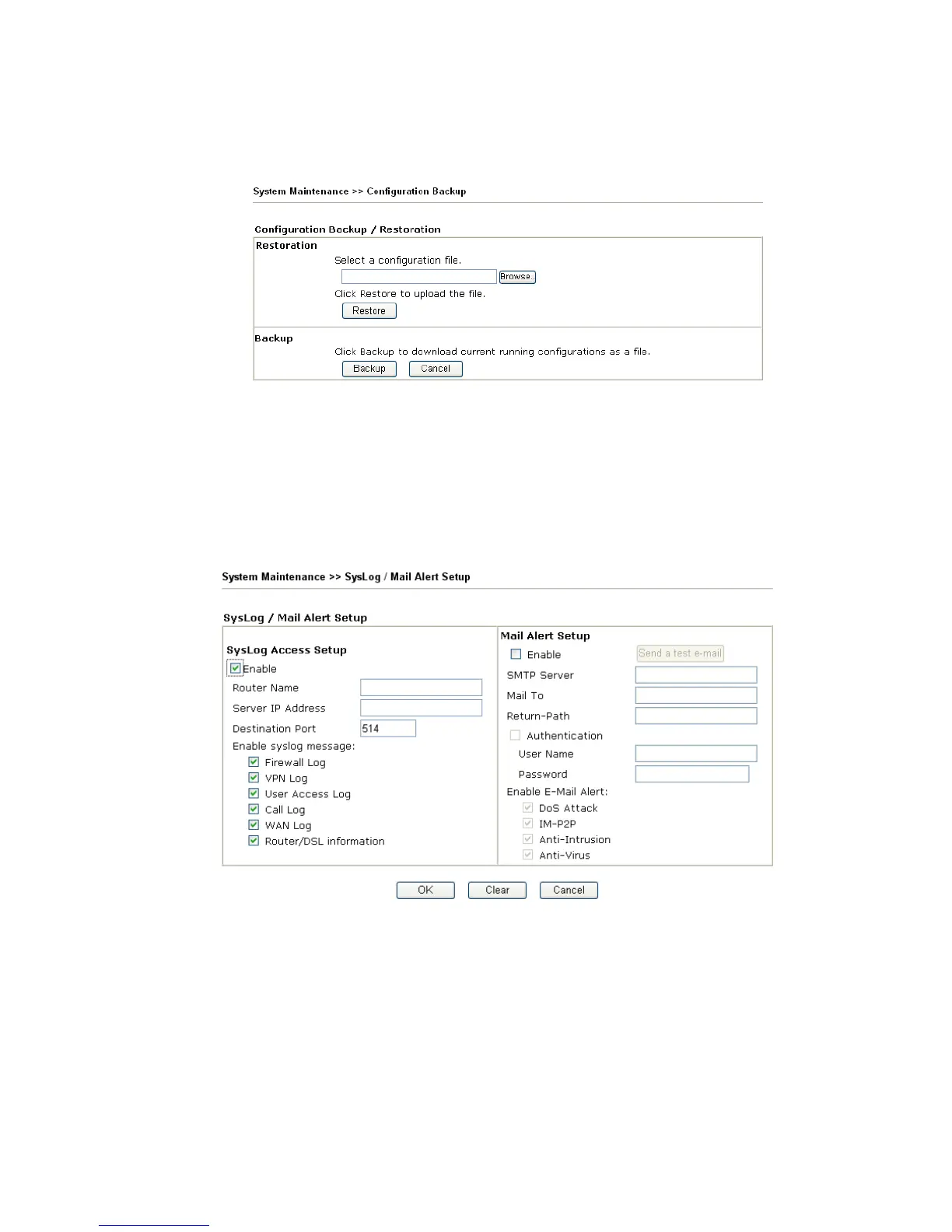
1. Go to System Maintenance >> Configuration Backup. The following windows will
be popped-up, as shown below.
2. Click Browse button to choose the correct configuration file for uploading to the
router.
3.
Click Restore button and wait for few seconds, the following picture will tell you that
the restoration procedure is successful.
3
3
.
.
1
1
6
6
.
.
4
4
S
S
y
y
s
s
l
l
o
o
g
g
/
/
M
M
a
a
i
i
l
l
A
A
l
l
e
e
r
r
t
t
SysLog function is provided for users to monitor router. There is no bother to directly get
into the Web Configurator of the router or borrow debug equipments.
Enable (Syslog Access…) Check “Enable” to activate function of syslog.
Syslog Server IP The IP address of the Syslog server.
Destination Port Assign a port for the Syslog protocol.
Enable syslog message Check the box listed on this web page to send the
corresponding message of firewall, VPN, User Access, Call,
WAN, Router/DSL information to Syslog.
Enable (Alert Setup…) Check “Enable” to activate function of mail alert.












 To Next Page