VigorPro5300 Series User’s Guide
234
4
4
.
.
3
3
R
R
e
e
g
g
i
i
s
s
t
t
e
e
r
r
i
i
n
n
g
g
Y
Y
o
o
u
u
r
r
V
V
i
i
g
g
o
o
r
r
R
R
o
o
u
u
t
t
e
e
r
r
You have activated the new account for the router. Now, it is the time for you to register
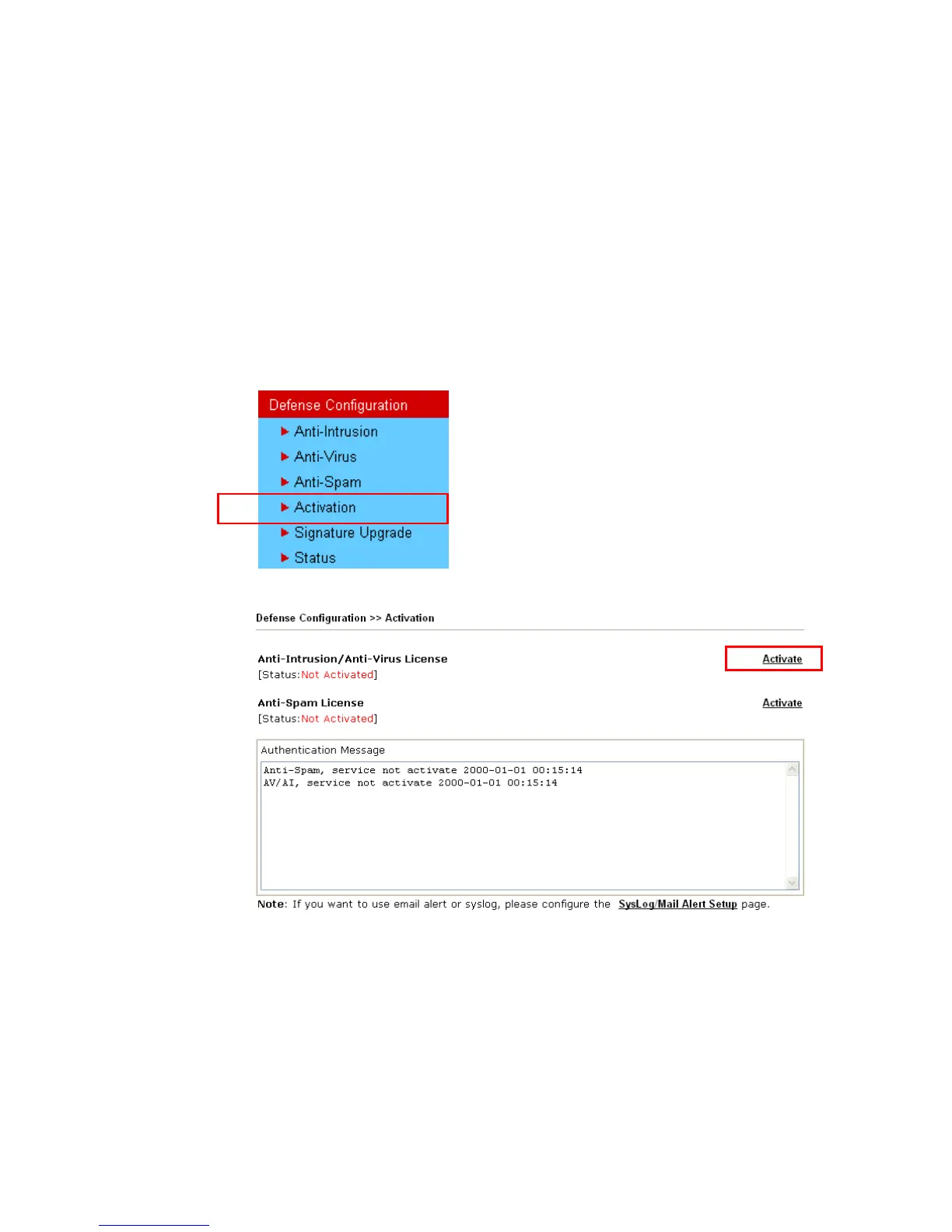
your vigor router. Open Defense Configuration >>Activation; the other is to register by
using Anti-Spam>>Profile Setting. Registering Vigor router should be done just for once.
If the router has been registered previously, the system will not allow you to register
the router again. After finishing the router registration, you can activate Anti-Virus,
Anti-Intrusion and Anti-Spam respectively.
1. Open a web browser on your PC and type http://192.168.1.1. A pop-up window will
open to ask for username and password. Do not type any word on the window and click
OK.
2. From the router’s web page, please open Defense Configuration >>Activation. You
will see the following web page.
3. Click any one of the Activate link from the Activation web page.












 To Next Page