VigorPro5300 Series User’s Guide
76
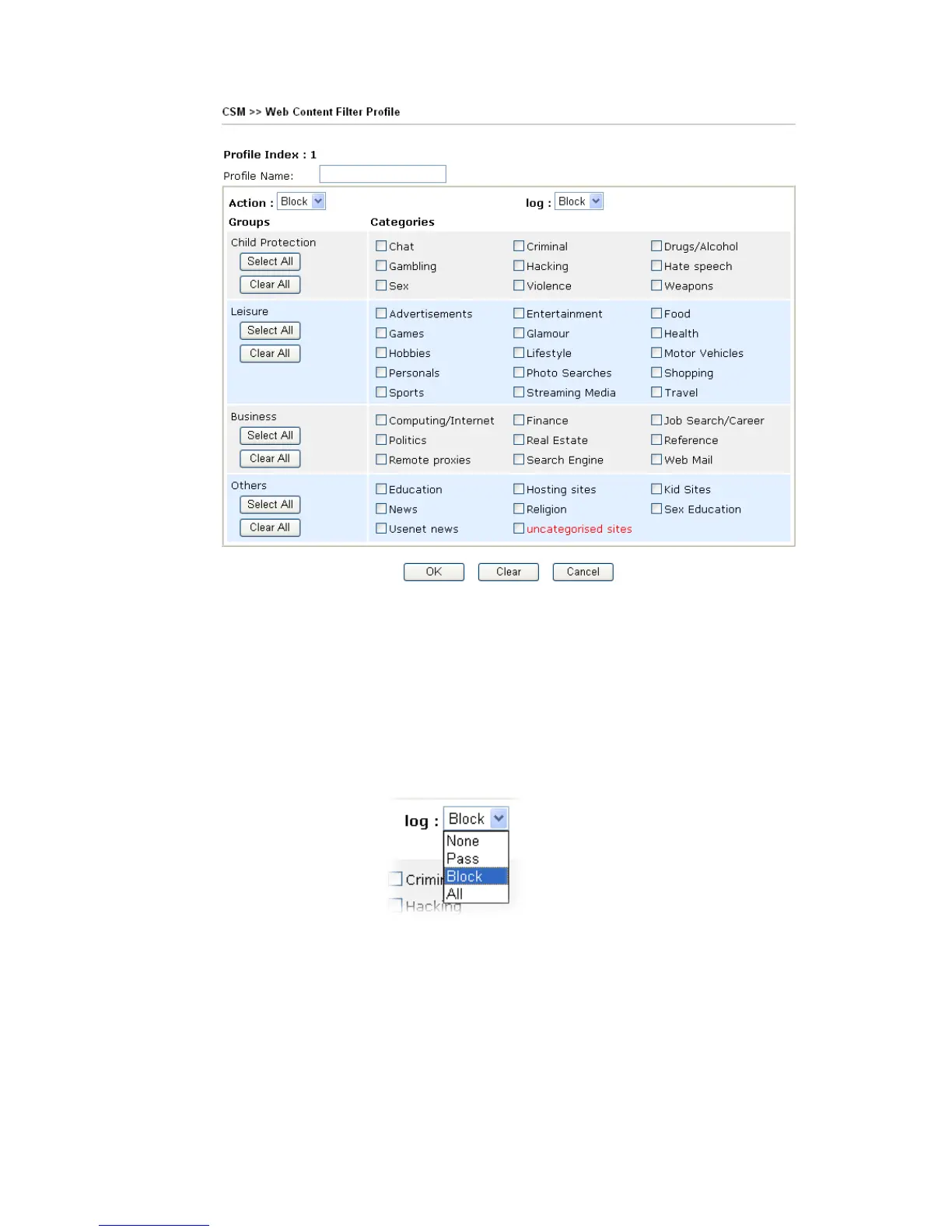
Action Pass - allow accessing into the corresponding webpage with the
categories listed on the box below.
Block - restrict accessing into the corresponding webpage with the
categories listed on the box below.
If the web pages do not match with the specified feature set here, it
will be processed with reverse action.
Log None – There is no log file will be recorded for this profile.
Pass – Only the log about Pass will be recorded in Syslog.
Block – Only the log about Block will be recorded in Syslog.
All – All the actions (Pass and Block) will be recorded in Syslog.
.
For this section, please refer to Web Content Filter user’s guide.
3
3
.
.
6
6
F
F
i
i
r
r
e
e
w
w
a
a
l
l
l
l
3
3
.
.
6
6
.
.
1
1
B
B
a
a
s
s
i
i
c
c
s
s
f
f
o
o
r
r
F
F
i
i
r
r
e
e
w
w
a
a
l
l
l
l
While the broadband users demand more bandwidth for multimedia, interactive applications,
or distance learning, security has been always the most concerned. The firewall of the Vigor
router helps to protect your local network against attack from unauthorized outsiders. It also












 To Next Page