VigorPro5300 Series User’s Guide
41
3
3
.
.
2
2
.
.
2
2
G
G
e
e
n
n
e
e
r
r
a
a
l
l
S
S
e
e
t
t
u
u
p
p
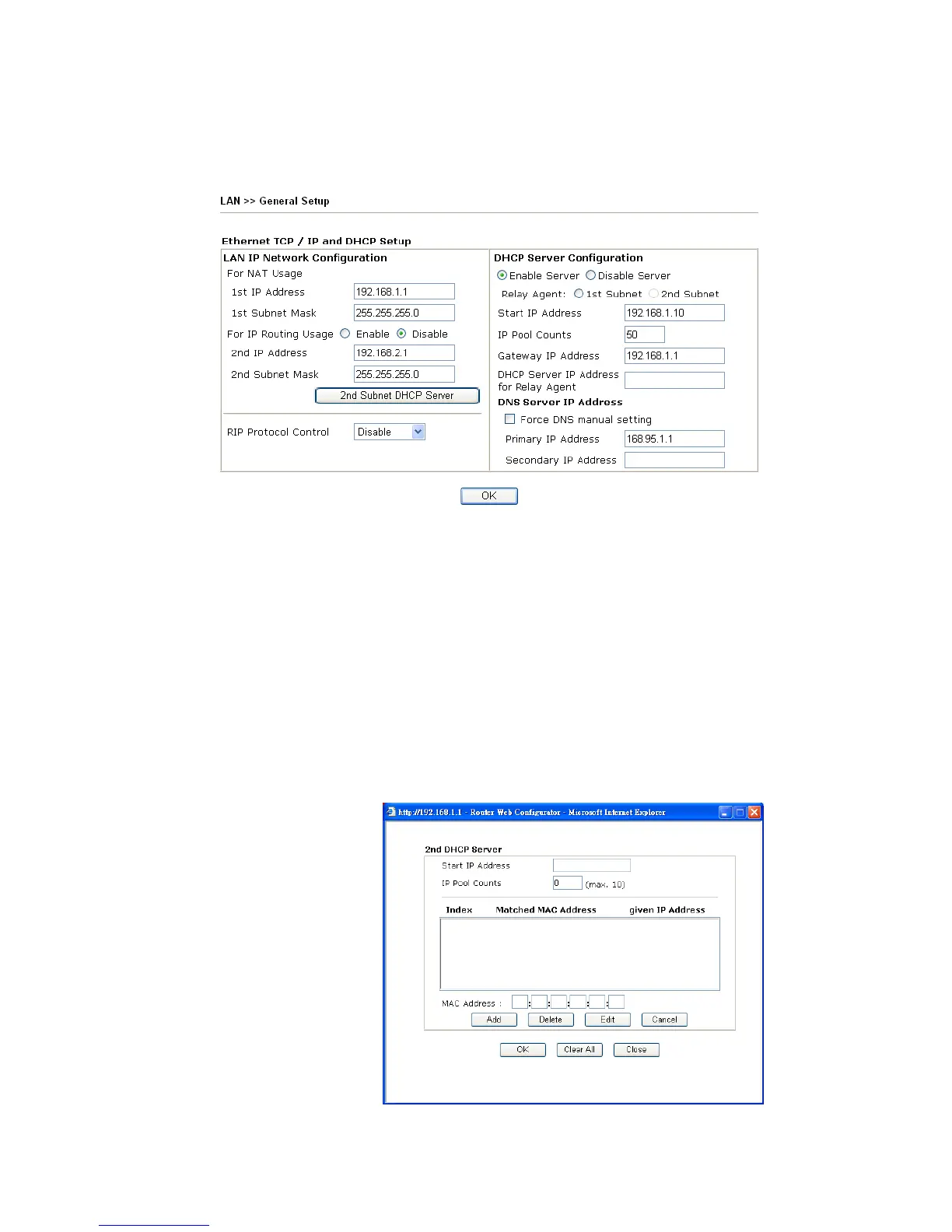
This page provides you the general settings for LAN.
Click LAN to open the LAN settings page and choose General Setup.
1st IP Address Type in private IP address for connecting to a local private network
(Default: 192.168.1.1).
1st Subnet Mask Type in an address code that determines the size of the network.
(Default: 255.255.255.0/ 24)
For IP Routing Usage Click Enable to invoke this function. The default setting is
Disable.
2
nd
IP Address Type in secondary IP address for connecting to a subnet.
(Default: 192.168.2.1/ 24)
2
nd
Subnet Mask An address code that determines the size of the network.
(Default: 255.255.255.0/ 24)
2
nd
DHCP Server You can configure the router to serve as a DHCP server for the 2nd
subnet.












 To Next Page