VigorPro5300 Series User’s Guide
24
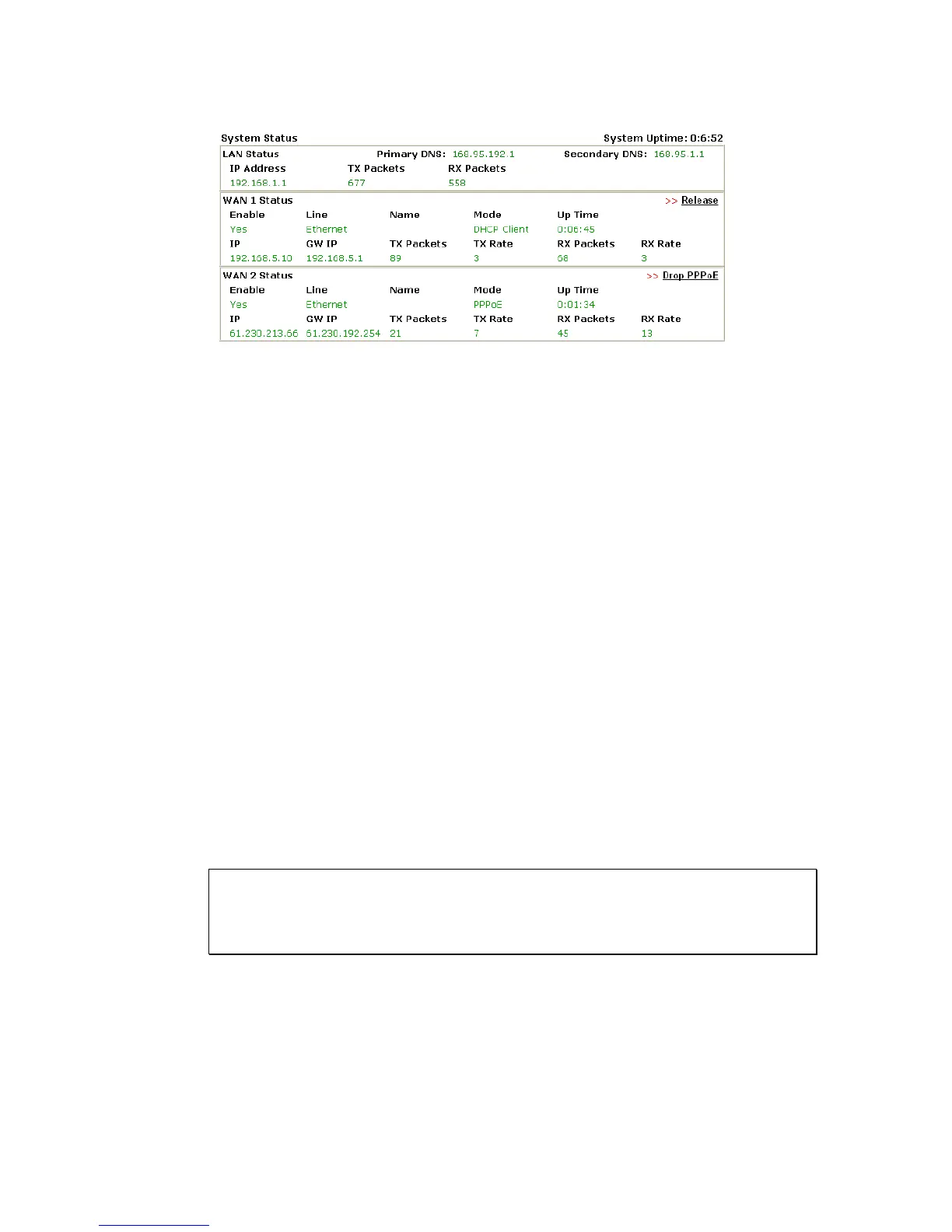
Online status for DHCP
Detailed explanation is shown below:
Primary DNS Displays the IP address of the primary DNS.
Secondary DNS Displays the IP address of the secondary DNS.
LAN Status
IP Address Displays the IP address of the LAN interface.
TX Packets Displays the total transmitted packets at the LAN interface.
RX Packets Displays the total number of received packets at the LAN interface.
WAN1/2 Status
Line Displays the physical connection (Ethernet) of this interface.
Name Displays the name set in WAN1/WAN web page.
Mode Displays the type of WAN connection (e.g., PPPoE).
Up Time Displays the total uptime of the interface.
IP Displays the IP address of the WAN interface.
GW IP Displays the IP address of the default gateway.
TX Packets Displays the total transmitted packets at the WAN interface.
TX Rate Displays the speed of transmitted octets at the WAN interface.
RX Packets Displays the total number of received packets at the WAN
interface.
RX Rate Displays the speed of received octets at the WAN interface.
Note: The words in green mean that the WAN connection of that interface
(WAN1/WAN2) is ready for accessing Internet; the words in red mean that the
WAN connection of that interface (WAN1/WAN2) is not ready for accessing
Internet.












 To Next Page