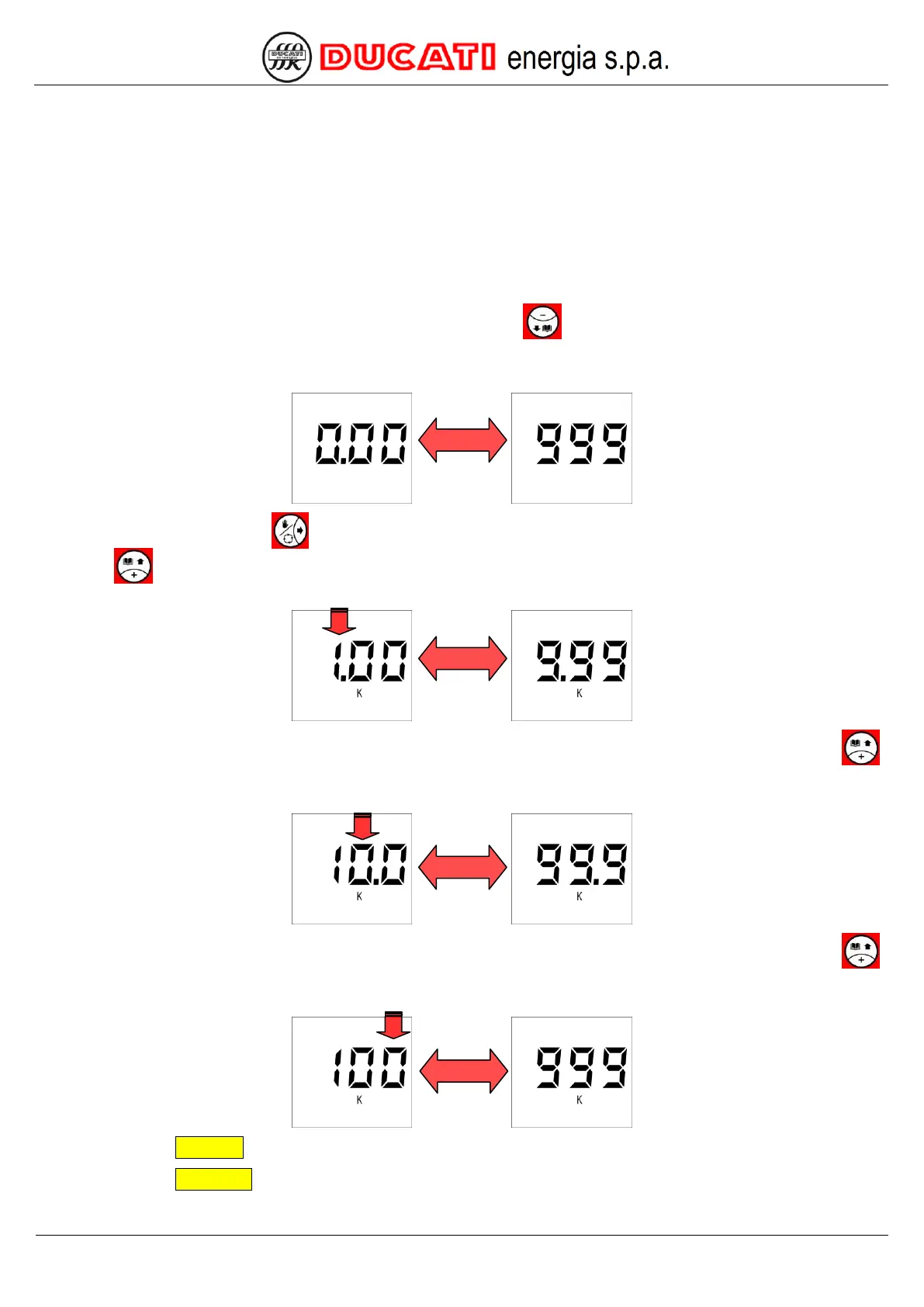
7.8 Numerical value entering modes
The following ranges are available if a numerical value has to be entered:
1. 0999;
2. 10009999;
3. 1000099999;
4. 100000999999.
NOTE: To enter a value higher than 999 starting from a previously set value in one of ranges 2, 3 or 4 that does not
include it, at first remove the thousands icon (k). To this end, use key to decrease the digit immediately to the left of
the dot until the icon disappears.
In the first case, simply use the single digits.
In the second case, use key
to move to the position of the first digit from the left (red arrow) and increase it by
using key
until the thousands icon (k) and the dot on digit right side appear, then adjust the digits by taking into
account that the resolution will be in the tens.
In the third case, move to the position of the second digit from the left (red arrow) and increase it by using key
until the thousands icon (k) and the dot on digit right side appear, then adjust the remaining digits by taking into account
that the resolution with be in the hundreds.
In the fourth case, move to the position of the third digit from the left (red arrow) and increase it by using key
until the thousands icon (k) appears, then adjust the remaining digits by taking into account that the resolution will be in
the thousands.
GO BACK TO SETTINGS
GO BACK TO CONTENTS


 To Next Page