EasyManua.ls Logo

DURAG D-ISC 100 2 Series - Page 18

DURAG D-ISC 100 2 Series
212 pages
Print Icon
To Next Page IconTo Next Page
To Previous Page IconTo Previous Page
Loading...
3 | Device and Function description
18
D-ISC 100 x xx2
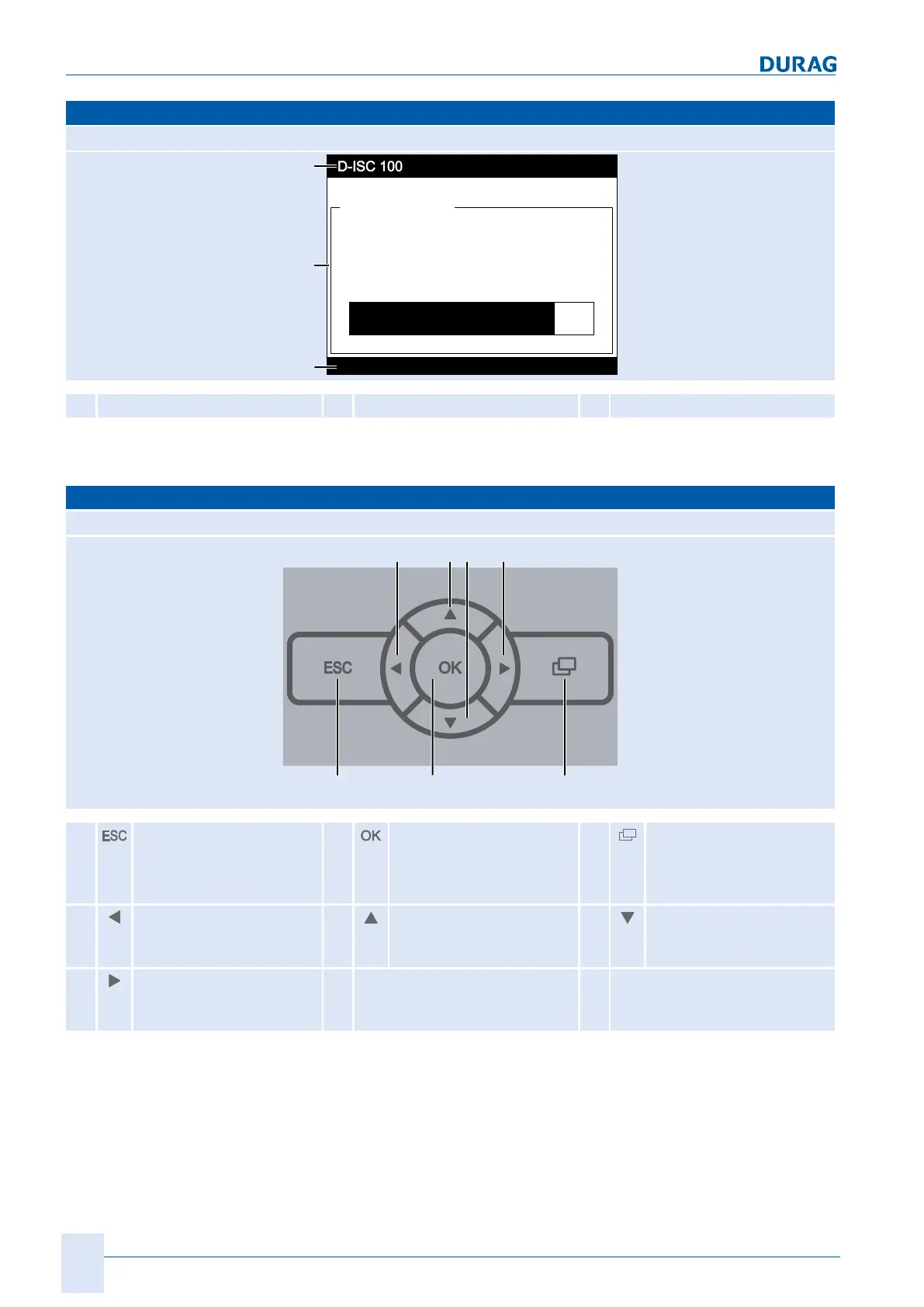
Display (example)
D-ISC 100 C, M, P, R
S1:D-R 220
Status: S1.3:Normal measurement
01.04.2013 12:34
61.8
% OP
0.0 35.0 70.0
S1.1:D-R 220 - Opacity
11
12
13
11
Header
12
Display area
13
Status bar
Table3.5: The display
Keyboard
D-ISC 100 C, M, P, R
21 22 23
24 25 26 27
21
Escape key
(to cancel and to go to
higher-level
menu)
22
Enter key
(to confirm the input)
23
Screen button
(menu button)
24
"left" arrow key
(menu selection, display
selection)
25
"upwards" arrow key
(display selection)
26
"downwards" arrow key
(display selection)
27
"right" arrow key
(menu selection, display
selection)
Table3.6: Keyboard

Table of Contents

Related product manuals