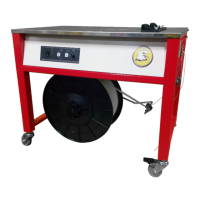
The Eagle 710 Strapping Machine is an advanced piece of equipment designed for efficiently strapping packages, cartons, paper boxes, newspapers, and magazines using polypropylene (PP) strapping. Its primary function is to stabilize these materials for transportation, ensuring secure packaging. The machine is built to state-of-the-art standards and incorporates recognized safety rules, though proper operation by trained personnel is crucial to prevent injury or damage.
Important Technical Specifications:
- Power Requirement: 110VAC, 60Hz (Single Phase)
- Minimum Carton Size (Width x Height): 2.75in x 0.75in
- Standard Arch Size (Width x Height): 26in x 20in
- Tabletop Height: 32.75in
- Core Size: 8in x 8in
- Tension: 2.5 to 70.5lbs
- Machine Dimensions (Length x Width x Height): 37in x 26.5in x 56in
- Strapping Speed: 65 straps per minute
- Maximum Package Weight: 70kg (For packages over 25kg, lifting aids may be necessary; over 40kg, a conveyor system is recommended).
- Strap Width: 5, 6, or 9mm
- Strap Thickness: 0.35-0.65 mm (0.014” –0.026”)
- Supply Voltage: 0.9 - 1.1 nominal supply voltage
- Source Frequency: 0.99 - 1.01 nominal frequency
- Ambient Temperature: 5°C - 40°C (41℉-104℉)
- Altitude: Up to 1000m above mean sea level
- Relative Humidity: Not to exceed 50% at 40°C
- Electrical Supply Cord: Minimum cross-section of 1.0 mm2 (16 AWG)
- Maximum Power Line Fuse: Not to exceed 16 Amp
Usage Features:
The machine is designed for specific applications and should not be modified or used for purposes other than its intended design. Operators must read the manual, wear eye protection and safety gloves, and ensure proper grounding. The machine only operates with polypropylene (PP) strapping; polyester (PET) or polyethylene (PE) cord strap should not be used.
Operational Controls:
- Main Power Switch: Turns the machine on ("1") and off ("0").
- LCD Display: Shows strapping conditions and error messages.
- Soft/High Tension Switch: Adjusts strap tension settings.
- Strap Tension Adjustment Knob: Increases tension clockwise, decreases counter-clockwise.
- Function Encoder: Rotates to change strapping settings and presses to select/set timers (cooling time, Timer 1, Timer 2).
- Start Switch: Initiates operation, starts a strapping cycle, or clears a machine fault.
- Reel Release Switch: Releases the strap dispenser for removal.
- Foot Bar (Front) / Foot Pedal Switch (option): Initiates a strapping cycle or clears a machine fault.
- Photo Eye Switch (option): Automatically initiates a strapping cycle when a package is detected.
- Foot Bar (Rear) (option): Initiates a strapping cycle or clears a machine fault.
Operational Modes (Photo-Eye dependent):
- 0 (Disabled): Strapping cycle initiated by Start switch, Foot bar, or foot pedal.
- 1 (Single Cycle): Initiates a cycle when a package is detected by the photo-eye, with a delay set by Timer 1 (0-5 seconds).
- N (Multiple Cycles): Continuously cycles when a package is detected, with intervals determined by Timer 1 (delay before first strap) and Timer 2 (interval between straps, 0-5 seconds).
Safety Features:
- The machine must be operated in good running order with all protective and safety devices in place and functional.
- Safety devices, including removable safety devices, emergency shut-off, noise-protection devices, and exhaust fans, must never be bridged or eliminated.
- The heating unit operates at high temperatures (approx. 270ºC / 520ºF); contact should be avoided to prevent burns.
- An exclamation mark symbol indicates dangerous voltages, warning against contact with live electrical parts.
- A hot surface symbol warns about the high temperature of the welding area.
- A warning symbol with a hand indicates that hands or any body part should not be placed into the arch working area during operation.
- If harmful gases or dust are generated, an exhaust system must be installed.
- A safety switch (B6) is activated when the front tabletop is opened, removing power but allowing the heating element to remain hot.
Maintenance Features:
Regular inspections and maintenance are crucial for reliability and service life.
- Daily Maintenance: Use an air gun to clean cutters, strap guide, and accumulating feed rollers.
- Weekly Maintenance: Lubricate front bar, press bar, rear bar, and shafts within the arch. Clean parts before lubricating to prevent mixing oil and debris.
- Monthly Maintenance (or after 100,000 strapping cycles): Clean both sides of the heater plate and polish with fine sandpaper if necessary (ensure welding plate has cooled). Check movement of front, press, and rear bars, and ensure slide table and strap track frame return to home position. Clean debris from the tension roller.
- 6-Month Maintenance (or after 500,000 strapping cycles): Check, replace, and re-adjust heating element and strap cutter. Verify firm connection of wiring housing to printed circuit board. Check safety switch on front table or right door. Manually strap bundles to check for malfunctions and proper strap accumulating function. Adjust accumulating feeding pressure or reel brake clearance. Lightly lubricate sealing head bearing points.
- Annual Maintenance (or after 1,000,000 strapping cycles): Replace deflection roller if visible changes occur. Locate and replace bearings if significant noise is produced.
Adjustments:
- Table Height Adjustment: Reposition screws underneath the machine frame and tighten. Ensure the proximity switch wire is removed from under the left side to avoid damage.
- Strap Accumulator Box Adjustment: Loosen nut A and turn screw bolt B counter-clockwise to increase strap storage, or clockwise to decrease. Re-tighten nut A after adjustment. Excessive strap can cause jams.
- Accumulator Box Feed Adjustment: Loosen nut A and turn nut C upwards to increase spring B tension. Re-tighten nut A. Excessive pressure can scrape the strap.
- Heater Temperature Adjustment: Turn trimmer A clockwise to increase temperature, counter-clockwise to decrease.
- Strap Width Change / Strap Guide Adjustment: Adjust strap guide A by moving it to ensure width B is approximately 0.5mm (0.02in) wider than the strap.
- Right Strap Guide Adjustment: Loosen screws on the "Right Strap Guide," then loosen 2 screws B (HBS0408N) and adjust A so D is about 0.1mm wider than the strap. Re-tighten screws B and replace the guide.
- Brush Clearance Adjustment: Left side and upper left clearance should be about strap width. Upper right clearance should be 2-3mm narrower. Lower right clearance should be 4-5mm narrower.
- Feed/Reverse Pressure Adjustment: Loosen Nut B and turn Nut A clockwise to increase feeding pressure, or counter-clockwise to decrease. Re-tighten both nuts. For reverse pressure, move TA-073 Spring Hook from C to B or A position to increase pressure.
- Tensioning Rollers Adjustment: If insufficient tension occurs even on "high" setting, turn Nut D clockwise to address pressure for high tension and strap slipping between A & B.
Troubleshooting:
The LCD display provides messages for reminders, switch malfunctions, and procedural malfunctions (e.g., "Push Start," "Load Strap," "B6 open; K1 open," "S1 Error," "S5 Error," "SQ1 on Error," "SQ9 failure," "ASF failed," "Feed jam"). Instructions are provided for clearing strap jams, including opening the upper table front assembly, lifting Lever A, removing Cover B, taking out the jammed strap, cutting it, and reassembling. If a feed jam persists, causes like curved strap, insufficient feeding pressure, or too much strap in the accumulator box should be checked. Other malfunctions like sealing failure or insufficient strap tension also have listed causes and remedies (e.g., cleaning heater plate, increasing heater temperature, changing tension switch position, cleaning lubricant/debris).

 Need help?
 General

 To Next Page