- 32 -
6 Troubleshooting
6.1 LCD Display Messages (continued)
Jammed Strap Removal
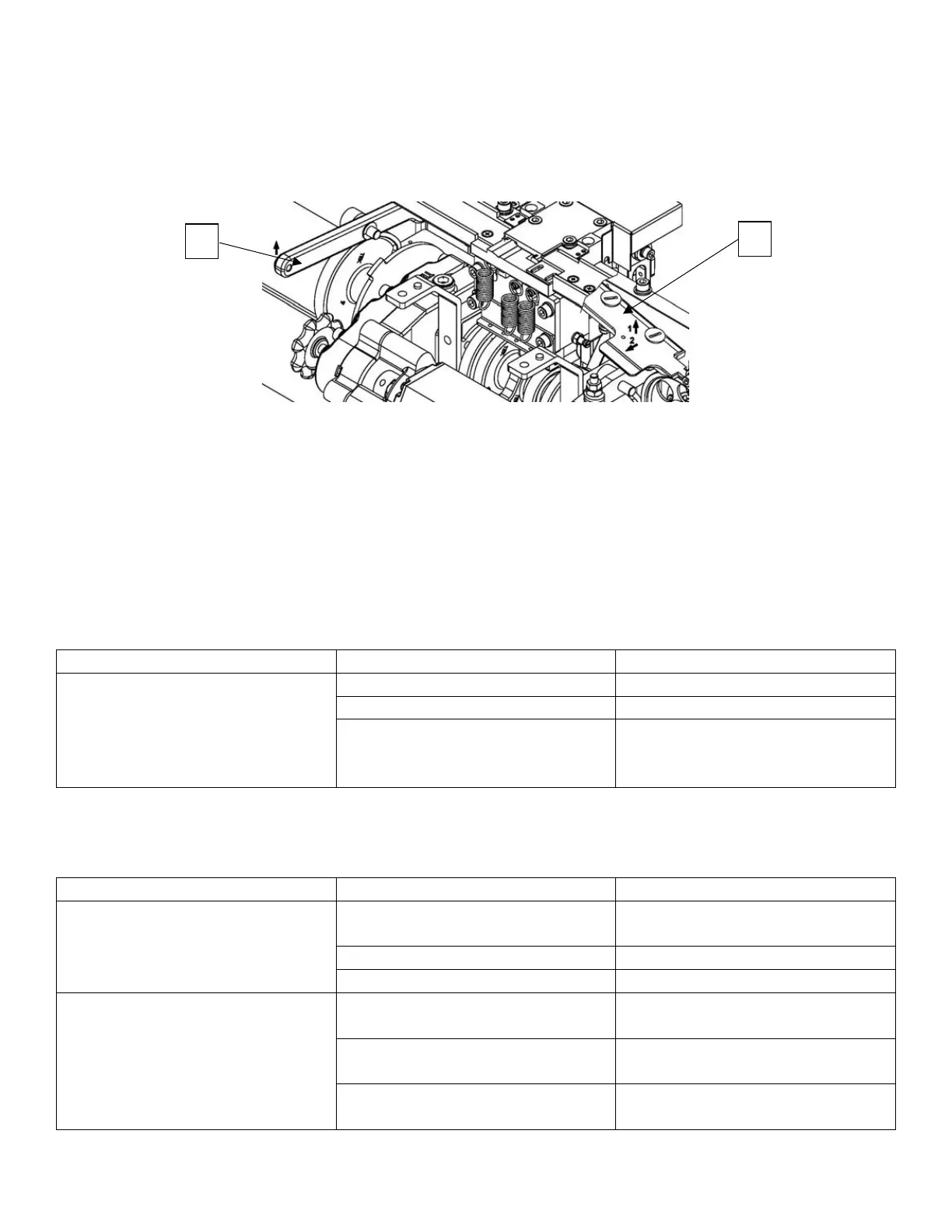
1. Open Upper Table Front Assembly M7-5-210020
2. Lift up the Lever A (M7-2-101400/M7-2-101410) with left hand and take out the Cover B
(M7-1-311220) for the Upper Guide with right hand at the same time.
3. Take out the jammed strap and cut it.
4. Put the cover (M7-1-311220) for the Upper Guide back to its position and put the Upper Table
Front Assembly back as well. Push START switch in the control panel to RESTART machine.
If the Feed jam problem still cannot be solved, the following causes have to be checked as well:
Insufficient feeding pressure
accumulator box and has
Adjust strap accumulator strap
amount
4. Other Malfunctions
Too much debris on sides of the
heater plate
Clean both sides of the heater
plate with fine sandpaper
Insufficient heater temperature
Increase heater temperature
Insufficient cooling time
Insufficient Strap Tension
Soft-High tension switch is at
“soft” position
Change tension switch to “high”
position
Lubricant drops into tension
roller
Too much debris in the gear of
the tension roller



 To Next Page