| 17
Magni GO Overview
Views
Views vary according to the type of probe you are using. You can select layouts or set one up yourself.
This section introduces the various elements of available views.
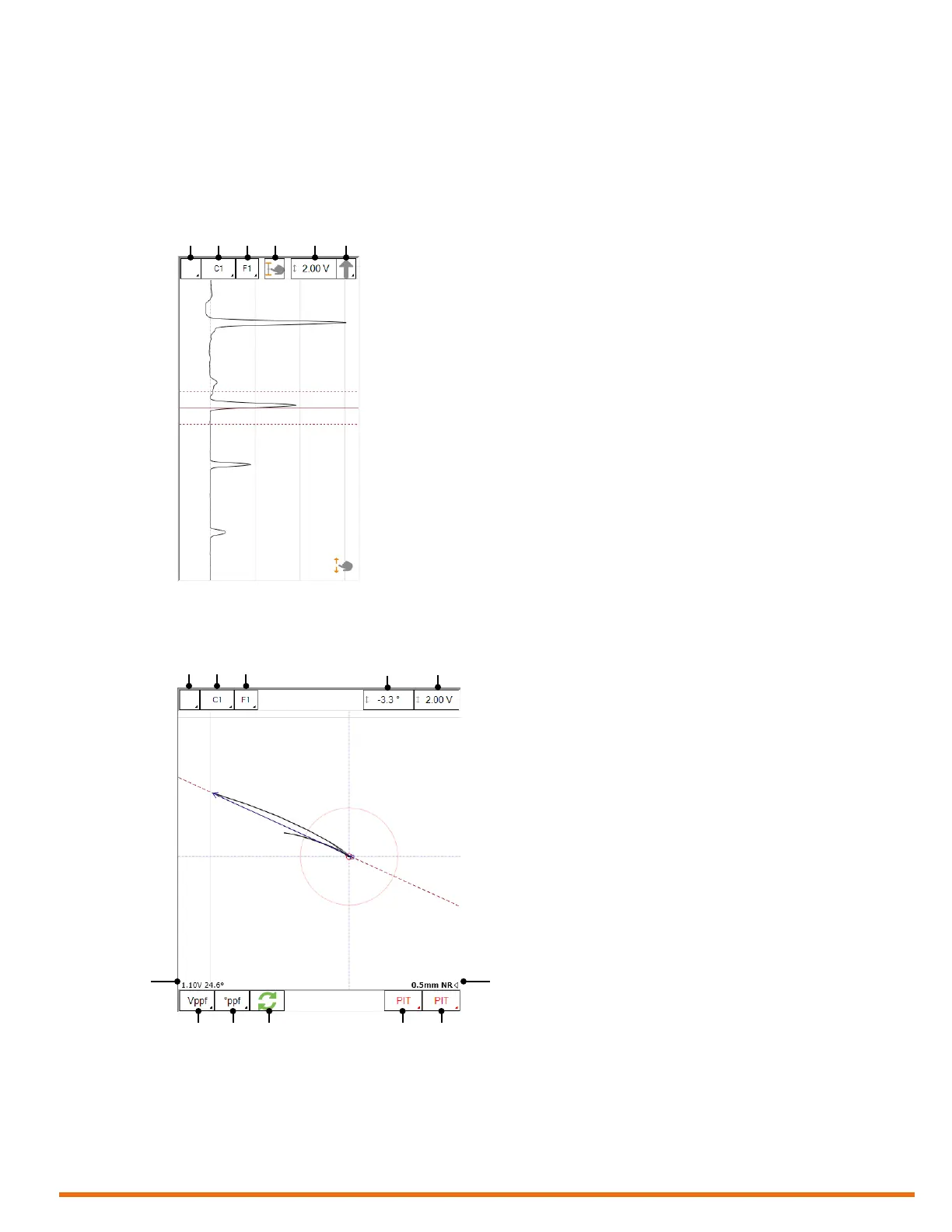
Strip Chart View
Figure 2–2 Strip chart
1. Global channel/C-scan selector
2. Channel/C-scan group name and
selector
3. Frequency selector
4. Resize cursor
5. Scale
6. Signal component selector
Lissajous View
Figure 2–3 Lissajous
1. Global channel/C-scan selector
2. Channel/C-scan group name and
selector
3. Frequency selector
4. Rotate (on/off toggle)
5. Scale
6. Sizing measurement (when sizing
curve created)
7. Report code 1
8. Report code 2
9. Invert phase angle measurement
10. Phase angle measurement mode
11. Amplitude measurement mode
12. Signal measurement result
1 2 3 4 5 6
1 2 3 4 5
7
6
12
891011



 To Next Page