EasyManua.ls Logo

Edwards iDT-002 - User Manual

Edwards iDT-002
67 pages
Print Icon
To Next Page IconTo Next Page
Loading...
MT-91E-A01-B
STP Series Turbomolecular Pumps
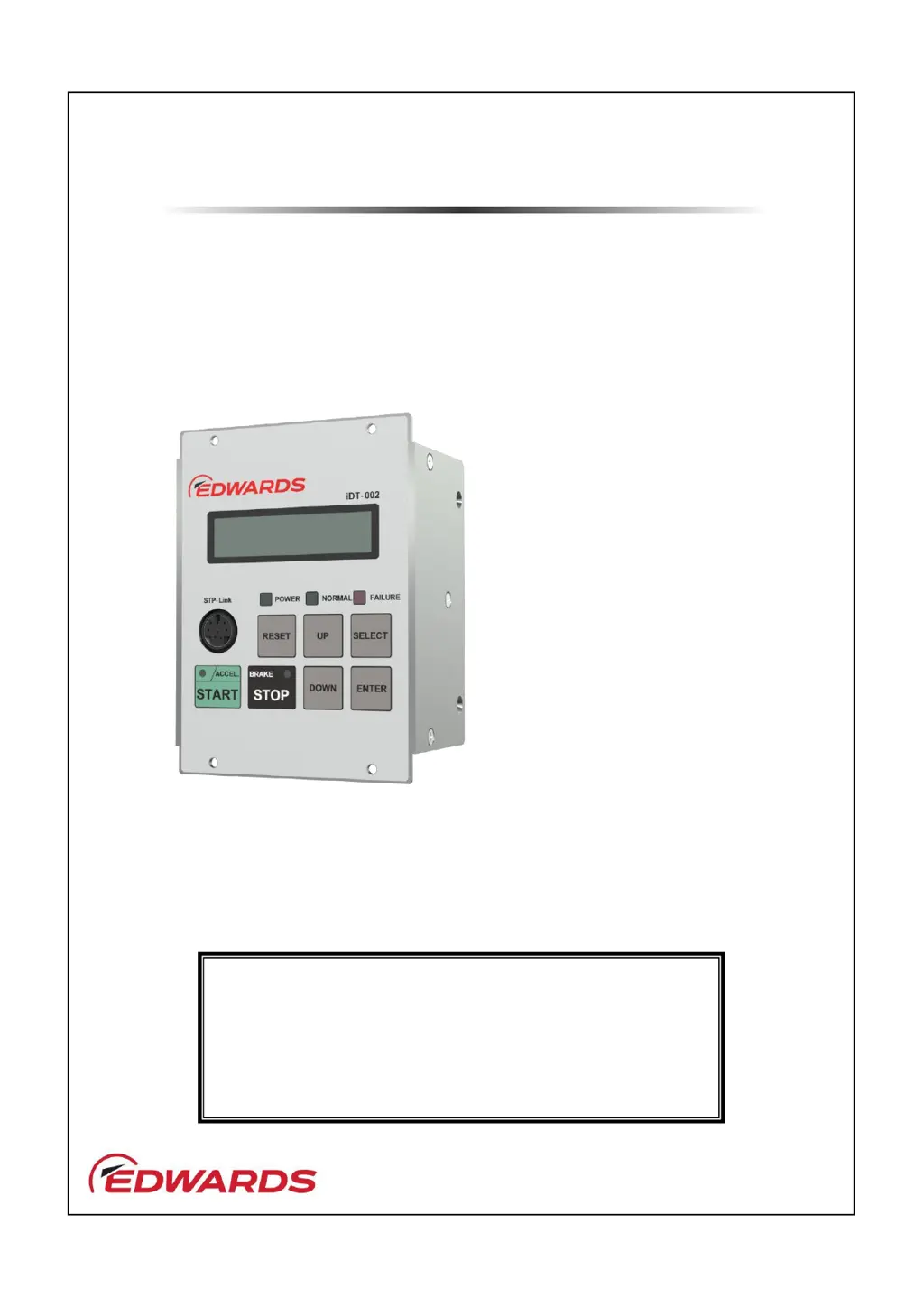
Display Unit iDT-002
Instruction Manual
Copyright 2023 Edwards Japan Limited. All rights reserved. Printed in Japan.
Edwards Japan Limited. All rights reserved. Printed in Japan.
Read through the Safety Precautions and each section of this
Manual carefully before using the STP pump.
Keep this Manual in a place where you can quickly access it
at any time.
Read this Manual thoroughly and keep it with the
Turbomolecular Pump Instruction Manual.
D
Applicable Models:
STP-iXA2206 series
STP-iXA3306 series
STP-iXA4506 series
STP-iX3006 series
STP-iX457 / iXU457 series
STP-iS1607 series
STP-iS2207 series
STP-iXA3307 series
STP-iXA4507 series

Table of Contents

Questions and Answers

  • A
    Albert CarrAug 8, 2025
    What to do if Edwards iDT-002 shows 'NO RESPONSE' for STP pump?
    • D
      David KnightAug 8, 2025
      If the Edwards Monitor displays 'NO RESPONSE' indicating the STP pump fails its initial communication, verify that the STP pump is receiving power correctly and ensure the communication cable is properly connected.
  • M
    Michael AndrewsAug 17, 2025
    What to do if Edwards Monitor displays 'SV Com. Err'?
    • R
      Robert RichardsAug 17, 2025
      If the Edwards Monitor displays 'SV Com. Err', indicating a communication failure with the STP pump, ensure that the communication cable is correctly connected.
  • A
    ariaswendyAug 28, 2025
    How to resolve 'Invalid START' error on Edwards iDT-002 Monitor for STP pump?
    • T
      Terry SimmonsAug 28, 2025
      If the Edwards Monitor shows 'Invalid START STP pump fails input operation', configure the input operation port in the STP pump. Refer to Section 4.7, "Parameter set mode," or Section 4.9, "Input operation port set mode."

Summary

INTRODUCTION AND WARRANTY

1.1 Scope and Definitions

Defines the unit's purpose, safety warnings, and general information.

1.2 Limited Warranty and Disclaimer

Details warranty terms, warranted items, and disclaimers for product defects.

TECHNICAL DATA

2.1 iDT-002 Specifications

Lists technical specifications including applicable pumps, voltage, current, and dimensions.

INSTALLATION AND CONNECTION

3.1 Unpackaging and Front Panel

Instructions for unpacking and identifying the front panel components.

3.3;3.4 Panel Details and Connectors

Describes the front panel components and the side/rear panel connectors.

3.5 Installation Precautions and Environment

Outlines precautions, operating environment, and temperature/humidity requirements.

3.6 Connecting to STP Pumps

Details procedures for connecting the display unit to various STP pump models.

3.7 Rack Mounting

Provides instructions for mounting the display unit onto EIA standard racks.

OPERATION AND CONTROL

4.1 Power ON and Basic Operation

Describes powering on the unit, LCD indications, and basic pump start/stop.

4.3 STP Pump Operation

Provides instructions for starting, stopping, and resetting the STP pump.

4.4 Operation Modes and 4.5 States

Explains different operation modes, pump states, error, and warning indications.

4.7 Parameter Setting Procedures

Covers setting various parameters like ports, speeds, warnings, serial comms, and date/time.

4.8 Manual Operation Control

Allows manual control of TMS heater, water valve, and vent valve outputs.

4.9 Input Operation Port Settings

Configures the input operation ports for controlling pump start, stop, and reset.

TROUBLESHOOTING AND SERVICE

5.1 Specific Error Messages

Lists LCD error messages, probable causes, and countermeasures for the display unit.

5.2 Failure LED and Warning Indicator

Explains the meaning of the FAILURE LED and the 'w' warning indicator on the LCD.

5.3 Cleaning and 5.4 Transport

Provides instructions for cleaning the unit and precautions for transport/repair.

ACCESSORIES AND SUPPORT

6.1 STP-Link Application

Describes the functions of the STP-Link Windows application for pump operation and setting.

7.1 Storage Precautions

Provides guidelines for storing the display unit over a long period.

8.1 Service and Spares Information

Information on ordering parts, service options, and availability of spares.

Edwards iDT-002 Specifications

General IconGeneral
BrandEdwards
ModeliDT-002
CategoryMonitor
LanguageEnglish

Related product manuals