131
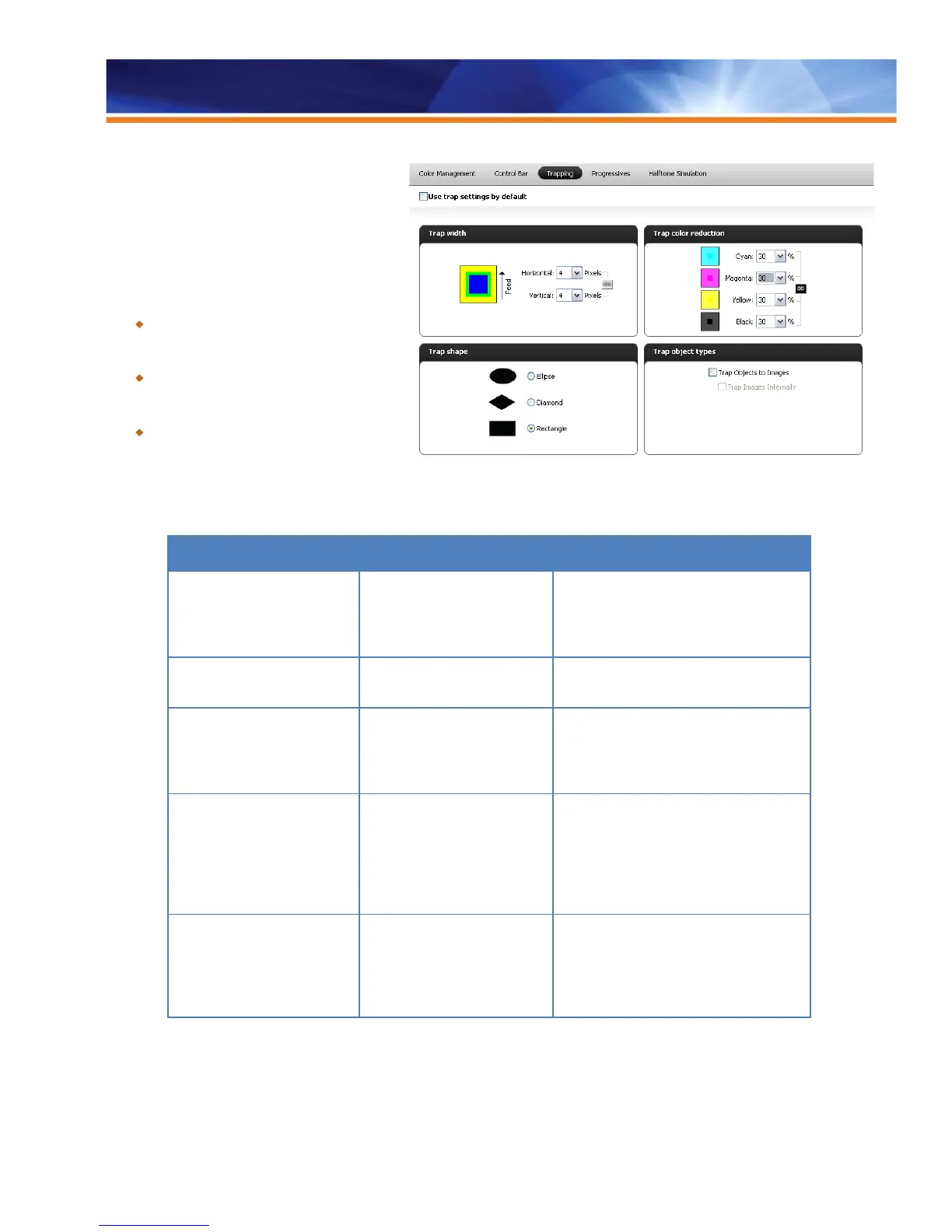
• Width
• Color reduction
• Shape
• Types of objects to trap
Benefits:
Increases quality without performance
impact, allowing operators to trap complex
jobs without slowing down production.
Offers full control over trapping values for
adapting to different printing environments
and job characteristics.
Enables operators to avoid registration
errors when printing on stiffer media,
opening up new job capabilities and
increasing revenue.
The following are the trapping options available in
Color Setup in Command WorkStation Device Center on the Color Setup tab:
Option Sub Option Description
APPLY AUTO TRAPPING When the checkbox is selected, Auto
Trapping is enabled for all incoming jobs.
The custom values specified are used for
all jobs.
TRAP WIDTH Determines the width of the trap (choke or
spread).
Horizontal (0–10 pixels),
Vertical (0–10 pixels)
This feature allows the user to define the
horizontal and vertical width of the trap.
The two values can be locked together with
the link icon.
TRAP COLOR REDUCTION This feature determines how dark the trap
is. The values entered refer to the percent
reduction of the ink in the trap. A 100%
reduction would result in no ink intensity
applied to the trap, and 0% reduction would
result in full ink intensity.
Cyan, Magenta, Yellow, Black This feature allows the user to define the
trap color reduction on a per-color basis
(0%–100% in increments of 10). Trap
reduction values can also be locked
together with the link icon.



 To Next Page