Button
sewing
2.5~4.5
1
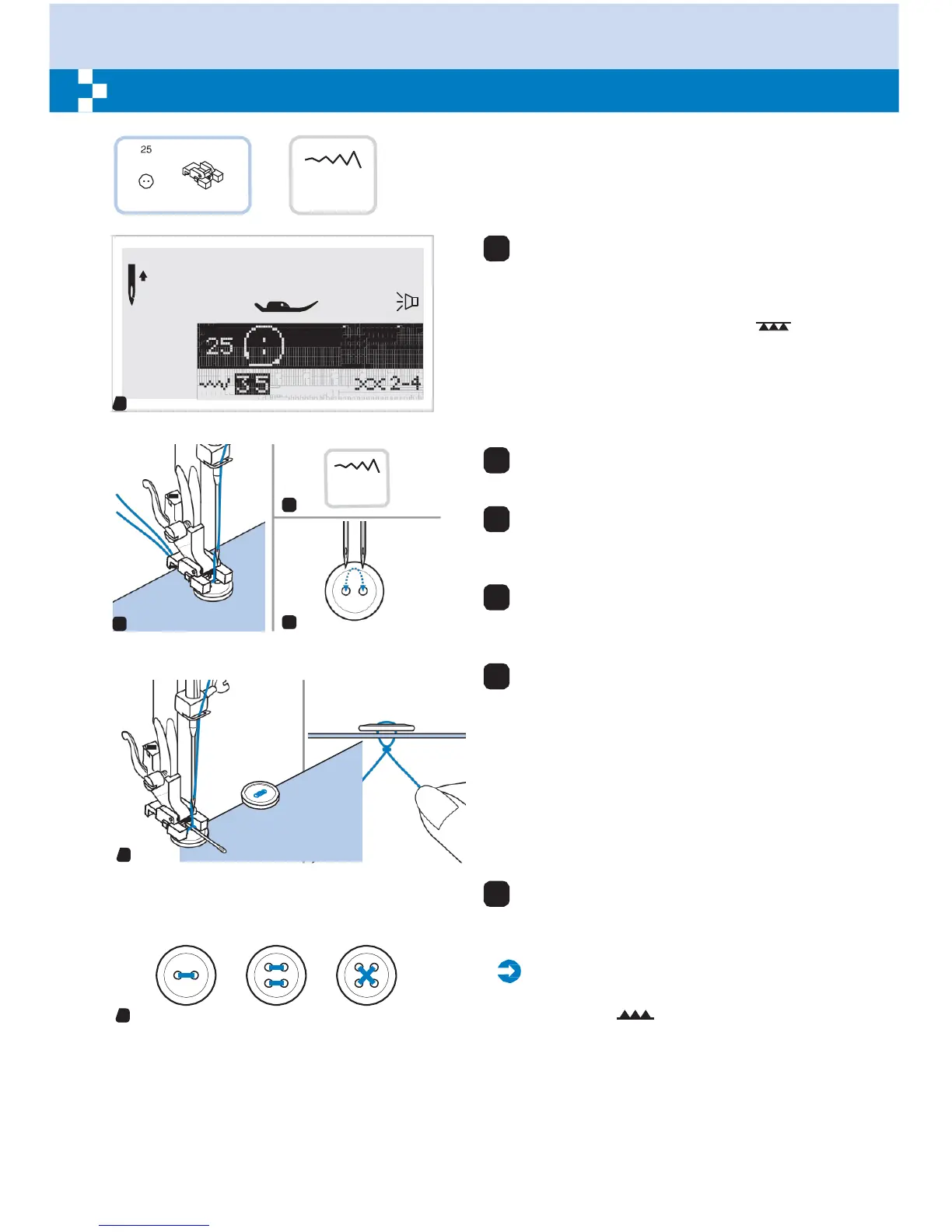
Select the pattern 25 from the Group
Patterns "A" to get the button sewing stitch.
Change the presser foot to the button
sewing foot.
Move the drop feed lever to " " to
lower the feed dogs.
1
2.
-4.
3
2
4
5
2
Position the work under the foot. Place the
button in the desired position, lower the foot.
3
Adjust the stitch width to " 2.5-4.5 "
according to the distance between the two
holes of the button.
4
Turn the handwheel to check that the
needle goes cleanly into the left and right
holes of the button.
5
Before sewing, press the Auto-lock button
to sew reinforcement stitches automatically
at the beginning and at the end of the stitch.
If a shank is required (ex. sew on coats or
jackets), place a darning needle on top of
the button and sew.
Pull end of the upper thread to the wrong
side of the fabric, then tie it with the bobbin
thread.
6
For buttons with 4 holes, sew through the
front two holes first, push work forward and
then sew through the back two holes.
Please
Note:
When you finish the work, move the drop
6
feed control to " " to raise the feed dogs.


 To Next Page