1
* The walking foot accessory is optional. It is not included
with this machine.
Always try to sew first
without
the walking foot
accessory
which should be used
only
when
necessary
.
It is easier to guide the fabric and you have a better view of the seam when using the standard,
regular foot on your machine.
Your sewing machine offers excellent stitch quality on a wide range of fabrics from delicate chiffons
to multiple layers of denim.
The Walking Foot accessory equalizes the feeding of the upper and lower layers of fabric and
improves the matching of plaids, stripes and patterns. It also helps to prevent uneven feeding of
very difficult fabrics.
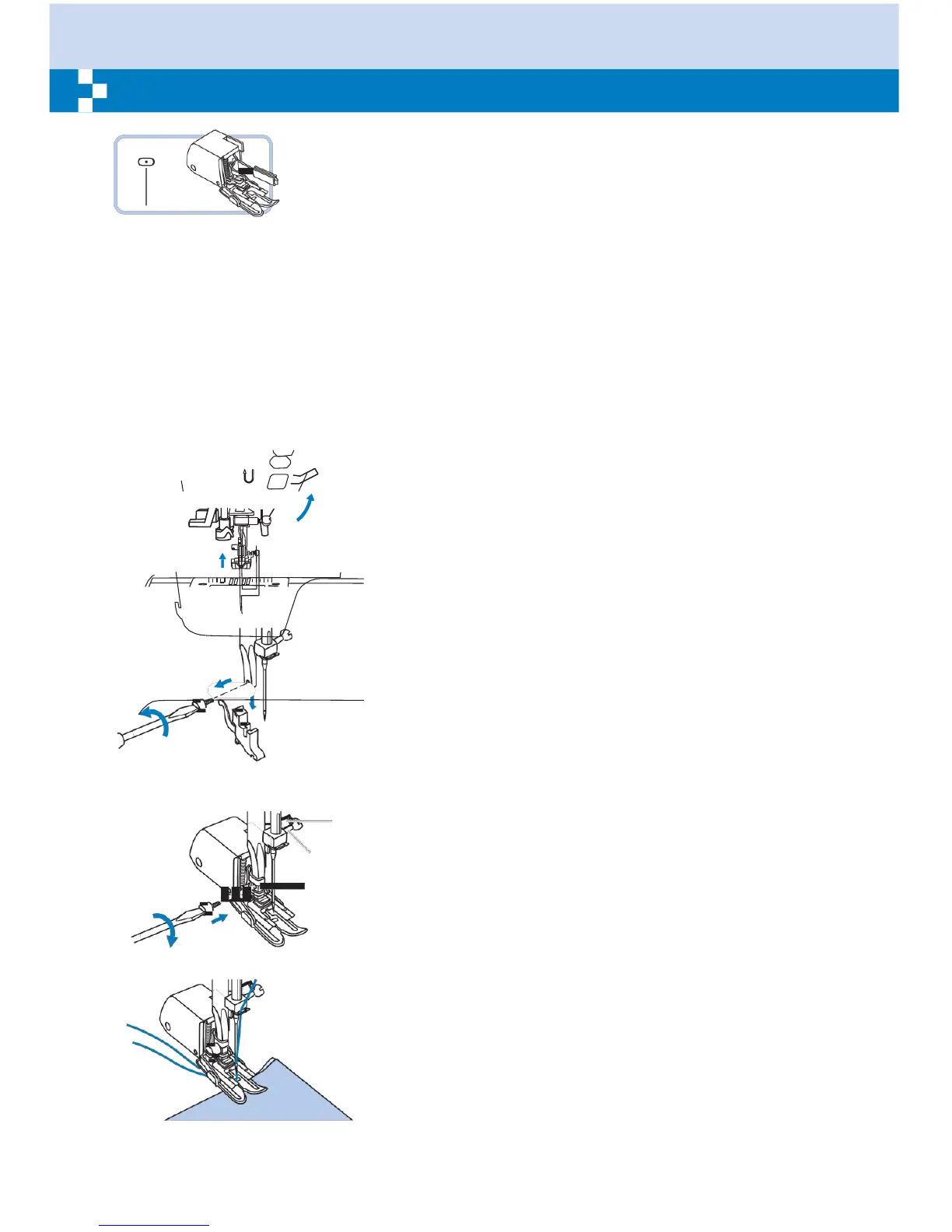
Lift the presser foot lifter to raise the presser foot bar.
Remove the presser foot holder by unscrewing
(counterclockwise) the presser bar attaching screw.
a
Attach the Walking Foot to the machine as follows:
- The arm (a) should fit into above the needle screw and
b
clamp (b).
c
- Slide the plastic attaching head (c) from your left to right
so that it is fitted into the presser foot bar.
- Lower the presser foot bar.
- Replace and tighten (clockwise) the presser bar
attaching screw.
- Make sure both the needle screw and the presser bar
attaching screw are tightly secured.
Draw the bobbin thread up and place both the bobbin
thread and the needle thread behind the walking foot
attachment.


 To Next Page