Description of parameters (ToF Tool) Cerabar S/Deltabar S
146 Endress+Hauser
P01-xMx7xxxx-19-xx-xx-xx-042
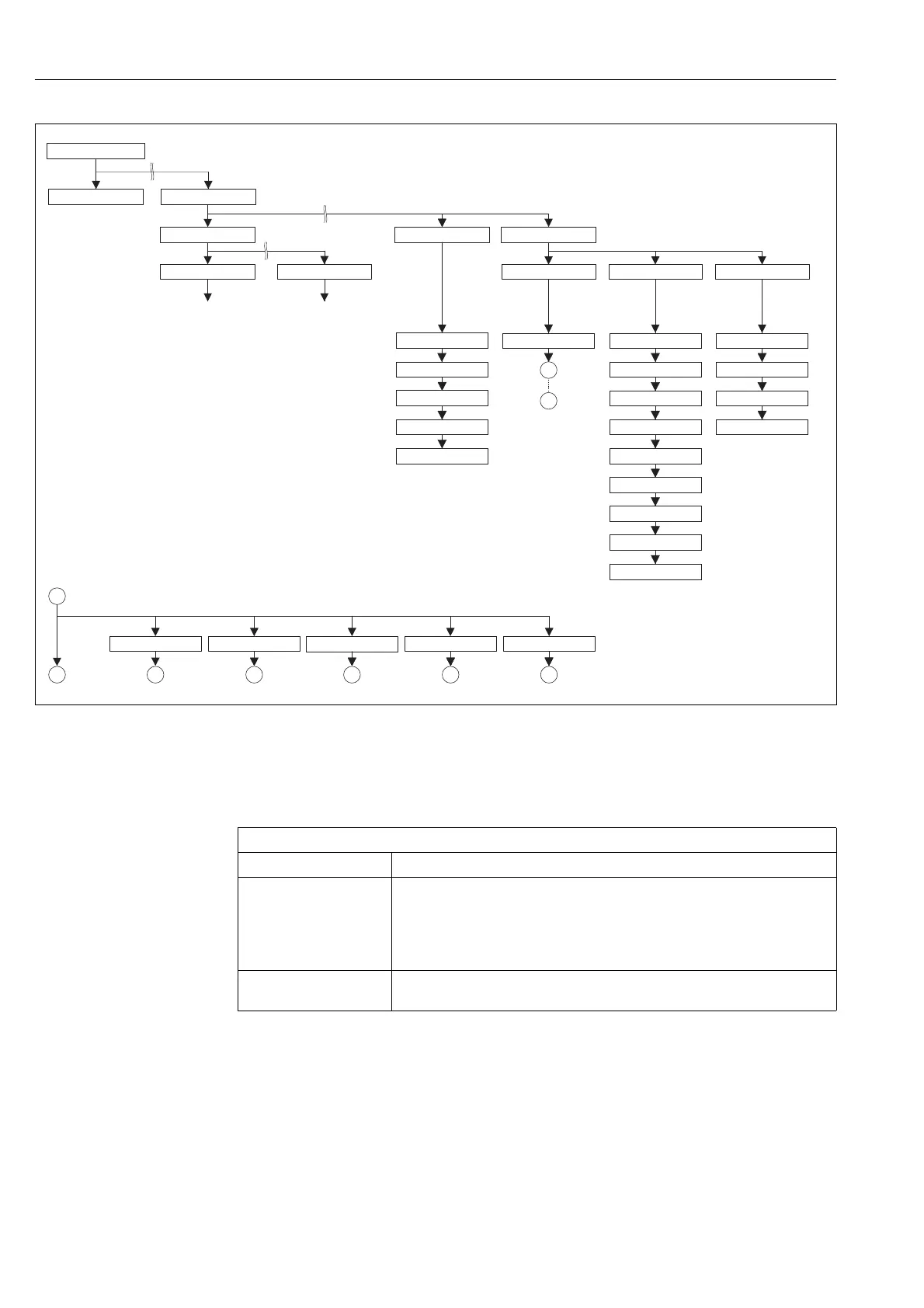
Fig. 36: OPERATING and DIAGNOSTICS group
→ For the OPERATING group, see Page 146, ToF Tool, table 25
→ For the SIMULATION function group, see Page 148, ToF Tool, table 26
→ For the MESSAGES function group, see Page 149, ToF Tool, table 27
→ For the USER LIMITS function group, see Page 150, ToF Tool, table 28
I
J
J J J J J J
I
SIM. LEVEL
SIM. PRESSURE SIM. TANK CONT.SIM. FLOW VALUE SIM ERROR NO.
none LevelPressure
Tank content
Flow
Alarm Warning
HistoROM AVAIL.
HistoROM CONTROL
SELSECT ALARMTYPE
ALARM DELAY
ALARM DISPL. TIME
Pmax ALARM WINDOW
Tmin ALARM WINDOW
Tmax ALARM WINDOW
Pmin ALARM WINDOWALARM STATUSSIMULATION MODE
OPERATING HOURS
INSERT PIN NO
ENTER RESET CODE
USER LIMITS
OPERATING MENU
MEASURED VALUE
QUICK SETUP
OPERATIONSETTINGS
POSITION ADJUSTMENT TOTALIZER SETUP
ERROR NO.
ACK. ALARM
RESET ALL ALARMS
LAST DIAG. CODE
ACK. ALARM MODE
MESSAGESSIMUALTION MODE
DIAGNOSTICS
ToF Tool, Table 25: OPERATING MENU → OPERATING
Parameter name Description
ENTER RESET CODE
Entry
Reset parameters completely or partially to factory values or delivery status.
→ See also Operating Instructions BA301P (Deltabar S) or BA302P (Cerabar S),
Section 5.7 "Factory setting" (reset).
Factory setting:
0
OPERATING HOURS
Display
Displays the hours of operation. This parameter cannot be reset.






 To Next Page