Enertech Global
EAV - EME/EMD Rev. A Models
Installaon and Operaons Manual
In manual mode, the system allows the technician to control the
pump, compressor, valves, and immersion heaters. This is useful
for validang the system components. An example would be to
move the diverng valve and verify ow is achieved to the hot
water tank. Aer compleng a vericaon of the system and
installaon, the mode can be changed back to “normal” in the
system sengs.
To reach manual mode:
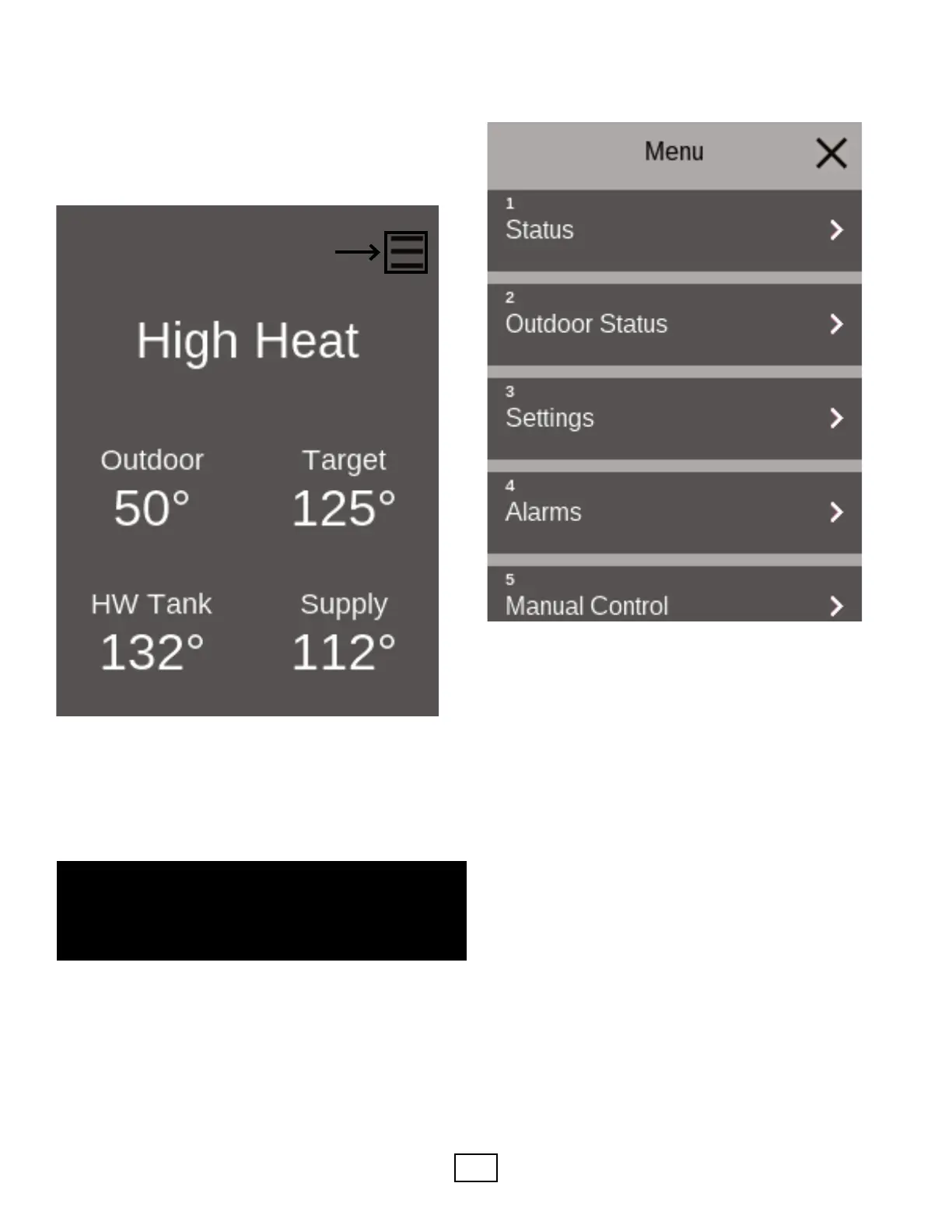
• Press the menu buon.
• Scroll to and press “5 Manual Control”
Once Manual Control is acvated, manual opons will be
displayed.
The menu structure of the touch-screen HMI provides many
customizable sengs. Not all HMI screens are shown in
this manual. The menus are very intuive. The best way to
navigate is to review the various menus aer going through
the start up Wizard. This approach will help provide familiarity
with the locaon of the various sengs. Navigate the opons
within the HMI, rst press the menu buon in the upper right
corner.
0.0 Main Menu 0.1 Menu 0.2 Menu
1.1 Status Menu 1.2 Menu 1.3 Menu
2.1 Outdoor Status Menu 2.2 Menu 2.3 Menu
Menu
0.0 Main Menu 0.1 Menu 0.2 Menu
1.1 Status Menu 1.2 Menu 1.3 Menu
2.1 Outdoor Status Menu 2.2 Menu 2.3 Menu
⚠⚠



 To Next Page