Long Range Wireless Access Point / Client Bridge Version 1.0
23
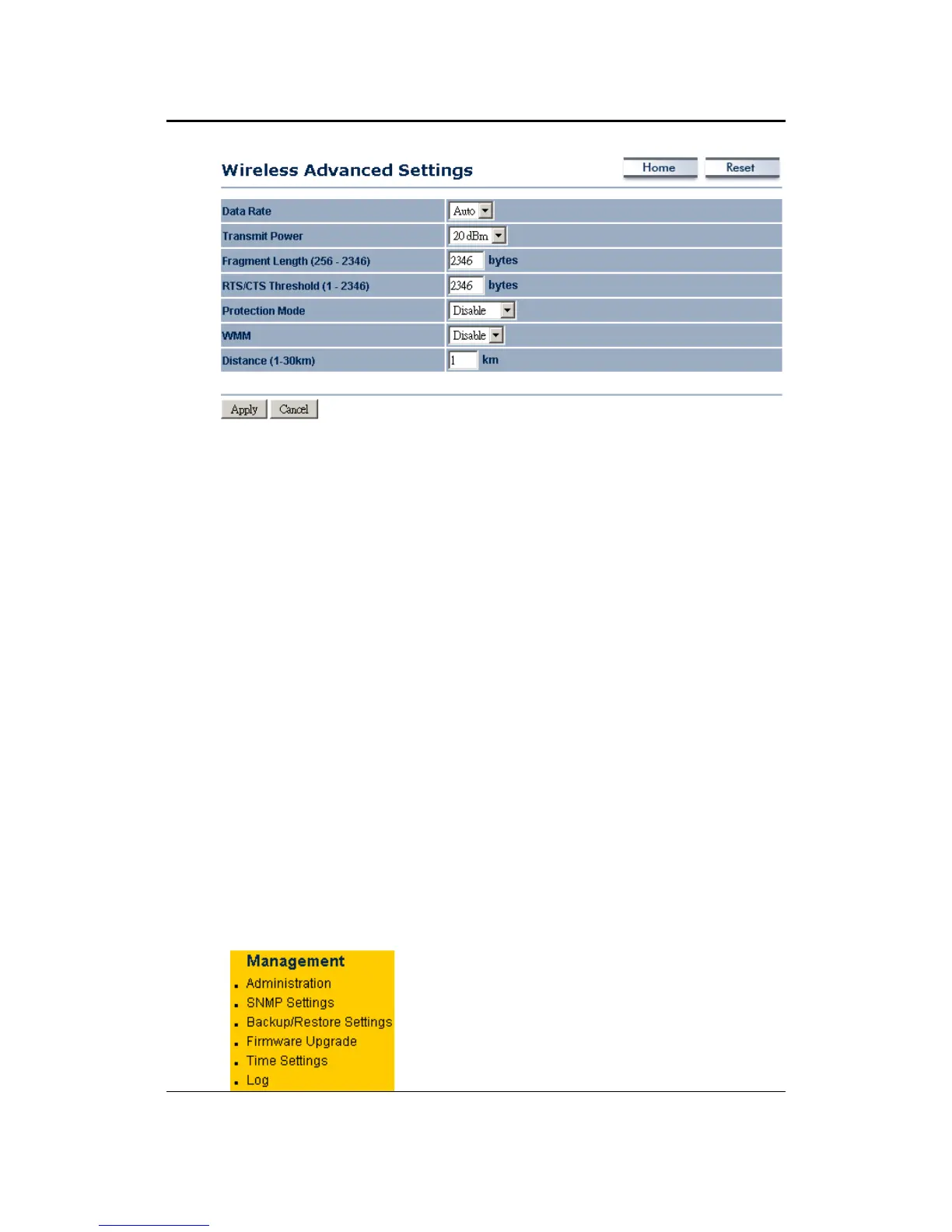
Data Rate: Ifyou would like to force a data rate, you may select one from the
drop‐down list. However, for best performance it is recommended to use the
Autosetting.
Transmit Power: You may have thedifferent application distance of thedevice
by selecting a
value from the drop‐down list. This feature can be helpful in
restrictingthecoverageareaofthewirelessnetwork.
Fragment:Packetsoverthespecifiedsizewillbefragmentedinordertoimprove
performanceonnoisynetworks.
RTS Threshold: Packetsoverthe specified size will use the
RTS/CTS mechanism
to maintain performance in noisy networks and preventing hidden nodes from
degradingtheperformance.
Protection Mode: If your wireless network is using both 802.11b and 802.g
devices then it is recommended to enable this feature so that the 802.11b
deviceswillnotdegradetheperformanceof802.11g
devices.
WMM:EnablewirelessQualityofService
Distance(1‐30km):Specifyadistancebetween1and30Km.
ClickontheApplybuttontosavethechanges.
4.5 Management
Click on the Management link on the
navigation drop‐down menu. You will then
see seven options: administration, SNMP
settings, backup/restore settings, firmware
upgrade, timesettings, and log.Each option
isdescribedbelow.



 To Next Page