Long Range Wireless Access Point / Client Bridge Version 1.0
48
DomainNameService:SelectGetAutomaticallyfromISPiftheISPwillprovide
the DNS address, if not, select Use these DNS servers and specify the primary
andsecondaryDNSserverIPaddress.
Router MAC Address: If you need to change the MAC address of the router’s
WANinterface,eithertypeinanalternateMACaddress(forexample,theMAC
address of the router initially connected to the ISP) or click on the Clone MAC
button.
ClickontheApplybuttontosavethechanges.
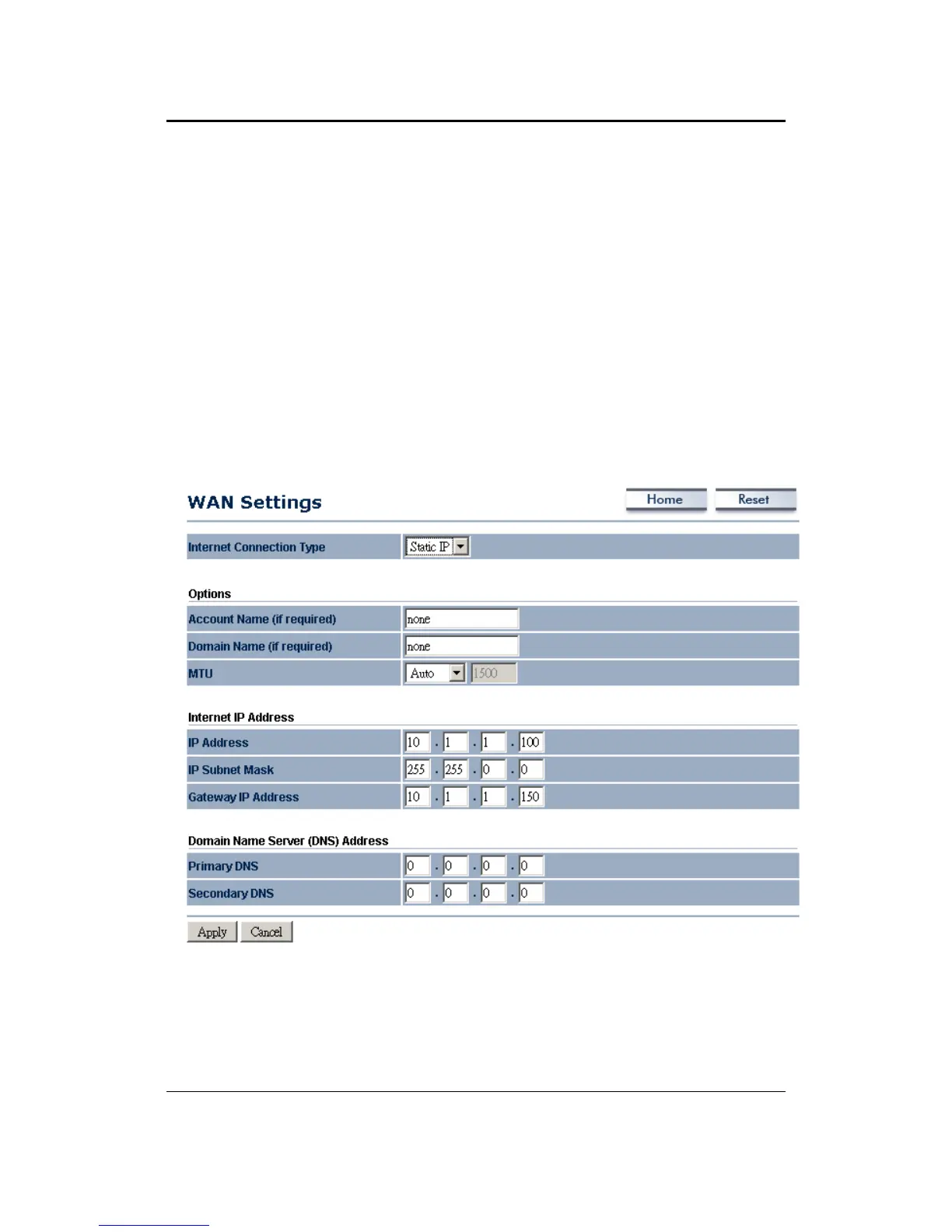
6.4.1.2 WAN–StaticIP
The WAN interface can be
configured as Static IP address. In this type of
connection, your ISP provides youwith a dedicated IP address (which does not
changeasDHCP).
InternetConnectionType:SelecttheStaticIPfromthedrop‐downlist.
AccountName:SpecifyanaccountnameifyourISPhasprovidedyouwithone.
DomainName:SpecifyadomainnameiftheISPhasprovidedyouwithone.
MTU: The Maximum Transmission
Unit (MTU) is a parameter that determines
the largest packet size (in bytes) that the router will send to the WAN. If LAN



 To Next Page