Long Range Wireless Access Point / Client Bridge Version 1.0
34
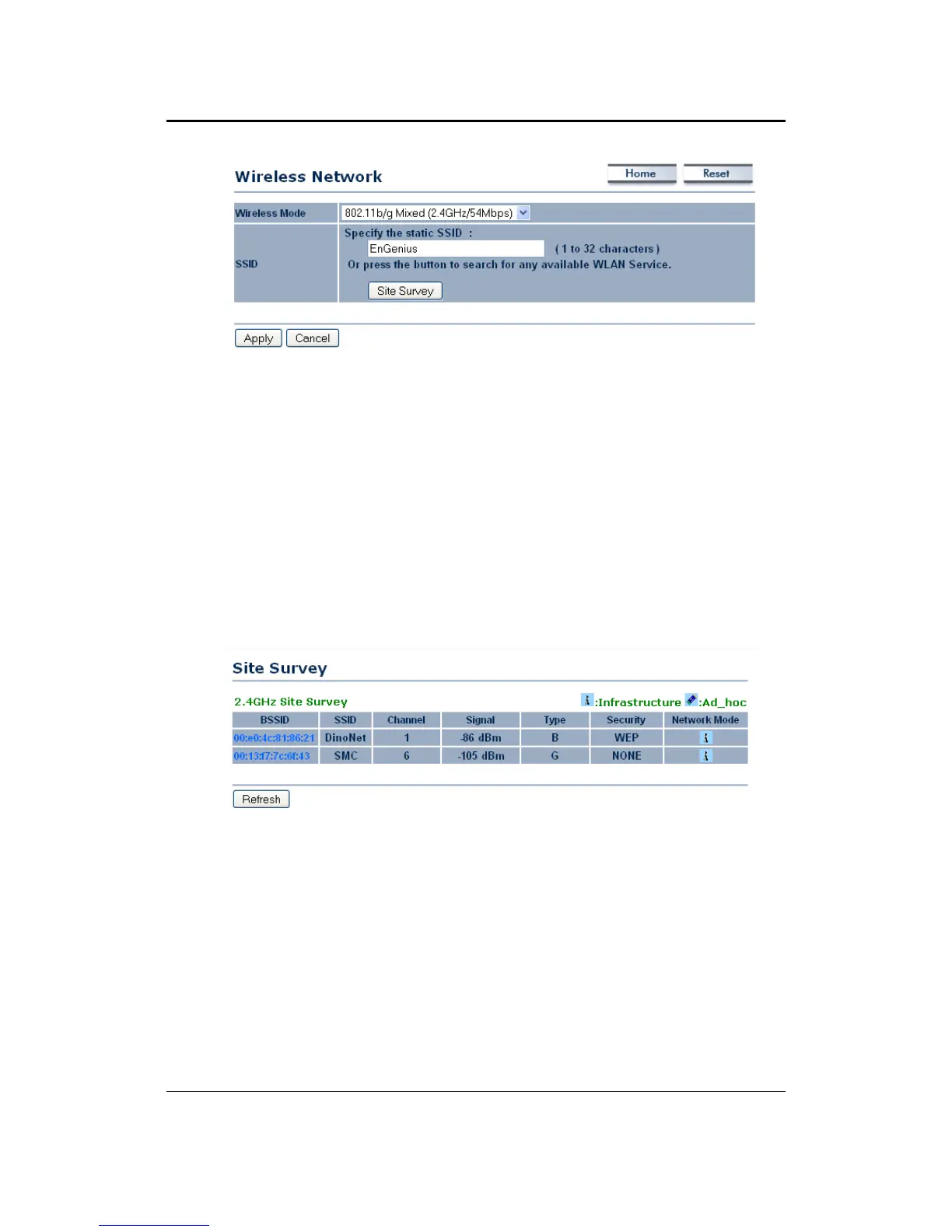
WirelessMode:Dependingonthetypeofwirelessclientsthatareconnectedto
thenetwork,youmayselectA,B,G,orB/G‐mixed,TurboMode.Ifyouarenot
sure about which clients will be accessing the wireless networks, it is
recommendedthatyouselectA
orB/G‐mixedforthebestperformance.
SSID:TheSSIDis aunique namedsharedamongstallthepointsofthewireless
network. The SSID must be identical on all points of the wireless network and
cannotexceed32characters.YoumayspecifyanSSIDorselectonefrom
theSite
Survey.
Site Survey: Click on the Site Survey button in order to scan the 2.4GHz
frequency for devices that broadcast their SSID. Click on the BSSID link to
connect to the Access Point. Click on the Refresh button to re‐scan the
frequency.
5.4.2 WirelessSecurity
TheWirelessSecuritypageallowsyoutoconfigurethewirelesssecurity.
5.4.2.1 WirelessSecurity‐WEP
Security Mode: Select WEP from the drop‐down list if your wireless network
usesWEPencryption.WEPisanacronymfor WiredEquivalentPrivacy, andisa
securityprotocol that providesthe same level
of security for wireless networks
asforawirednetwork.



 To Next Page