Scanner unit
Mechanism
Is the glass surface clean? oChecked / oNot necessary
Does paper skew during loading or feeding oChecked / oNot necessary
Any abnormal noise during movement? oChecked / oNot necessary
Carriage mechanism
Does the carriage move smoothly? oChecked / oNot necessary
Any abnormal noise during movement? oChecked / oNot necessary
Any dirt or obstacles around the shaft of carriage
guide?
oChecked / oNot necessary
Is the CR motor at the correct temperature
(not over heating)?
oChecked / oNot necessary
Lamp
Does the lamp turn on and successfully perform white-
reflective test near home position?
oChecked / oNot necessary
Local copy System
Perform a color test of the local copy function. Is the
output quality satisfactory?
oChecked / oNot necessary
Adjustment Specified adjustment items Are adjusted conditions all right? oChecked / oNot necessary
Lubricant Specified lubricated item
Is lubrication applied to the specified locations? oChecked / oNot necessary
Is the quantity of lubrication adequate? oChecked / oNot necessary
Function
Printer ROM version Newest version: oChecked / oNot necessary
Scanner ROM version Newest version: oChecked / oNot necessary
Shipping
Ink cartridges Are the ink cartridges installed correctly? oChecked / oNot necessary
Pads on bottom Are all six pads attached? oChecked / oNot necessary
Protection conditions during
transport
Are all the pointed parts firmly fixed? oChecked / oNot necessary
Others Attached items Are all attached items from users included? oChecked / oNot necessary
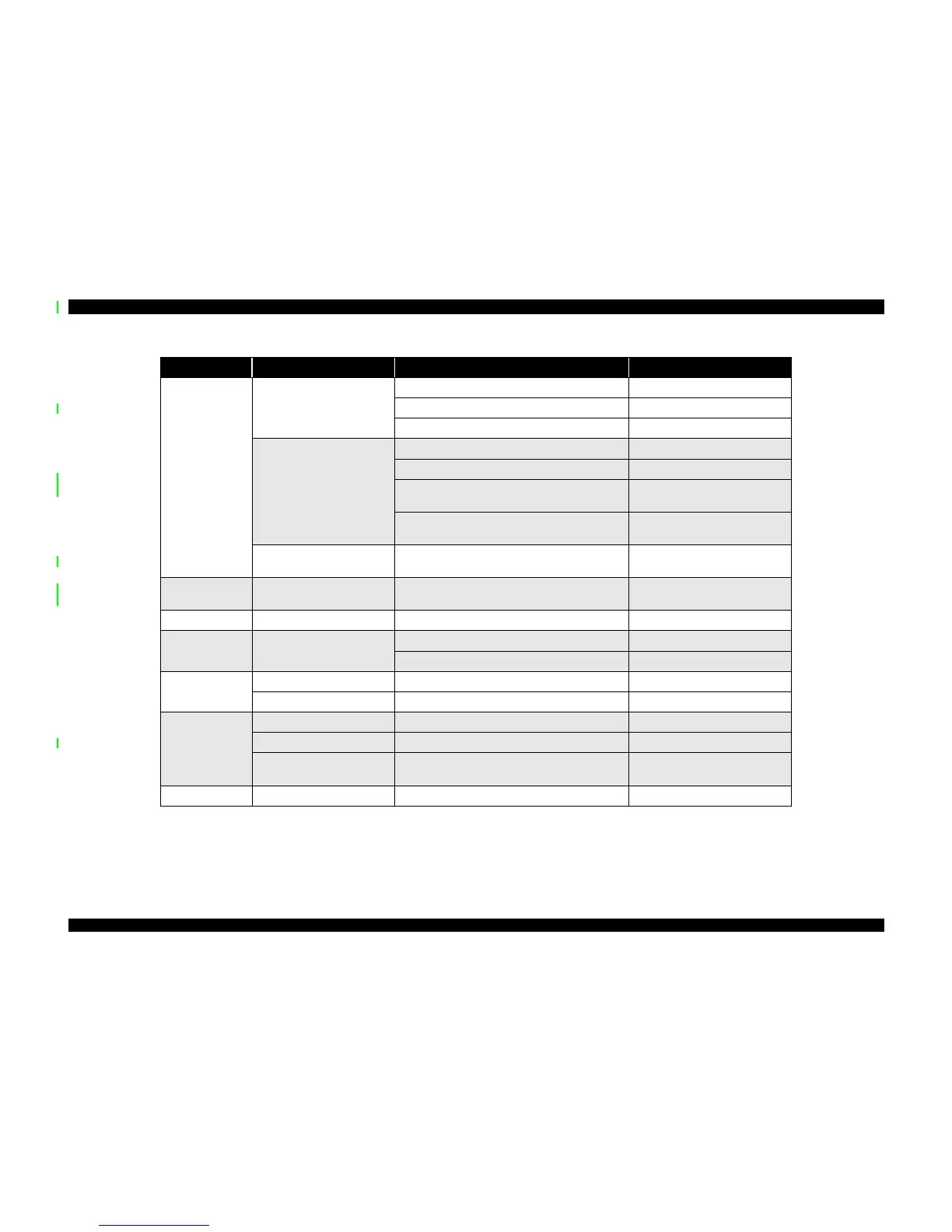
Table 4-4. Inspection Checklist for the Stylus Scan
Category Component Item to check Is Check Required?



 To Next Page
 Loading...