Design and function
Machine configuration menu
099-000115-EW501
17.06.2015
Warnings
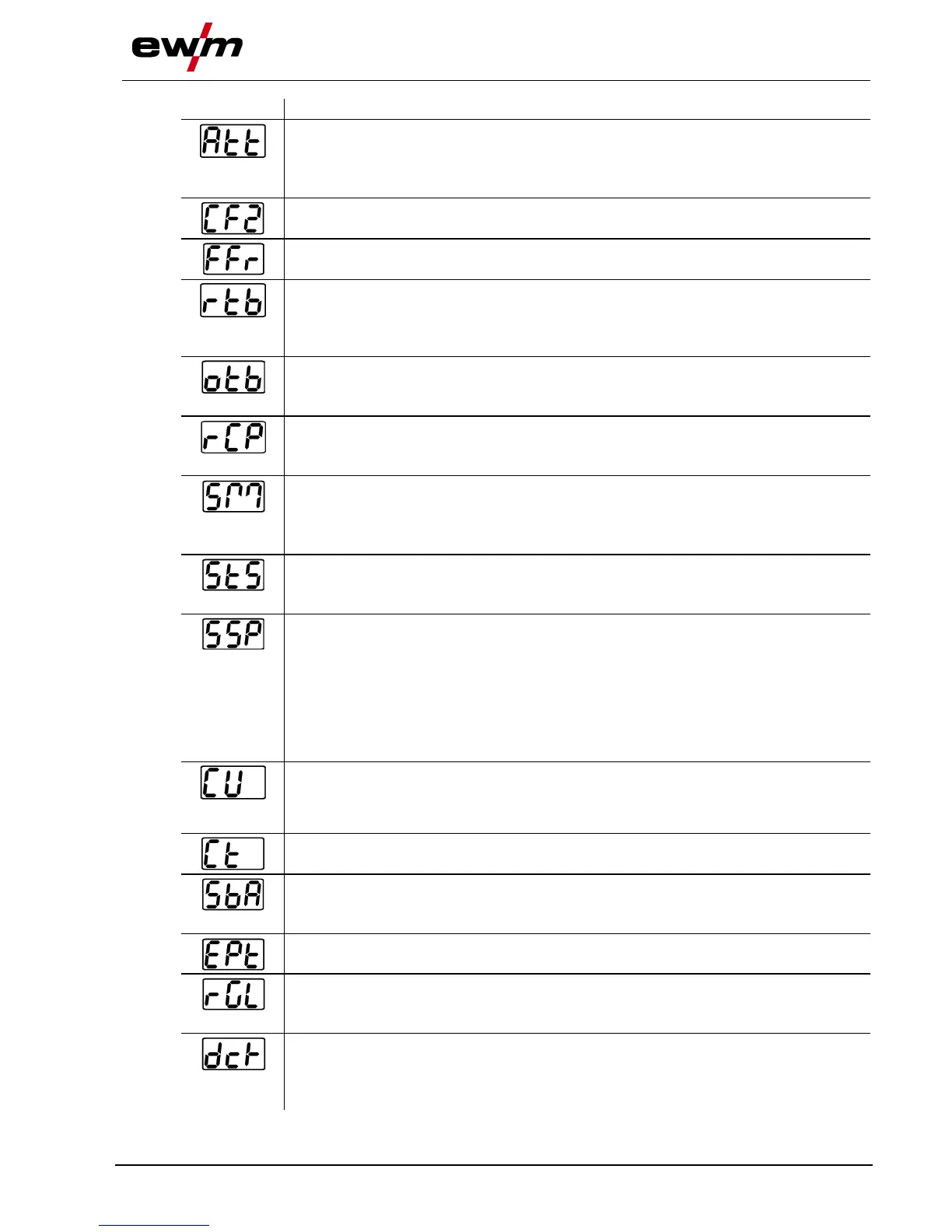
Warnings can be issued prior to a machine failure.
off Warnings disabled (ex works)
on Warnings enabled
Machine configuration (part two)
Settings for machine functions and parameter display
Ramp function Remote control RTF 1
The ramp function can be switched on and off
Tungsten balling with RT AC remote control
off Function switched off (factory setting)
on Function switched on (in addition, the "AC Balance" rotary knob at the
RT AC remote control has to be turned to the left stop)
Tungsten balling (old variant)
• on = on
• off = off (ex works)
Welding current polarity switching
• on = polarity switching at the RT PWS 1 19POL remote control (ex works)
• off = polarity switching at the welding machine control
spotMatic
Variation of operation mode spotArc, ignition with workpiece contact
• on = on
• off = off (factory setting)
Setting spot time
• on = Short spot time (5 ms - 999 ms, 1 ms- steps)
• off = long spot time (0,01 s - 20,0 s, 10 ms- steps)
Setting process activation
• on = Separate process activation:
The welding process has to be reactivated for every arc ignition by pressing the torch
trigger.
• off = Permanent process activation:
The welding process is activated by pressing the torch trigger once. The following arc
ignitions are initiated by shortly touching the tungsten electrode against the
workpiece.
Torch cooling mode
• AUt = automatic operation (ex works)
• on = permanently switched on
• off = permanently switched off
Welding torch cooling system pre-flow time
Setting 1–60 min. (ex works 5)
Time-based power-saving mode
• 5 min.–60 min. = Time to activation of power-saving mode in case of inactivity.
• off = inactivated (ex works 20 min.)
AC mean value controller
• on = on (factory setting)
• off = off
Switching option for welding current potential (dc+) with TIG DC
• off = Select option for TIG DC+ is blocked (factory setting). Serves to protect the
tungsten electrode from being destroyed.
• on = Polarity can be selected freely








 To Next Page