Design and function
Configuring the welding machine for mechanical arc fusion welding
099-000115-EW501
17.06.2015
5.11 Configuring the welding machine for mechanical arc fusion welding
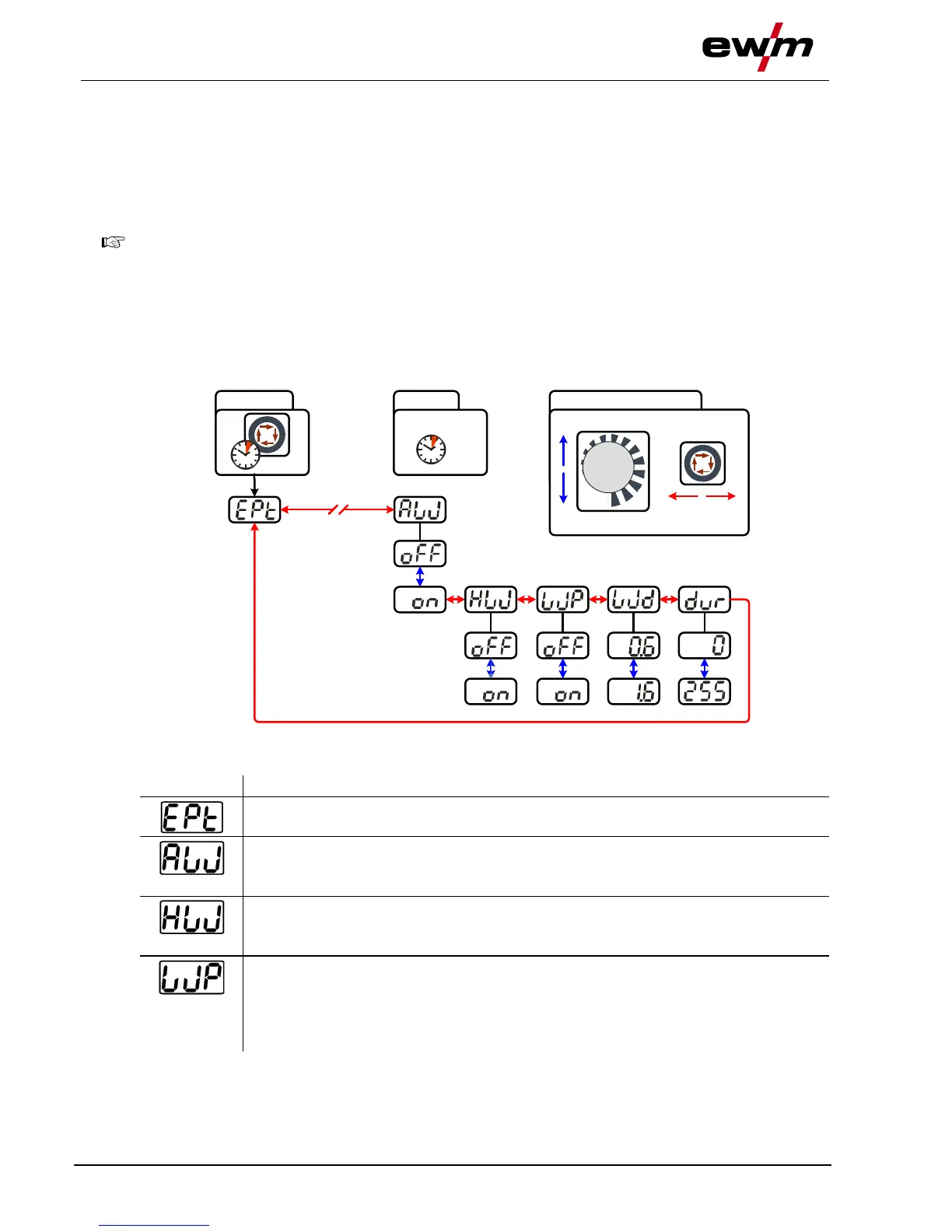
Before the welding machine is commissioned it has to be configured for mechanical arc fusion welding
(cold or hot wire welding). The following basic settings are made in the Expert menu:
1. Activate filler wire process (AW = on).
2. Hot wire or cold wire selection (HW = on/off)
In addition, wire diameter and wire return can be adjusted if required.
ENTER (enter the menu)
• Keep the "welding parameters" button pressed for 4 s.
NAVIGATION (Navigating in the menu)
• Parameters are selected by pressing the "welding parameters" button.
• Set or change the parameters by turning the "welding parameter setting" rotary dial.
EXIT (leave the menu)
• After 4 s, the machine will return automatically to the ready-to-operate status.
ENTER EXIT
4 s
4 s
NAVIGATION
Filler wire process (cold/hot wire)
• on = filler wire activated
• off = filler wire deactivated (factory setting)
Hot wire process (start signal for hot wire power source)
• on = hot wire activated
• off = hot wire deactivated (factory setting)
Wire/pulse function (wire feed characteristics when using TIG pulses)
The wire feeding can be disabled during pulse pauses (not in case of pulse
automatic or kHz pulses).
• on = wire feeding switched off during pulse pause
• off = wire feeding switched on during pulse pause (ex works)








 To Next Page