54
SunSDR2 DX User Manual
© 2020 Expert Electronics
ExpertSDR2 SOFTWARE DESCRIPTION
5.7 Options
For fine tuning of the ExpertSDR2 software press the Options button in the top right corner of
the software window.
Note:
·
If you changed anything in the menu and you don't like it, but you forgot the default value,
you can reset all setting to default values by simply clicking the Global Default button.
·
You can check the changes without leaving the Options window, just click the Apply button.
·
If you are satisfied with the changes and don't want to change anything else, click the OK
button to close the Options window.
Warning!
i
We recommend you study this section of the manual very carefully because many
settings are hidden in the sub-menus.
5.7.1
Device
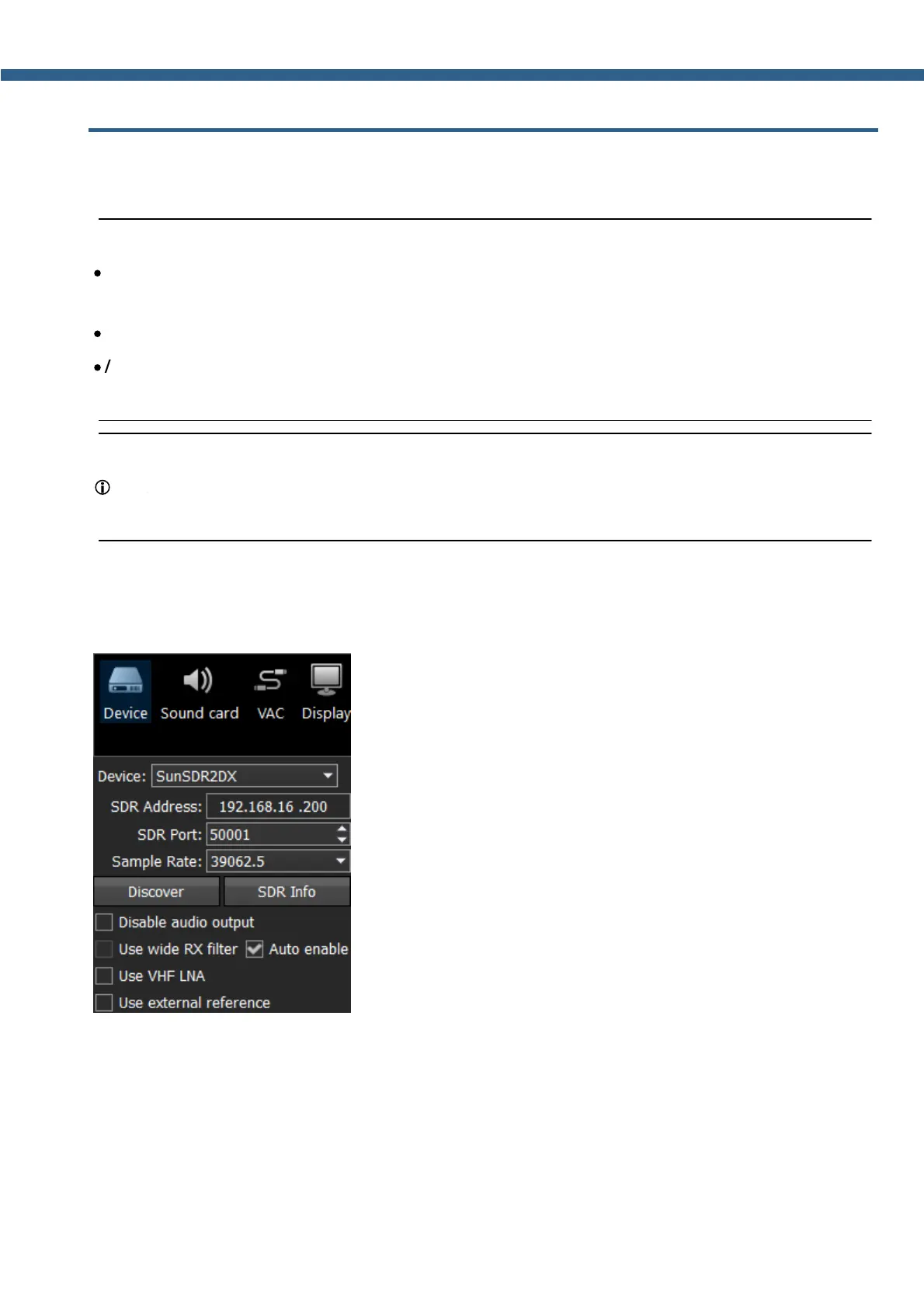
In the Device menu, you can find software functions of the signal processing and hardware
settings.
Device – Shows that it's ExpertSDR2 for SunSDR2 DX.
SDR Address – physical static IP-address of the SDR module, by default 192.168.16.200.
SDR Port – port number, which is used for the data exchange, by default 50001.
Sample Rate – IF sample rate, equals the panorama bandwidth. You can select one of four
panorama bandwidth values.



 To Next Page