64
SunSDR2 DX User Manual
© 2020 Expert Electronics
ExpertSDR2 SOFTWARE DESCRIPTION
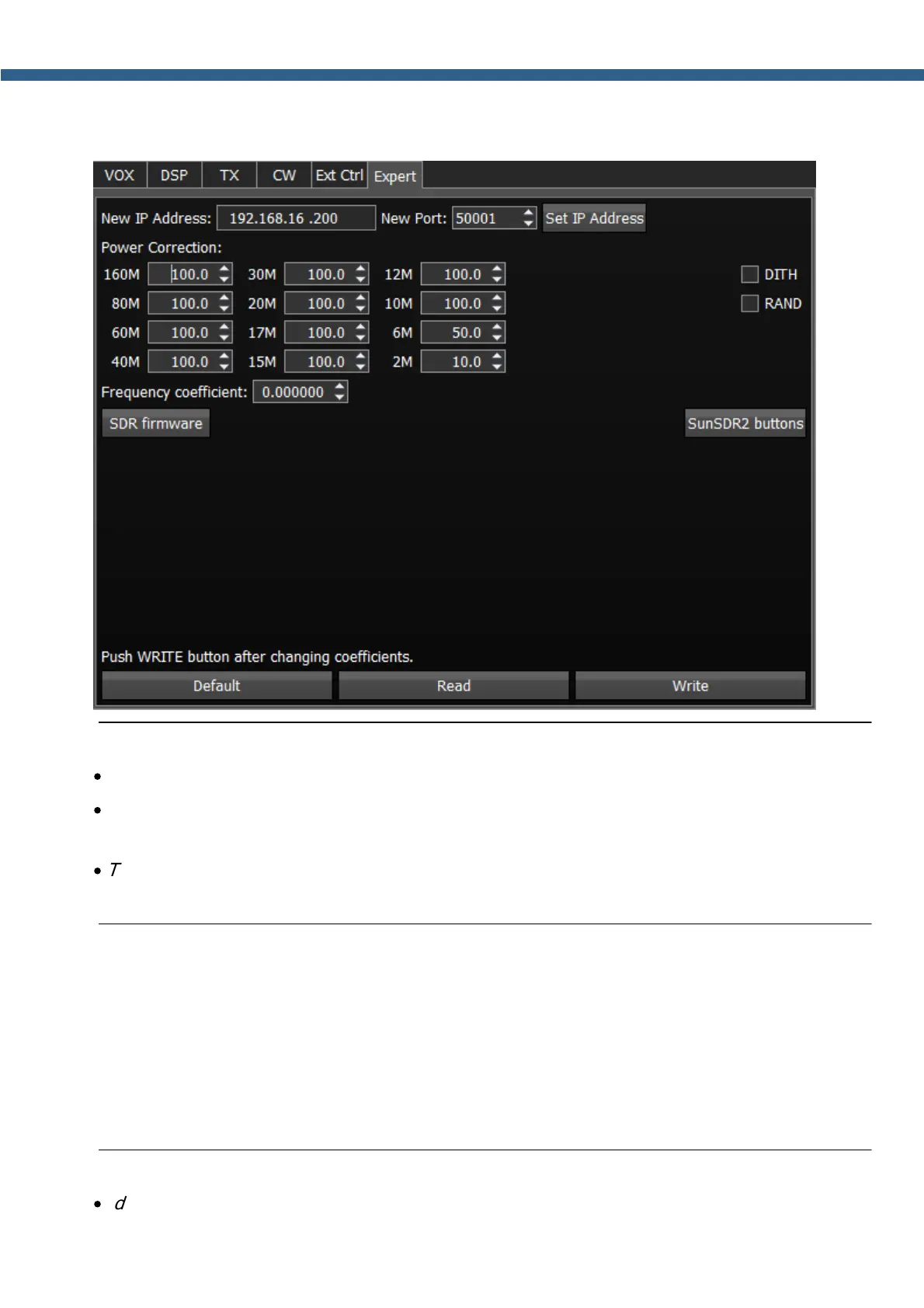
5.7.1.6 Expert
On the Expert tab you can see the fine hardware settings of the transceiver.
Note:
·
All settings in this tab are stored in the transceiver's energy independent memory.
·
After setting the required values, set/unset checkboxes, press the Write button to save the
settings.
·
To read the current settings state from the memory, press the Read button. Auto-read
happens with every software launch.
New IP Address – an input box to enter new IP Address.
New Port – an input box to enter the New Port.
Set IP Address – a button to activate the new values of the IP address and Port.
Power Correction - output power correction menu, set the output power value for each band.
Value = 100 means the maximum output power of the transceiver.
Note:
·
Adjustments may be required when connecting an external power amplifier to the transceiver.



 To Next Page