76
SunSDR2 DX User Manual
© 2020 Expert Electronics
ExpertSDR2 SOFTWARE DESCRIPTION
·
Rate - Waterfall movement speed slider.
Set the Rate slider according to the required waterfall movement speed.
5.7.4.4 Grid
On the Grid tab you can see the spectrum scope grid display settings.
·
Color - Color of the spectrum scope grid.
Select the required grid color from the palette.
·
Transparency - Grid transparency slider.
Set the required grid transparency by moving the slider.
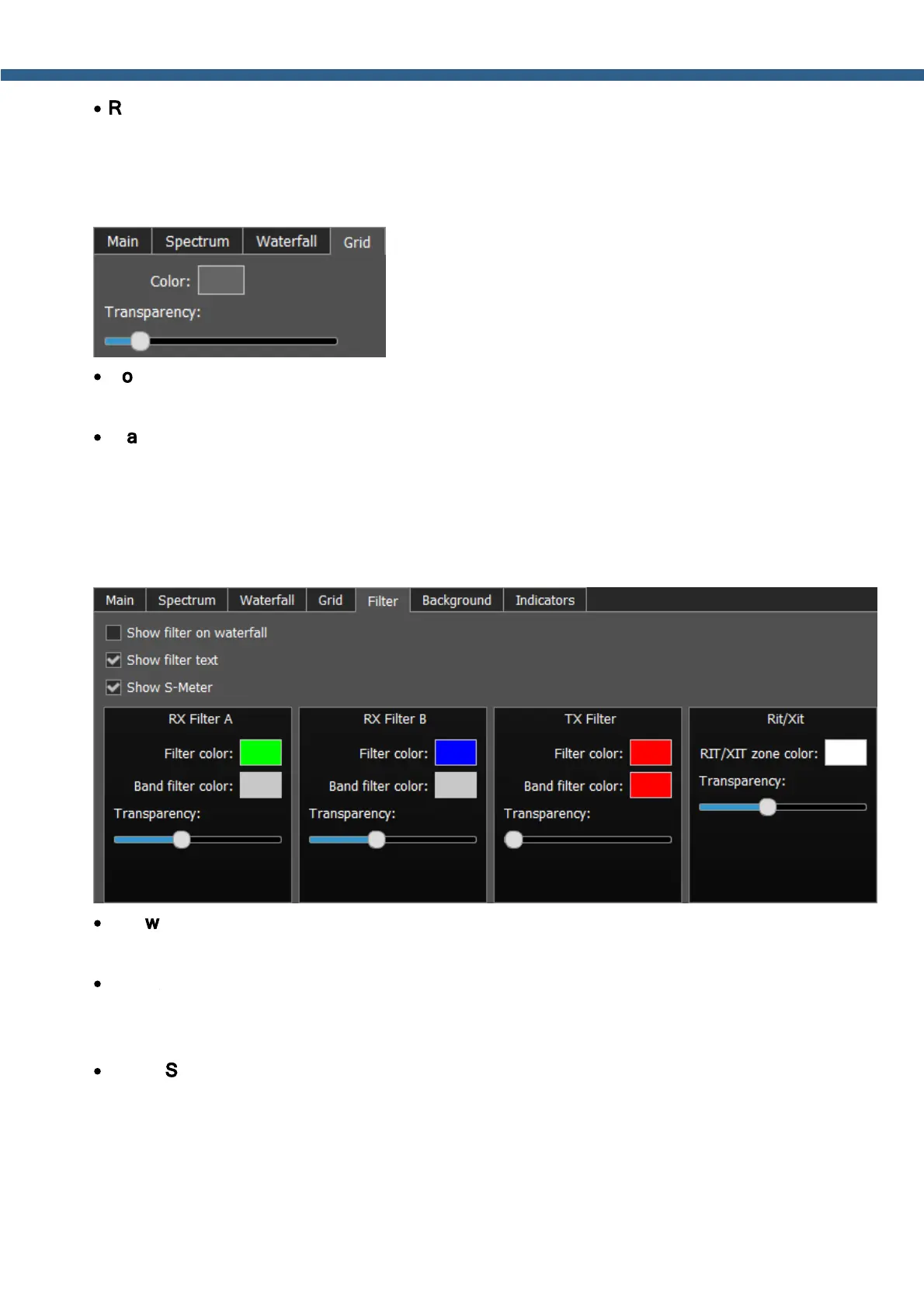
5.7.4.5 Filter
On the Filter tab you can set the required color of filters and the necessity to display the
additional text information.
·
Show filter on waterfall - Show receiver(s) filter on the waterfall.
Set the Show filter on waterfall checkbox to show receiver(s) filter on the waterfall.
·
Show filter text – Show text info near the receiver's filter on the spectrum.
Set the Show filter text checkbox to display filter's tuned frequency, signal level in S-units
etc. in the used filter bandwidth.
·
Show S-Meter – Enable animated S-Meter near the receivers' filter on the spectrum.
Set the Show S-Meter checkbox to display S-Meter near the receiver's filter.
In the RX Filter А, RX Filter В, TX Filter categories displayed filters' color and
transparency settings.



 To Next Page