CHAPTER 5 PROCESS
5-7
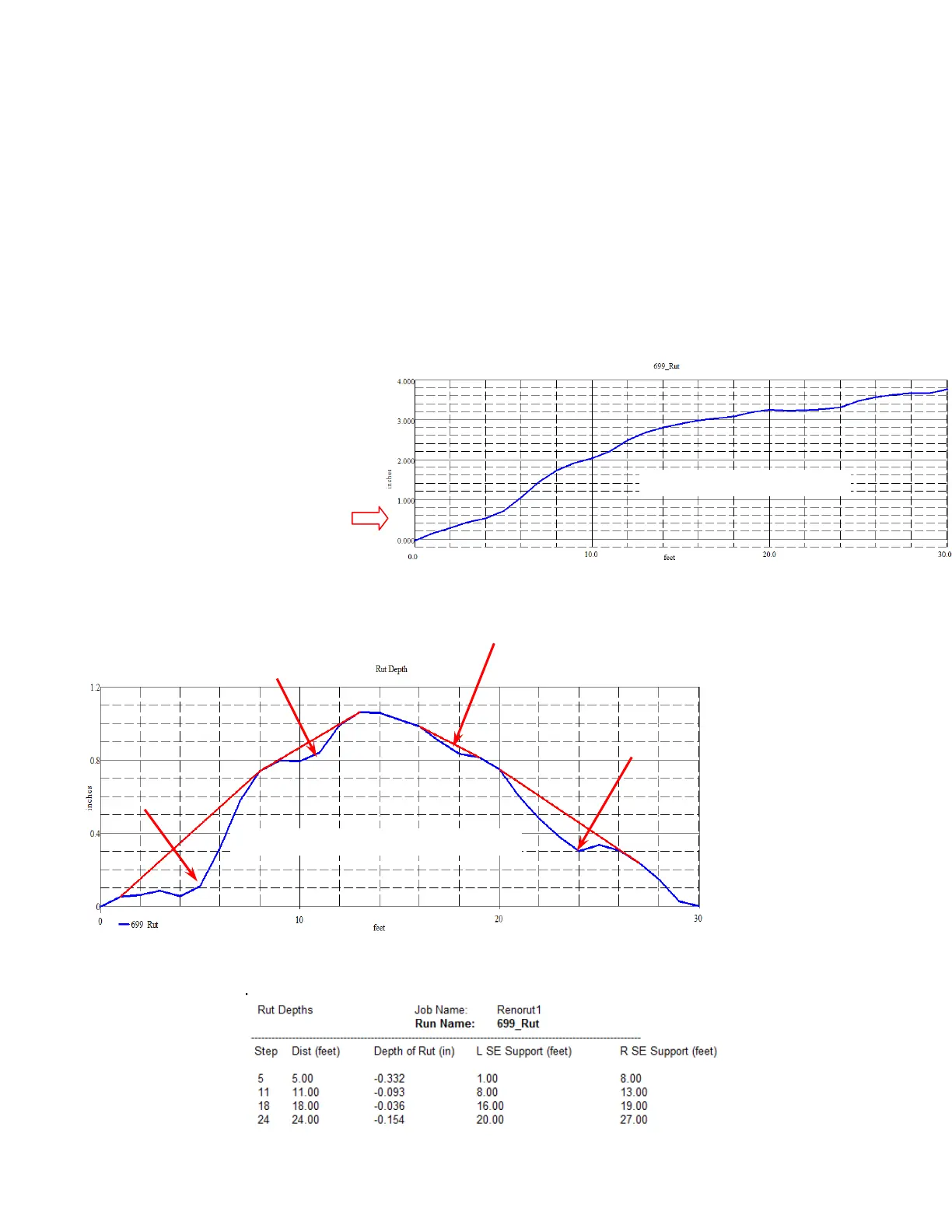
Original Transverse Profile (2 lanes)
These digital “notes” can be a handy way to make note of features on the pavement surface.
Think of this as just another way to make notes for your use later. You can write notes on your
hand or on a small scrap of paper, and this might work in the short run, but sooner or later you’ll
need to wash your hands, and you’ll eventually lose that little scrap of paper. But these
electronic notes stay with the original run forever, and cannot be lost.
RUT DEPTH [Only available on the desktop program - RoadFace 6.X only]
The RoadFace program will automatically calculate the depth of any transverse Runs that you
have collected. This report is not available on the RFCollect program. Just highlight the Run
you want to analyze, and use REPORT/RUT DEPTH. Then you must choose whether to make a
graphical or a tabular report, and
the program will estimate the
number of lanes that you have
crossed. You should correct the
number of lanes if the program
guesses wrong.
This is the transverse profile
across two traffic lanes
The Rut Depth Graph shows you a transverse profile, rotated so the coordinate axes are parallel
to the overall slope of the road. It also shows you the straight line between two high spots on
each side of every "Rut". This makes it easy for you to visualize the depth of the ruts.
The tabular Rut Depth Report gives you the location and depth of the deepest ruts, along with the
contact points of a Straightedge over the rut.
Rut Depth Graph of same Transverse Profile



 To Next Page