CHAPTER 5 PROCESS
5-8
Another of 3 Worst
Failures
GAP UNDER THE STRAIGHTEDGE or "
1
/
8
in Ten"
[Only available on the desktop program - RoadFace 6.X only]
To Make a Report using a "Gap Under a Straightedge" type Spec :
At the Run level, select the Run that you want to analyze, then use REPORT/GUSE
(The Acronym “GUSE” is short for GAP UNDER STRAIGHTEDGE)
There are two types of report: Graphical and Tabular.
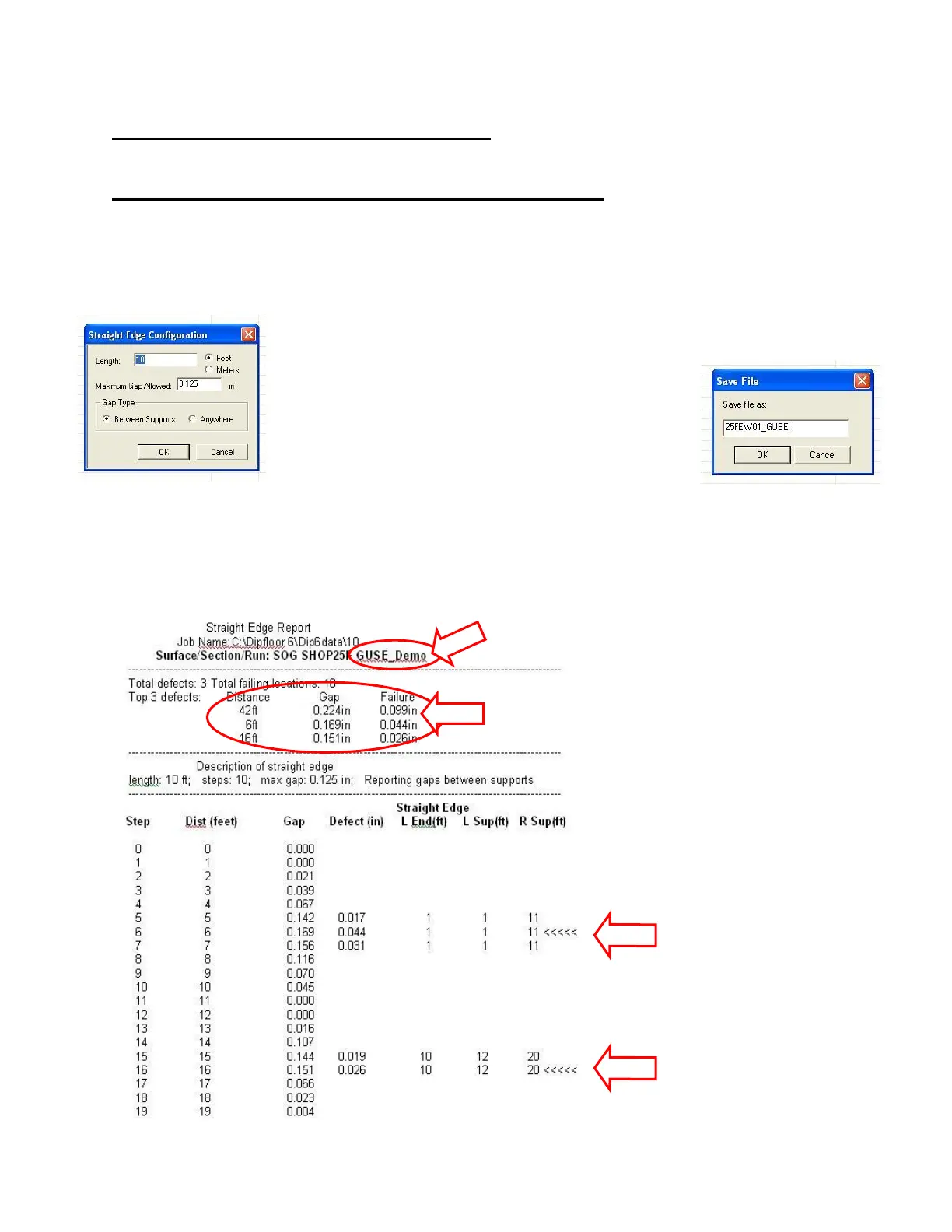
Now you get to choose between a Tabular Report - listing all the failing locations, and a Graphic
Report, showing the profile and the Straightedge.
In either case, you will be required to choose the length of the Straightedge
and the maximum allowable Gap. You can also choose
whether to count only gaps between contact points or
any Gap under the Straightedge. If you choose the
Tabular Report, the report will be saved as a .RTF file
that can be opened by any word-processing program.
You will be asked to name the file. The program will
suggest a name for you based on the Run Name.
The Tabular Report lists the worst "Gap" under a Straightedge at every point along the line. The
table also points out wherever the gap is larger than the specified allowable maximum gap. In other
words, it tells you wherever the pavement fails, and by how much. In addition, it lists the three
largest gaps and highlights their locations.



 To Next Page