Appendix A Collecting Elevation Profile Data in Wheelpaths
A-4
When you reach the end point (~250 steps) on the right wheelpath and after you have marked a circle
around the Moon foot at that location, pick up your Dipstick and go across and mark the desired location
directly opposite. Don’t stop the Data Collection program, just don’t press the Trigger and the Dipstick will
not collect data. Make a circle around the Moon foot at the desired location, and also draw a 12” (300 mm)
circle around this point. You can use the Dipstick to draw a circle around this point on the pavement. Draw
the circle so it is tangent to the outer edge of the Moon foot as shown in the drawing. Then go back to
where you stopped collecting data and carefully put the Dipstick down exactly on the Moon foot circle at
the end of the right wheel path.
Now you can continue your Run from this point. Collect data towards the circle across the lane toward
the left wheel path. At the point where you would step across the circle, don't step over the circle, but
put the foot down exactly tangent to the circle. (Anywhere on the circle) This will require that you
"step off" at an angle as shown in the picture above. Your next step will always put you exactly on the
desired spot at the center of the circle. You will also have to use this procedure to get exactly back on
to the starting point of the Run. On the next to last reading, set the foot down anywhere on the 1-
ft (300-mm) circle and you will be assured of being exactly 12” (300 mm) from the starting
point for the final reading. Rotate the Dipstick back to the starting point to take the final
reading. Be sure to take the final reading exactly on the original starting point. (Use the
12”/300 mm circle to compensate for any discrepancy on the next to last reading.) This is very
important. You should always do this “stepping off onto the 12” circle” on the short
transverse runs that will not be part of the longitudinal profiles.
PROCESSING BOX DATA - OVERVIEW
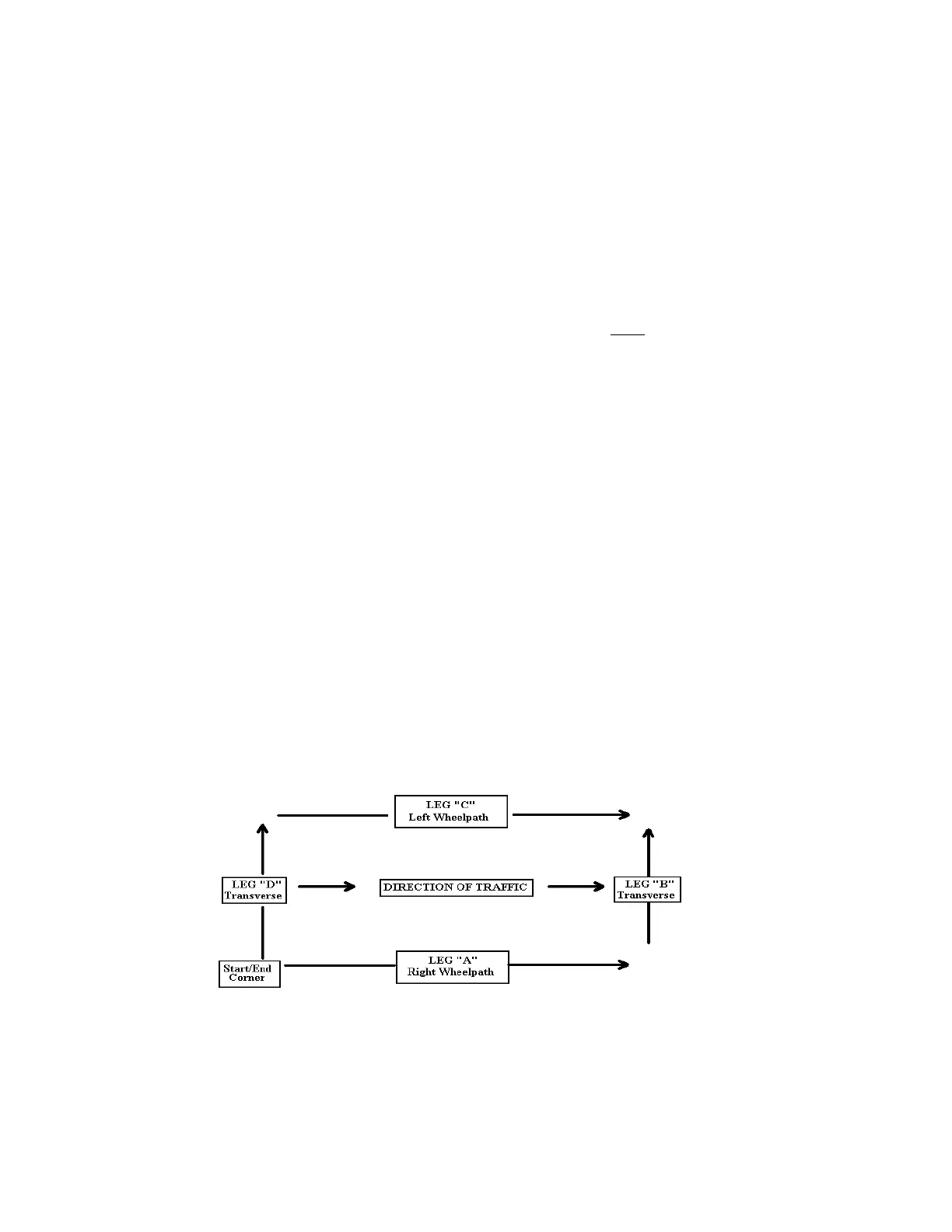
You will "UnBox" the first box, separating the four legs of each box. UNBOX creates four smaller records
from a larger one. This routine assumes that you have walked a "box" pattern on a test site and you finished
the run at the same spot where you started it.
The program will automatically calculate and apply data collection Bias, and will automatically reverse the
third and fourth legs.
The program will automatically adjust the start point for each leg so that the elevations on each leg will be
correct relative to the start point elevation of the box.
Note: Arrows now show the profile layout after “UnBoxing”. Since you may want to
compare the A and C legs (The two long runs) and perhaps the B and D legs (the two
transverse runs), the program automatically reverses the C and D legs so they correspond
to the direction of the A and B legs.



 To Next Page