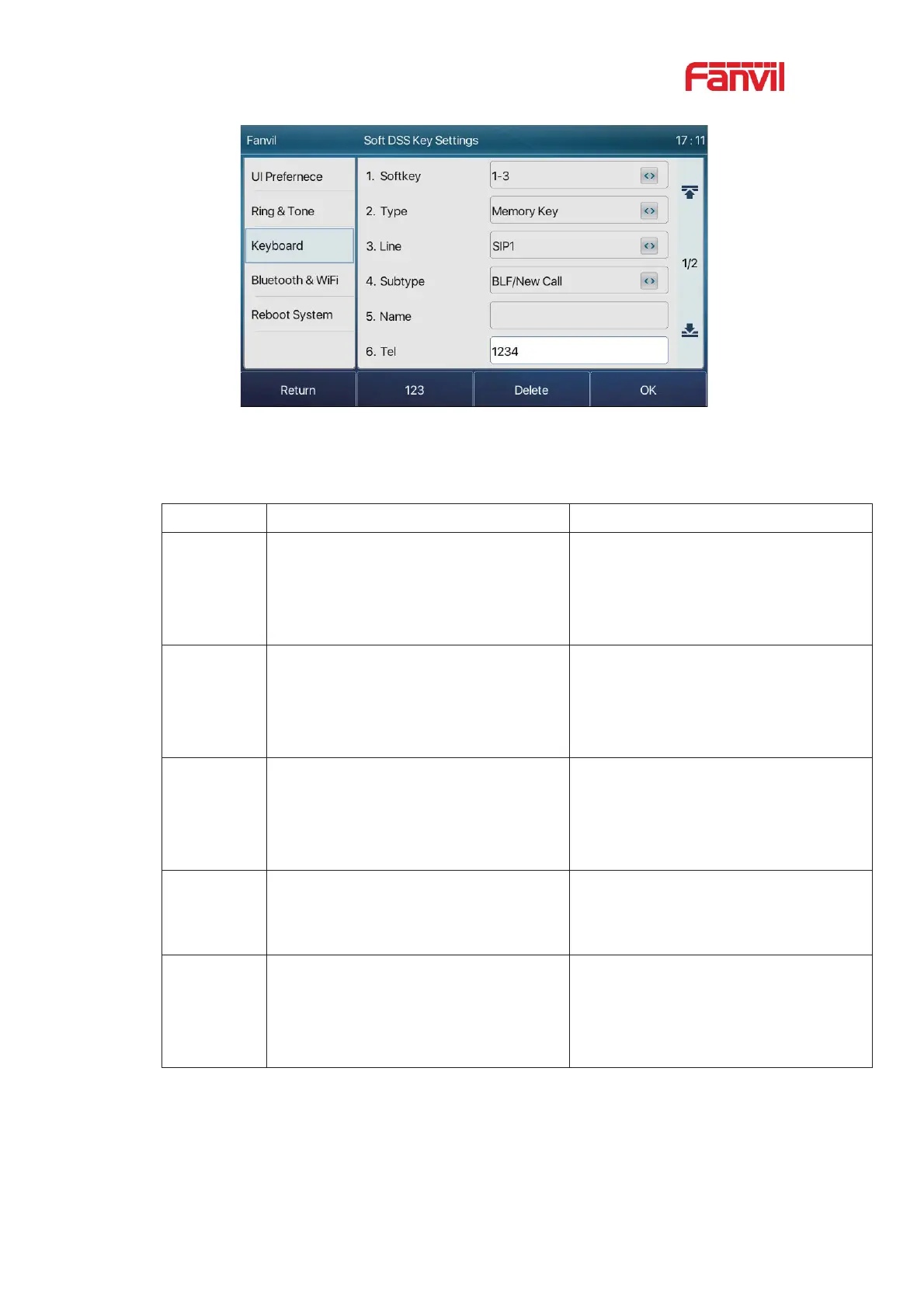
Picture 65 - Phone configuration BLF function key
Table 9 - BLF Function key subtype parameter list
Pressing the BLF key while standby to
dial the subscriber number.
When you press this BLF key while
talking to another user, you create a
new call along with the subscribed
number.
Pressing the BLF key while standby to
dial the subscriber number.
When you press this BLF key while
talking to another user, you
blind
transfer the call to the subscribed
number.
Pressing the BLF key while standby to
dial the subscriber number.
When you press this BLF key while
talking to another user, you attendance
transfer the call to the subscribed
number.
Pressing the BLF key while standby to
dial the subscriber number.
When you press this BLF key while
talking to another user, you invite the
subscriber number to join the meeting.
Pressing the BLF key while standby to
dial the subscriber number.
When the BLF key is pressed while
talking to another user, the phone
automatically sends the DTMF
corresponding to the BLF key number.



 To Next Page