9.3.1 Local Record
USB flash disk
Local recording is supported when USB flash drive is mounted.
When using local recording, it is necessary to start recording on the phone page
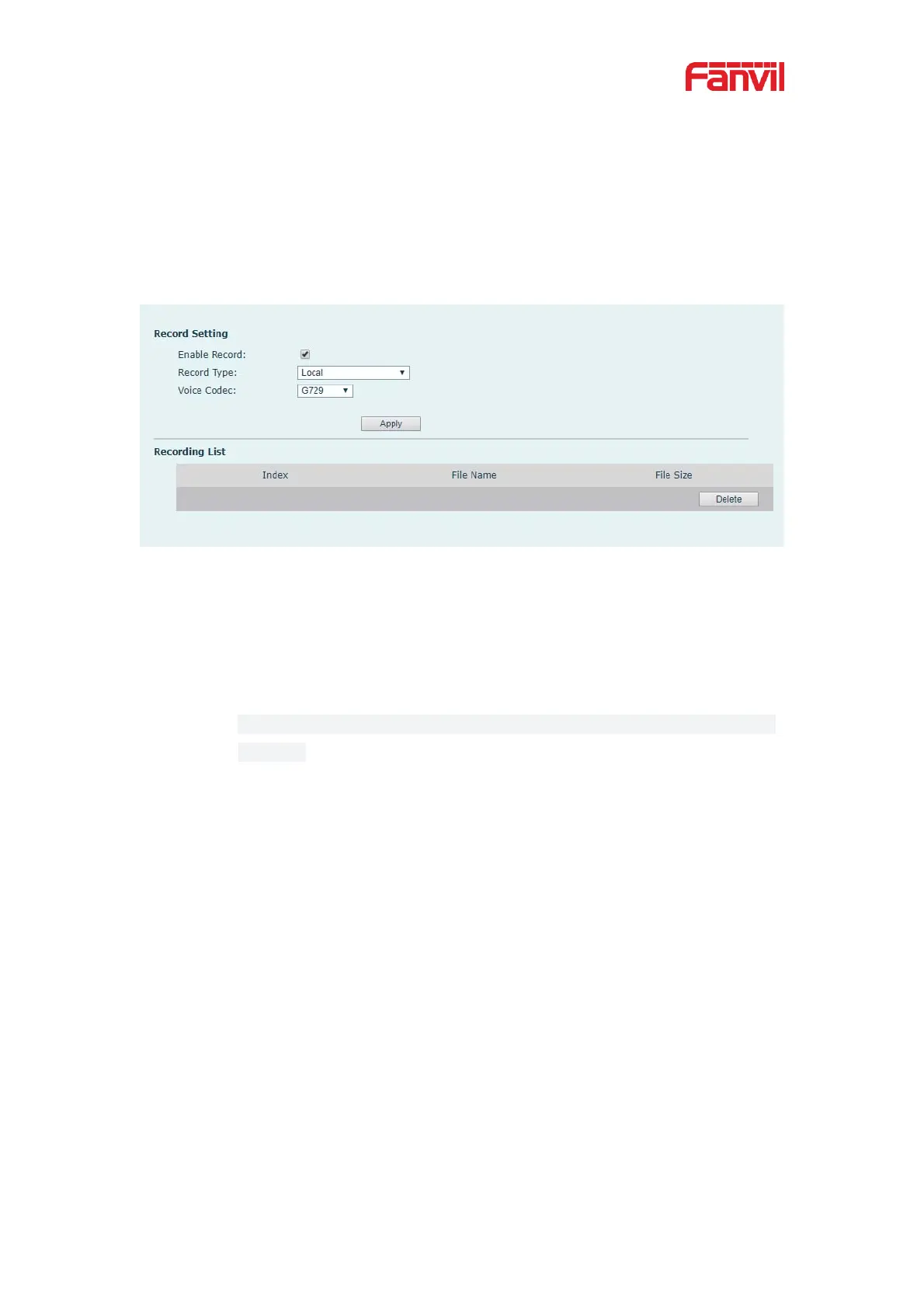
[Application] >> [Manage recording], select the local type and set the voice coding.
The webpage is as follows:
Picture 68 - WEB local recording
Local recording steps:
z Plug the U disk into the USB port of the phone, open the recording on the
web page, and set the recording type as local recording.
z Set DSSkey type as key event and type as record in the phone/web
interface.
z Set up one line call and press the recording key (set DSSkey).
z End the recording. End the call.
View local recording:
z Enter [Menu] >> [Application] >> [USB].
z Enter [USB] to view the recording file.
z Or enter the webpage [Application] under the [Manage recording] to view
the recording file.
Listen to the record˖
z Enter [Menu] >> [Application] >> [USB].
z Enter [USB] to view the recording file.
z Select the recording file that you want to listen to, and click the "play"


 To Next Page