FARO
®
Laser Scanner Focus
3D
X 130 Manual
January 2014
93
Chapter 6: The Focus
3D
X 130 Controller Software
restore to this directory. If you use SCENE to create new or modify backed up
data, this will be done automatically by SCENE.
When finished, insert the SD card with the data you want to restore.
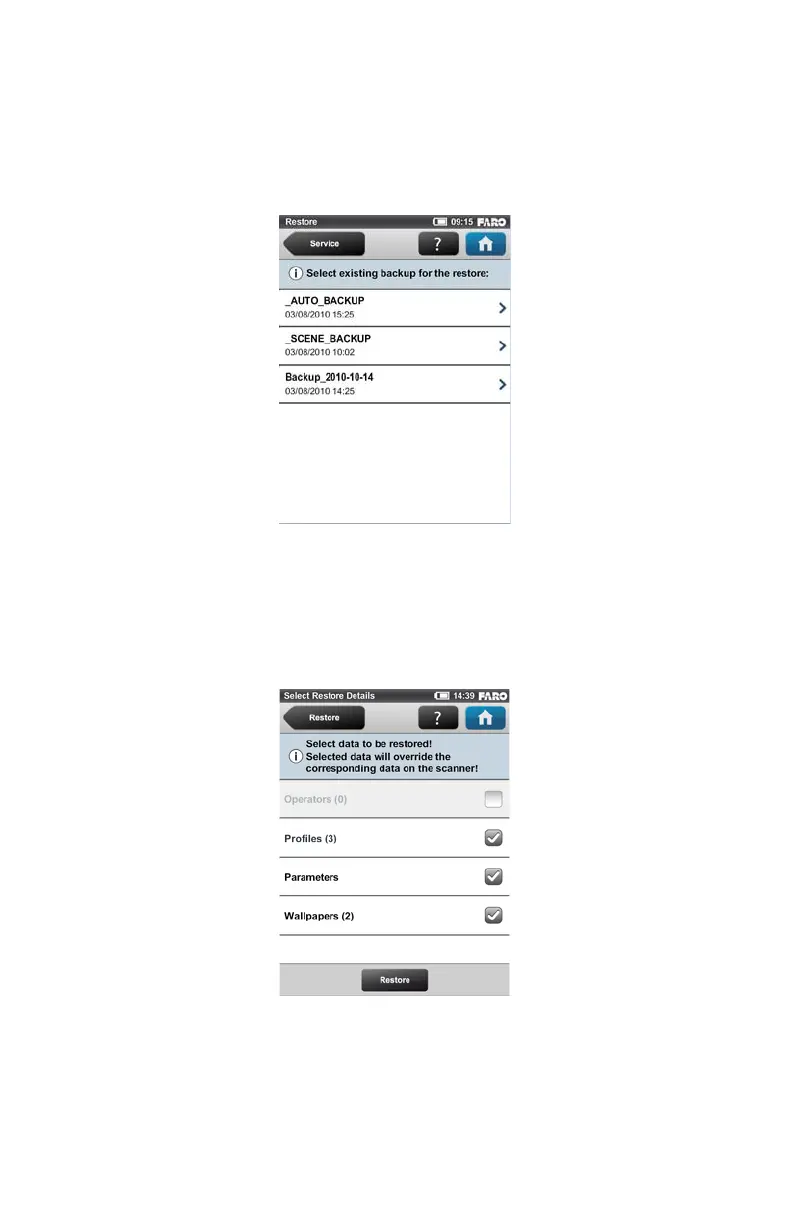
This screen shows you a list of all backup packages on the inserted SD card.
_AUTO_BACKUP is the automatically generated scanner snapshot (see
“Backup” on page 90). _SCENE_BACKUP is the scanner snapshot that has
been created or modified with SCENE. Click on the backup package you want to
restore. A new screen will appear.
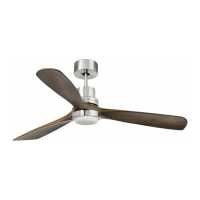
Select the data from the backup package you want to restore and press the
Restore button to start the restore operation.
Figure 6-30 Restore - Select Backup File
Figure 6-31 Restore - Select Restore Data


 To Next Page