FARO
®
Laser Scanner Focus
3D
X 130 Manual
January 2014
19
Chapter 4: Parts and their Functions
Chapter 4: Parts and their Functions
Scanner
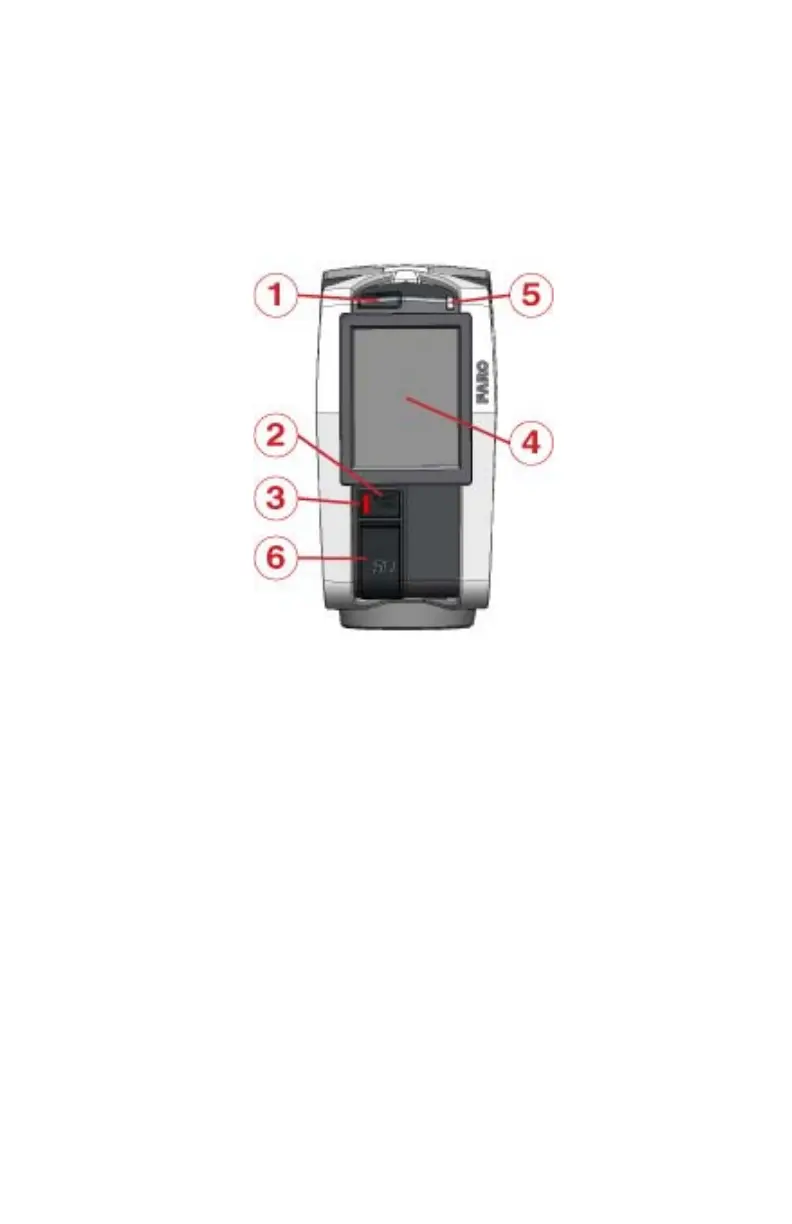
Right Side (Display / Mirror Side)
POWER button - Press this button to power on the Focus
3D
X 130. If the
Focus
3D
X 130 is on and running, press this button to power the Focus
3D
X 130
down. Pressing and holding the button more than 4 seconds will switch the
Focus
3D
X 130 off without shutting down. Only use this option in exceptional
cases; e.g., if the shutdown mechanism does not work or the Focus
3D
X 130 is
non-responsive.
START / STOP Button - Press this button to start or stop recording a scan.
LED beneath START / STOP button
Touch screen display
LED on mirror side of the scanner
SD memory card slot cover - Open the cover to insert a card into or release a
card from the card slot (7). For more information, see “SD Memory Card” on
page 31.
Figure 4-1 Mirror Side of the Focus
3D
X 130



 To Next Page