If you own more than one scanner, you can also transfer operators, scan profiles
or wallpapers from one scanner to another without the need of entering the data
individually.
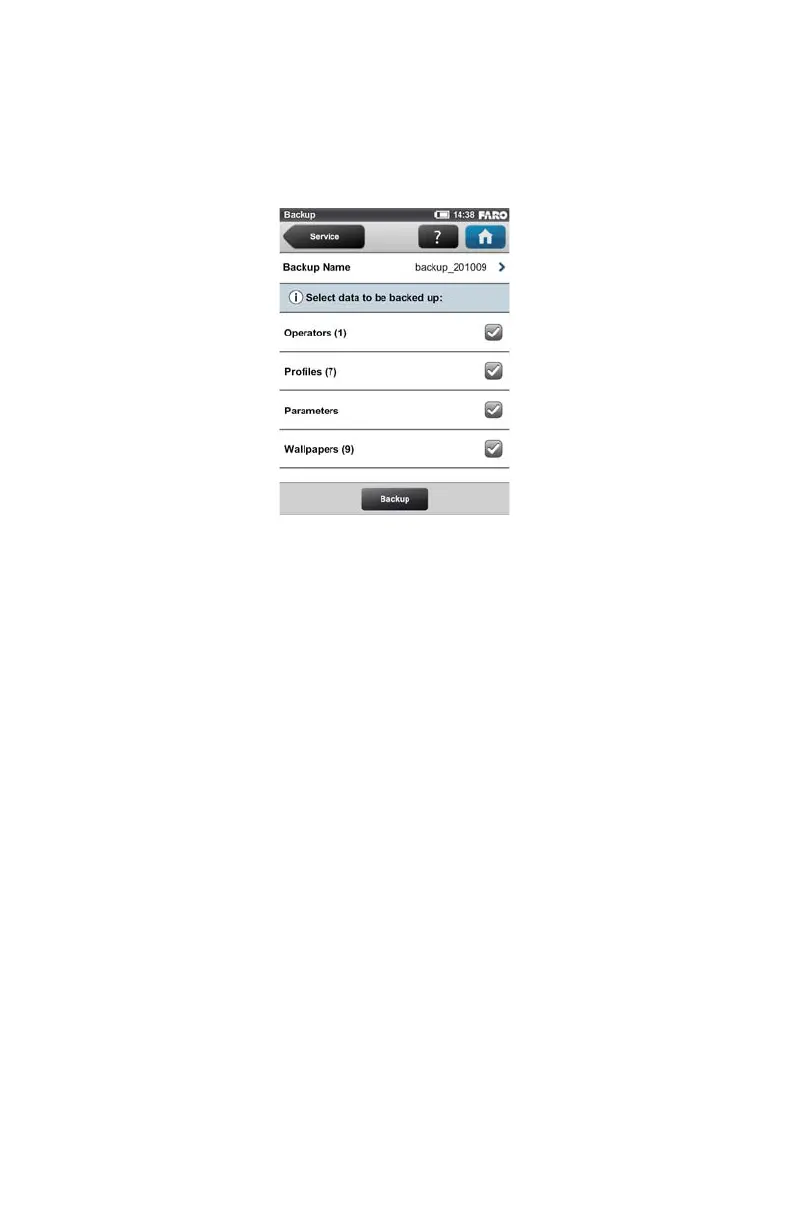
Backup Name - Click to enter the name of the backup package. Data will be
saved to the following directory on your SD card: /Backup/Your_backup_name/.
After having specified the name of the backup folder, select the data you want to
backup and click the Backup button to start the operation.
N
OTE: The number behind Operators, Profiles and Wallpapers informs
about the number of operators, scan profiles and wallpapers on the scanner.
Restore
(Home > Manage > Service > Restore)
With this function you can
• restore operators, scan profiles, scanner parameters and wallpapers from
archived backups or scanner snapshots.
• import operators, profiles and wallpapers that were newly created with
SCENE.
• import formerly backed up operators, profiles and wallpapers that were
modified with SCENE.
• import operators, profiles, wallpapers and scanner parameters from other
scanners.
To restore data, it must be saved to a SD card. For this, create a directory on the
SD card, named “Backup”, and then copy the folder with the data you want to
Figure 6-29 Backup


 To Next Page