4-25
1
2
3
4
Settings Menu
[S8] I/O
4-7-2 [S8] - [O2] Pin 2 setting
This assigns the (I/O) function of the white wire.
For the setting of pin 2 on analog output types, refer to “4-7-4 [S8] - [O4] Pin 2 setting” (page 4-26).
Selectable Options
Selectable option Function description
Output 2 (default value) Sets as control output 2.
Alarm output The received light amount set for output 1 is monitored in the range of 0 to 254%. When
the received light amount becomes less than 50%, the alarm output is generated.
For details on received light amount diagnosis, refer to
“4-8 [S9] Information” (page
4-29).
Teach input
*1
Sets as an external input for teach.
Emitter off Sets as an external input to turn off the emitter.
Counter reset
*2
Sets as an external input to reset the counter.
Not used Disables this I/O.
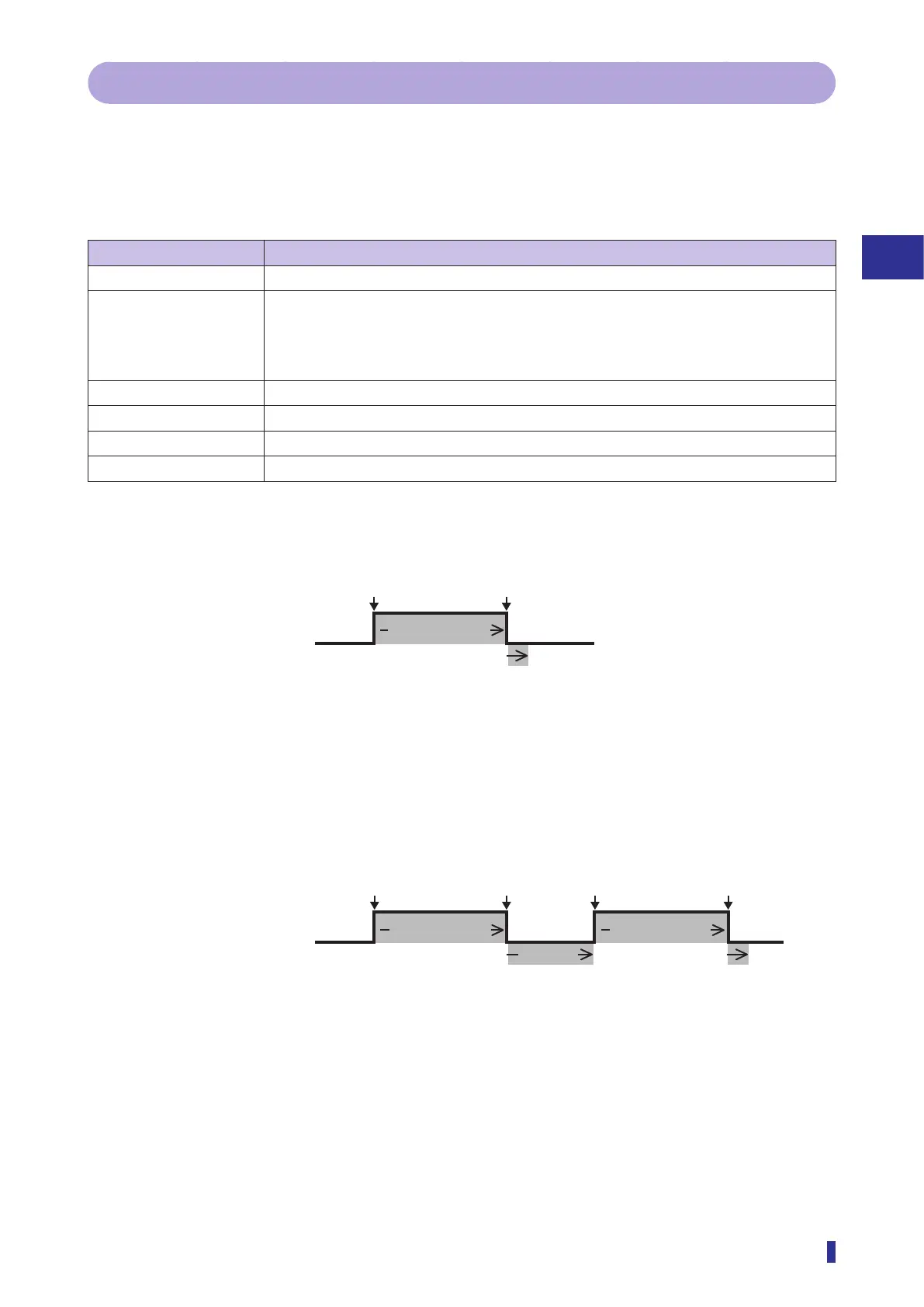
*1: To execute the teach function via external input, follow the instructions below.
• “1 point”, “Through”, and “1-point Zone” teach modes
In the teach menu, select a teach mode to execute, and then enter an input at the following timing.
OFF
ON
Teach input signal
More than 1 second
① Enter the teach input for one second or more.
② Turn off the input.
③ At the point of input off, teach is executed to set a threshold. (this completes the execution of the
teach function).
• “2 points”, “Auto”, and “2-point Zone” teach modes
On the teach menu, select the teach mode to execute, and then enter the teach input at the following
timing.
OFF
ON
Teach input signal
More than 1 second More than 1 second
Within
30 seconds
① Enter the teach input of the first teach point for more than a second.
② Turn off the teach input.
③ At the point of input off, the teach is executed to set a threshold of the first teach point.
④ Within 30 seconds, enter the teach input of the second point for more than a second.
⑤ Turn off the teach input.
⑥ At the point of input off, teach is executed to set a threshold of the second point (this completes the
execution of the teach function).
*2: Displayed when “On” is selected in “[D6] Counter”.


 To Next Page