3-2
Display Screens
3-1 Display Screens
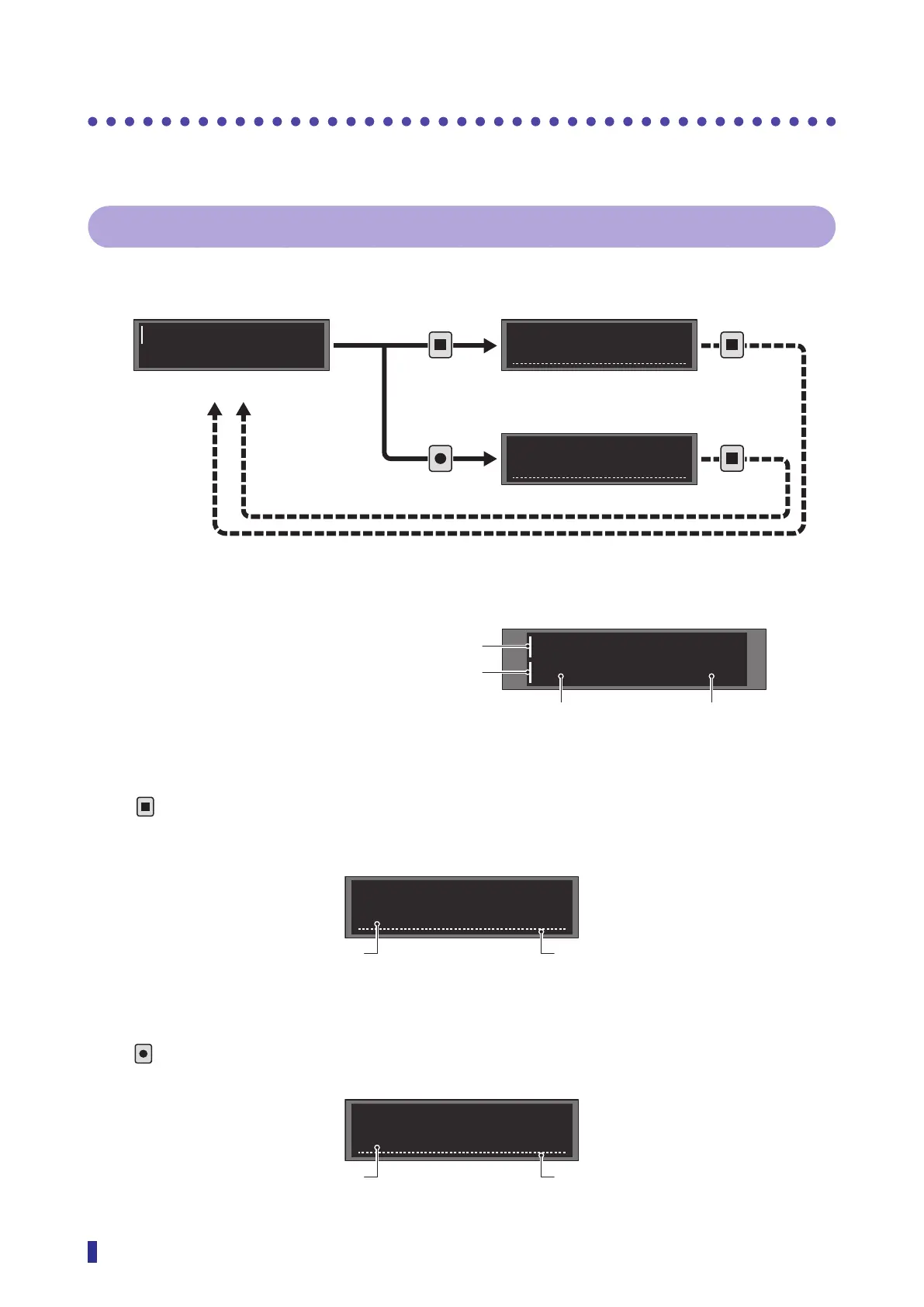
This section explains the types of display screens and transitions.
3-1-1 Screen Types
There are three types of screens: RUN, Teach, and Settings.
99
100
1 point
E1
Output mode
S1
MENU
OK
TEACH
ESC
TEACH
ESC
TEACH
ESC
RUN Screen
Displays the threshold and the present received light amount.
1
2
99
100
Teach Screen
Press
to display this screen.
For details on the teach function settings, refer to “3-4 Setting the Threshold (Teach Function)” (page
3-7).
1 point
E1
Setting Screen
Press
to display this screen.
For details on setting operations, refer to “3-1-2 Operations on the Setting Screen” (page 3-3).
Output mode
S1
Threshold and received light amount
Parameter settings
Teach mode selection
● Setting screen
● Teach screen● RUN screen
The vertical line indicates the
displayed channel (output 1/
output 2).
Received light amount
Threshold
Output 1 indicator
Output 2 indicator
The line appears during setup.
Teach mode number
The line appears during setup.Parameter number



 To Next Page