2-7
1
2
Installation and Connection
Wiring the Fiber Amplier
2-2-2
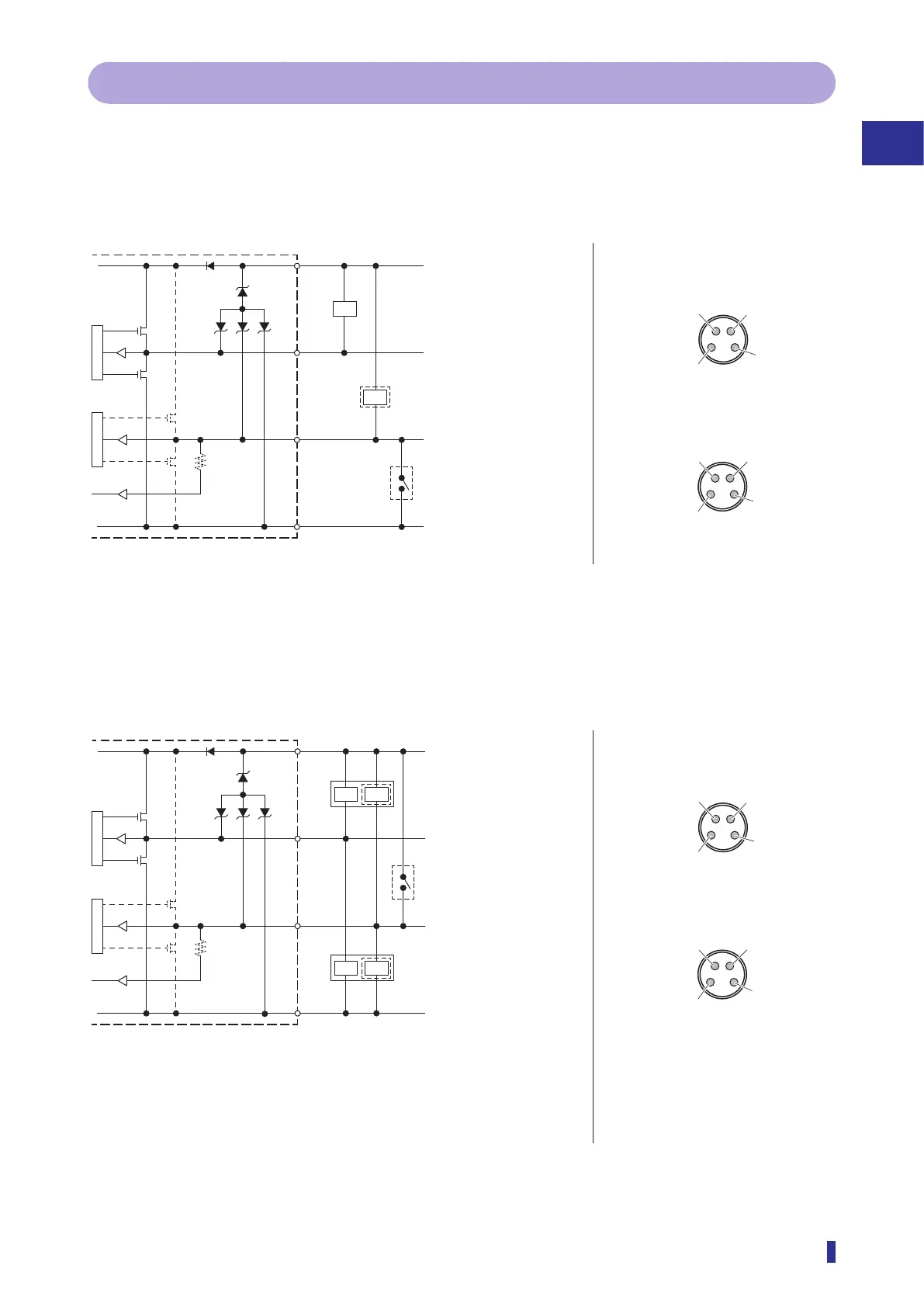
I/O Circuit Diagrams in SIO Mode (Standard I/O Mode)
The circuit diagram by I/O model is shown below.
1-Output and 1-Switchable-Output/Input Models
z NPN setting
M8 connector pin layout
Brown
*1
Black
➃
White
➁
Blue
➂
*1
12 to 30 VDC
(stand-alone unit)
12 to 24 VDC
(inter-connection main unit)
Control output 1
External input/
control output 2
0 V
When used as external input
*1: Power supply wires (Brown ➀, Blue ➂) are not equipped
on the inter-connection expansion units.
When used as control output 2
Load
Load
➀
12 to 30 VDC (stand-alone unit)
➃
Control output
➁
External input
➂
0 V
1-output + 1-input setting
2-output setting
➀
12 to 30 VDC (stand-alone unit)
➃
Control
output 1
➁
Control output 2
➂
0 V
➀
12 to 24 VDC (inter-connection main unit)
➀
12 to 24 VDC (inter-connection main unit)
z PNP or Push-pull setting
Brown
*1
Black
➃
White
➁
Blue
➂
*1
12 to 30 VDC (stand-alone unit)
12 to 24 VDC
(inter-connection main unit)
Control output 1
External input/control output 2
0 V
Load
Load
Load
Load
When used as external input
When used as control output 2
When used as control output 2
*2
*3
*1: Power supply wires (Brown ➀, Blue ➂) are not equipped on the inter-connection
expansion units.
*2: When I/O polarity is set to Push-pull and the sensor is connected with plus common
circuits.
*3: When I/O polarity is set to Push-pull or PNP and the sensor is connected with minus
M8 connector pin layout
➀
12 to 30 VDC (stand-alone unit)
➃
Control output
➁
External input
➂
0 V
1-output + 1-input setting
2-output setting
➀
12 to 30 VDC (stand-alone unit)
➃
Control
output 1
➁
Control output 2
➂
0 V
➀
12 to 24 VDC (inter-connection main unit)
➀
12 to 24 VDC (inter-connection main unit)



 To Next Page