5-7
1
2
3
4
5
Troubleshooting
Errors and Countermeasures
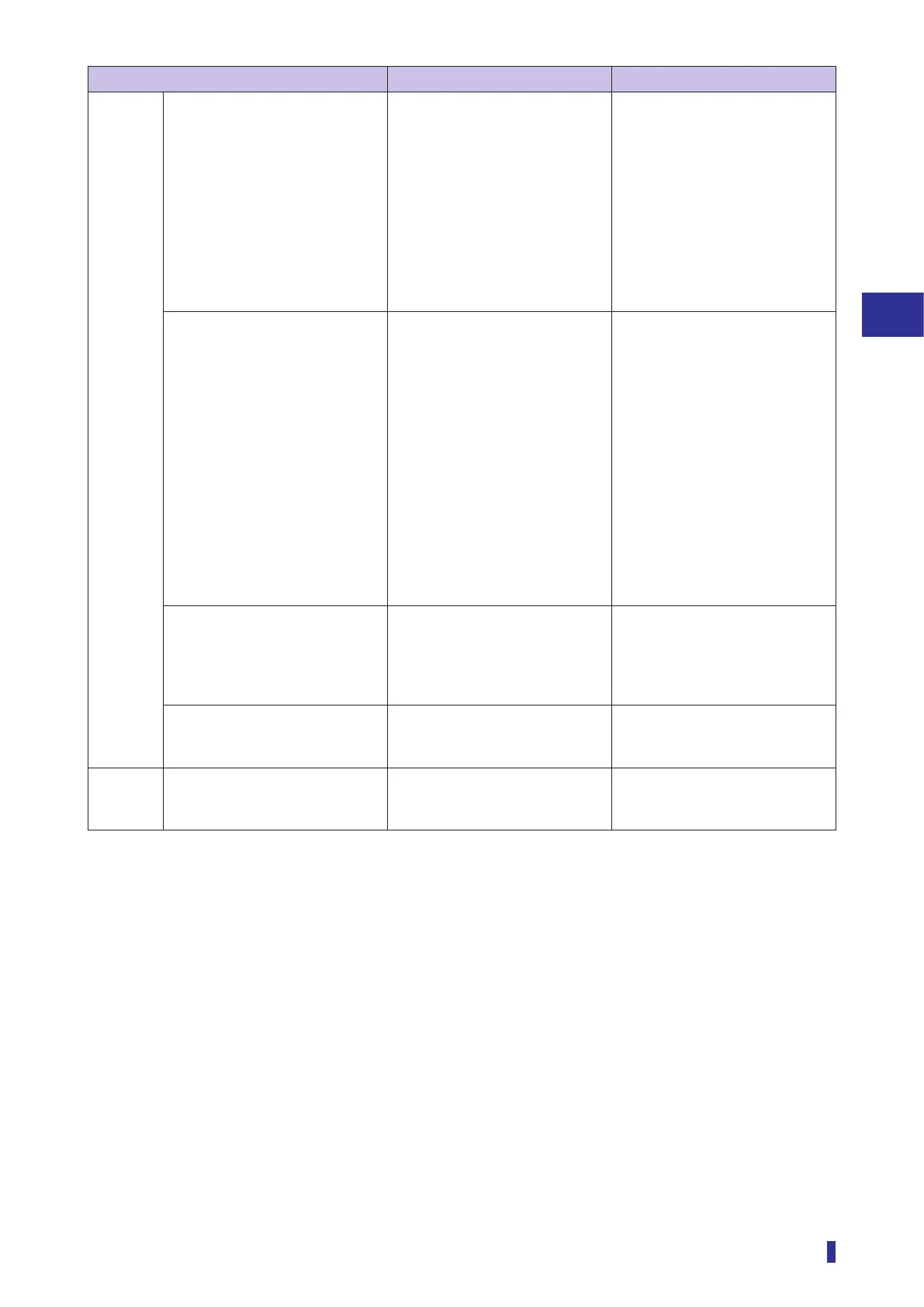
Error Cause Countermeasure
Received
light
amount
The received light amount is
insufficient.
• The emitter or receiver surfaces
of fiber unit gets dirty.
• The sensing distance (through-
beam: distance between the
emitter and receiver of fiber unit,
diffuse reflective: distance to the
object) is set too far.
• The light axis is misaligned.
(With a through-beam fiber
unit.)
• Clean the dirt without damaging
the tip.
• Review the distance and
environment of installation and
adjust the light axis.
• If the emitter power is set to
“Min”, set it to “Mid”. If it is set to
“Mid”, set it to “Max”. (page
4-18)
• Set “Response time” to a longer
mode. (page 3-37)
Even when an object blocks the
light, the displayed received light
amount does not change from the
maximum value (such as “9999”).
The received light amount is
saturated.
• Install the emitter and receiver
of the fiber unit at a longer
distance. (With a through-beam
fiber unit.)
• Install the fiber unit at a longer
distance from the object. Also,
set a longer distance between
the object and background.
(With a diffuse reflective fiber
unit.)
• Set “Emitter power” to “Auto”
and execute the teach function
again. (page 4-18)
• Set “Response time” to a
shorter mode. (page 3-37)
The received light amount does
not change regardless of object
presence.
“Hold display” is On and the
amount of received light is not
displayed in real time, but the
peak value or bottom value is
displayed.
Hold down the [−] key and [OK/
MENU] key for 1 second or longer
to turn off the “Hold display”.
(page 3-40)
The amount of received light is
displayed as a negative (-)
number.
The “Zeroing” function is enabled. Set “Zeroing” to “Not used”. (page
4-13)
Other As details of the settings are not
known, they need to be reset.
— Execute the “Factory reset” or
“Setting reset” of the Reset to
initialize the settings. (page 3-57)


 To Next Page