Festo — EMCS-ST — 2021-03b
Steps for updating the firmware
–
Requirement: output stage is deactivated
–
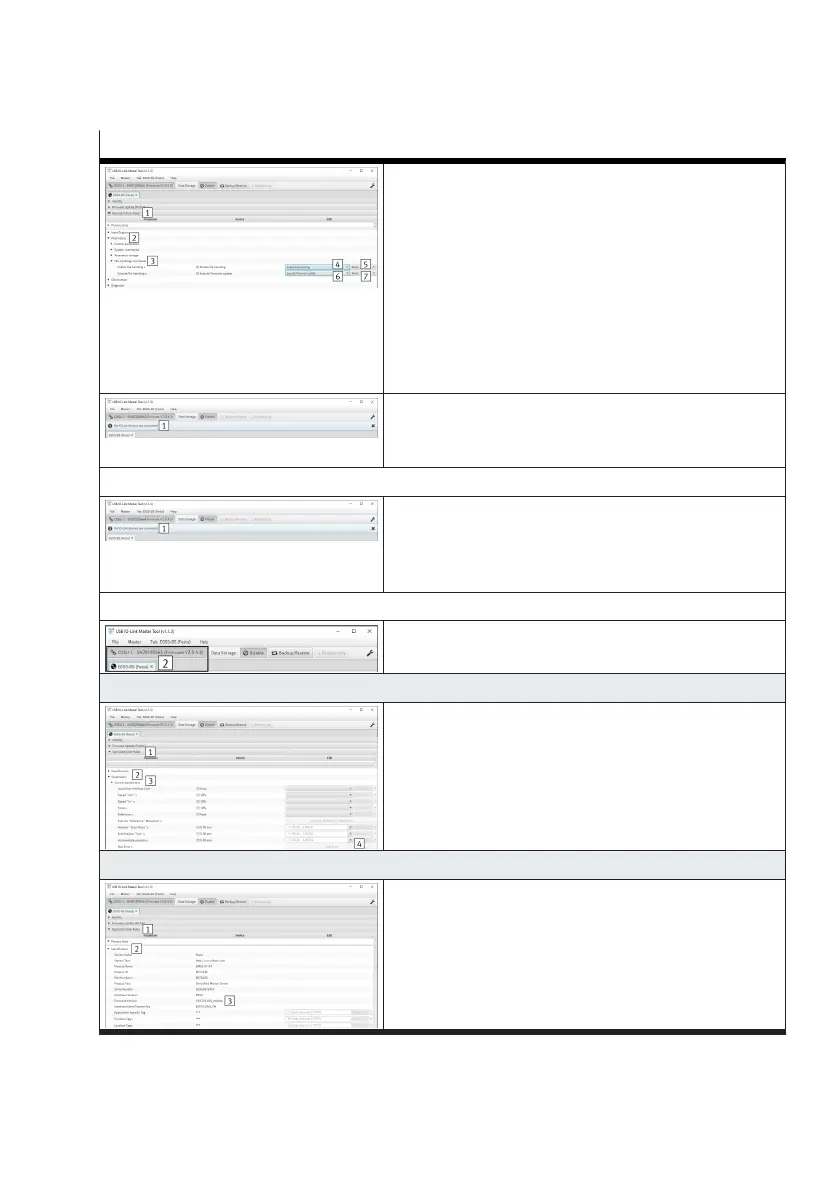
Open the "Specialist (user role) 1" tab
–
Open the "Parameter 2" and "File handling com-
mands 3" submenus
–
In the "Activate file handling" parameter select the
"Activate file handing 4" value and press the "Write
5" button
– In the "Execute file handling" parameter select the
"Execute firmware update 6" value and press the
"Write 7" button
–
The firmware update is started and then a restart is
executed
–
The connection to the IO-Link master is interrupted 1
from version V19.0.4.107
–
The output stage switches off automatically
–
The firmware update is started automatically and then
the system is restarted
–
The connection to the IO-Link master is interrupted 1
All versions
–
After a successful update, the connection to the IO-Link
master is automatically restored 2
8. Acknowledge error (only if an error is pending)
–
Open the "Specialist (user role) 1" tab
–
Open "Parameter 2" and "Control parameter 3" sub-
menus
–
Press the "Acknowledge error 4" button
–
The cause of error 0x0064 is eliminated by an active
save process
9. Check the firmware version
–
Open the "Specialist (user role) 1" tab
–
Open the "Identification 2" submenu
–
Check the current version in the "Firmware version 3"
parameter
1) The use of the function depends on the application software.
Tab. 21: Steps for updating the firmware




 To Next Page