Festo — EMCS-ST — 2021-03b
Steps for updating the firmware
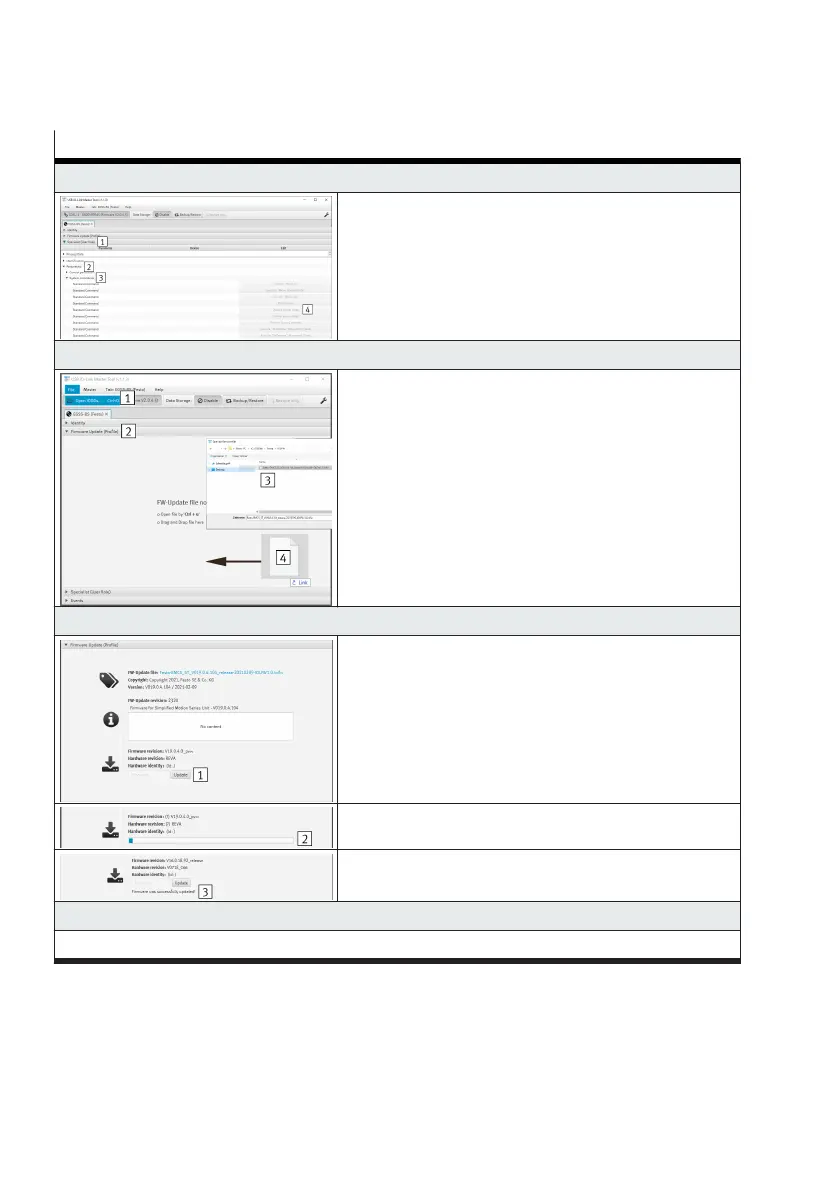
Switch off 4th output stage (optional from version V19.0.4.107)
–
Open the "Specialist (user role) 1" tab
–
Open the "Parameter 2" and "System commands 3"
submenus
–
For the standard commands, press the "Switch off
power stage 4" button
5. Open the firmware file (e.g. Festo-EMCS_ST_V019.0.4.107_release-20210315-IOLFW1.0.iolfw)
–
Open the "Firmware Update (Profile) 1" tab
Variants for opening the file:
–
Open the "File" tab and execute the "Open IODDs"
submenu 2
–
Via the key combination "Ctrl + u 3"
–
By drag-&-drop 4
6. Load the firmware file into the integrated drive
–
Press the "Update 1" button
–
The firmware is transferred 2 (L 30 minutes)
–
The transfer is successfully completed 3
7. Update the firmware file in the integrated drive
up to Version V16.0.18.92




 To Next Page