Festo — EMCS-ST — 2021-03b
–
The application software checks the "Profile characteristic" attribute in the IODD for the value
0x0031 (49) for the profile identifier of the firmware update profile. If the check is successful, the
"Firmware update (profile)" tab becomes active.
–
In the application software, the parameter "0x43BE.0, Hardware Identification Key (HW_ID_Key)"
is checked for the character string "BOOTLOAD_FW" and compared with the IOLFW file used. If the
check is successful, the file can be written to the drive.
–
An IODD device description file with version V1.2.6 or higher is used in the application software.
With the Festo IO-Link master CDSU-1 an update of the firmware in the integrated drive can take up
to 30 minutes and must not be interrupted, e.g. by switching off the device or by exiting the software.
This time can vary greatly if other IO-Link masters are used. If the firmware is updated incorrectly or
improperly, the device may become unusable (servicing required).
All HMI buttons are blocked and all LED indicators flash blue during the firmware update.
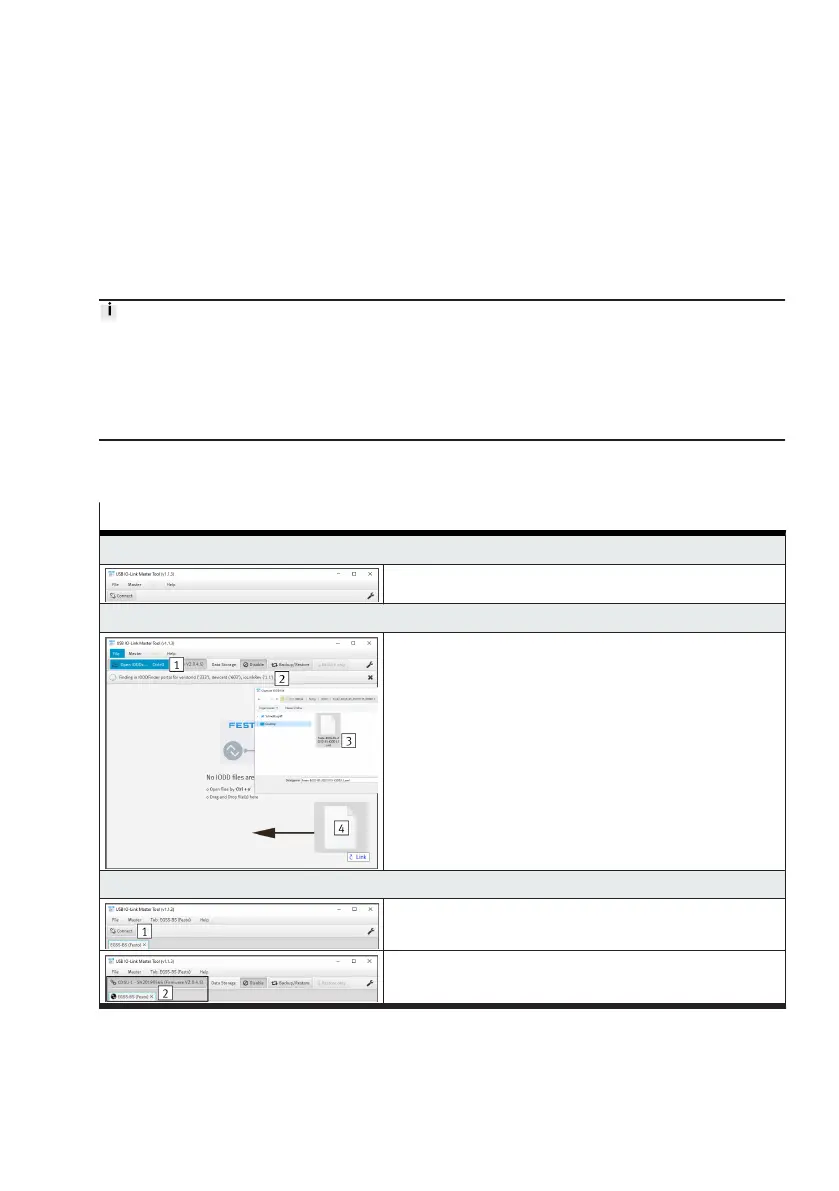
The table shows all steps for updating the firmware using the application software of the Festo USB
IO-Link Master CDSU-1 as an example.
Steps for updating the firmware
1. Start the application software
–
Run app
2. Open the IODD file (device description file)
Variants for opening the file:
–
Open the "File" tab and execute the "Open IODDs"
submenu 1
–
Via the automatic search 2
1)
–
Via the key combination "Ctrl + o 3"
–
By drag-&-drop 4
3. Establish a connection to the IO-Link master
–
Press the "Connect 1" button
–
The connection is established 2




 To Next Page