Festo — EMCS-ST — 2021-03b
10.2.3.1 Perform data backup (Data Storage) (from firmware version v19.0.4.107_release)
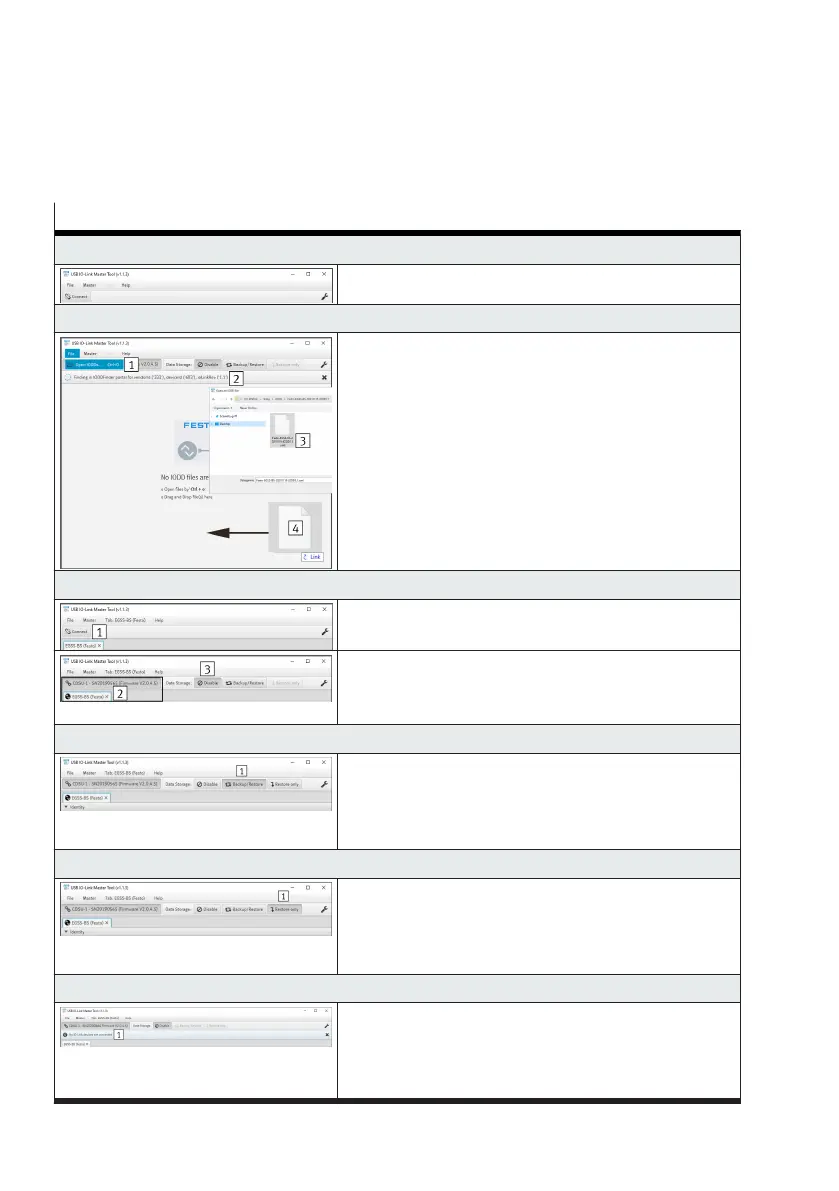
The table shows all steps for executing the data storage function using the application software of the
Festo USB IO-Link Master CDSU-1 as an example.
Steps for executing the data storage function
1. Start the application software
–
Run app
2. Open the IODD file (device description file)
Variants for opening the file:
–
Open the "File" tab and execute the "Open IODDs"
submenu 1
–
Via the automatic search 2
1)
–
Via the key combination "Ctrl + o 3"
–
By drag-&-drop 4
3. Establish a connection to the IO-Link master
–
Press the "Connect 1" button
–
The connection is established 2
–
Default setting: the data storage function is disabled —
the "Disable 3" button is active
4. Activate automatic saving (backup)
–
In the "Data Storage" tab press the "Backup/Restore
1" button
–
The predefined application data is automatically saved
in the IO-Link master with every change
5. Activate one-time storage (restore only)
–
In the "Data Storage" tab press the "Restore only 1"
button
–
The predefined application data is saved once in the
IO-Link master
6. Replace device
–
Disconnect the connection to the IO-Link master
–
Disconnect the electrical connections at the integrated
drive
–
The connection to the IO-Link master is interrupted 1




 To Next Page