FLAMIC S.R.L. 5 Via dell’Artigianato, 36035 Marano Vicentino (Vicenza) - Italy
13
Dough sheeter SF450 - SF500 - SF600 Operation and maintenance manual (translation of original instructions) – Ed. 10/2016
Rev.02 10/2017
All rights reserved. Reproduction in whole or in part of this manual is prohibited.
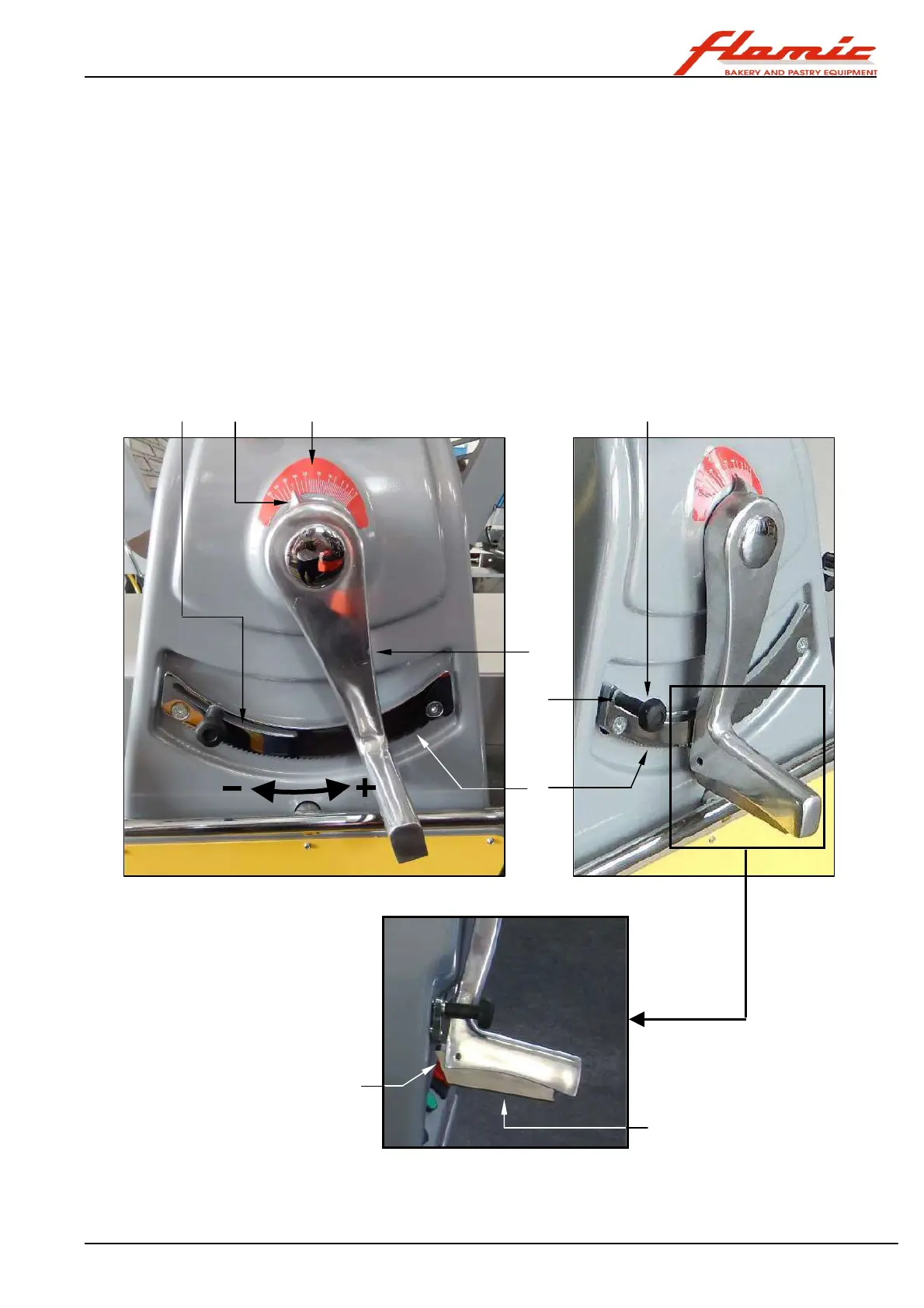
2.5 ROLLING THICKNESS ADJUSTMENT LEVER (HANDLE)
With reference to Figure 5, adjusting the position of lever ref. 1 (handle) modifies the distance between the
rollers and allows the thickness of the sheet of dough to be regulated. Turning the handle clockwise decreases
the rolling thickness, turning it anticlockwise increases it.
There is a graduated scale ref. 2 above the axis of rotation of the lever, the pointer of which ref. 3, provides an
indication of the rolling thickness.
To move the lever ref.1 you must press and hold the locking lever ref.4 under the handle. When the locking
lever is released, the tooth ref. 5, pushed by a spring, will tend to be inserted into one of the notches on the
bottom of the rack ref. 6. This will allow the handle to remain in a fixed position during the rolling process and
keep the rolling thickness constant. If the handle is released in an intermediate position between two adjacent
notches on the rack ref. 6, the force exerted by the dough against the upper roller may cause it to move, but
only until the tooth ref. 5 encounters the first notch.
The minimum required rolling thickness can be set using the limit stop ref. 7. It can be moved manually along
the slot ref. 9 after loosening the knob ref. 10. Once the correct position has been found, secure it in place using
the knob ref. 10. In this way, the limit stop ref. 7 will act as a mechanical stop for the handle ref. 1.
Figure 5 - Rolling thickness adjustment
1
2 3
6
7
9 10
4
5



 To Next Page