FLAMIC S.R.L. 5 Via dell’Artigianato, 36035 Marano Vicentino (Vicenza) - Italy
39
Dough sheeter SF450 - SF500 - SF600 Operation and maintenance manual (translation of original instructions) – Ed. 10/2016
Rev.02 10/2017
All rights reserved. Reproduction in whole or in part of this manual is prohibited.
4.5 REMOVING/INSTALLING THE SCRAPERS
The scrapers must be removed when the machine has to be cleaned.
They should be replaced when they are so worn and/or deformed that they no longer have an adequate
scraping and cleaning effect on the rollers. To remove/install the scrapers, place the tables in the down position
(working). Use only scrapers supplied by Flamic or by authorised dealers.
Before starting, implement the safety measures set out in section 4.1 and wear at least safety footwear
with reinforced toecaps and abrasion resistant gloves.
4.5.1 UPPER ROLLER SCRAPERS
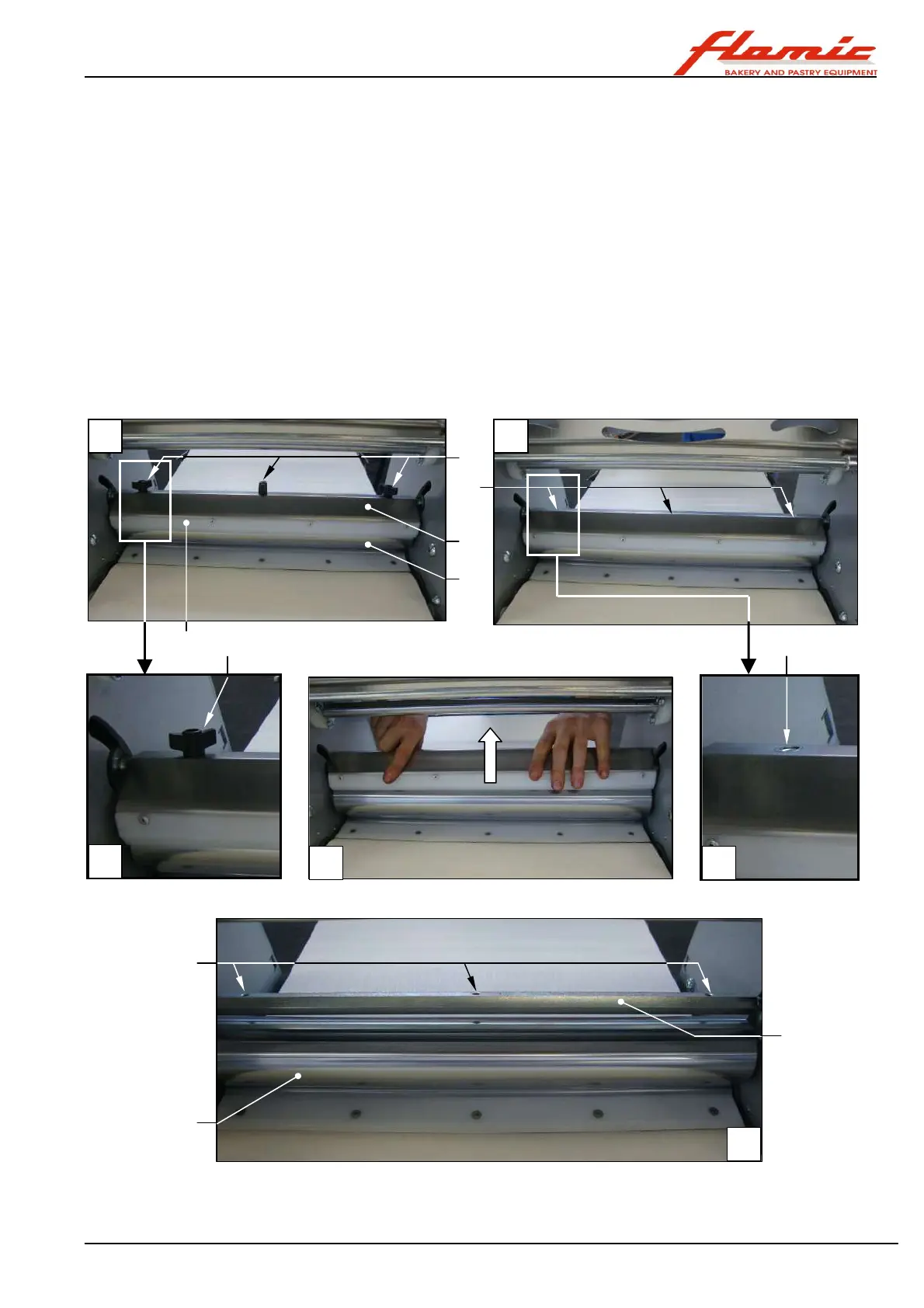
With reference to Figure 33 (the one shown is for mod. SF450, but the procedure is the same for other models),
there are two scrapers ref. 1 installed on a single support ref. 2 that straddle the upper roller ref. 3.
To remove the scraper unit of the upper roller, simply unscrew and remove the butterfly screws ref. 4 on the top
of the support ref. 2 (photos A - B - C) and remove the support upwards (photo D).
To install the scraper unit, place it astride the upper roller ref. 3 (photo C), align the through holes ref. 5 (photo
E) with the threaded holes ref. 6 on the support rod ref. 7 (photo F) and tighten the butterfly screws ref. 4 (photo
A).
Figure 33 - Removing/installing the upper roller scrapers
2
1
3
4
4
5
6
7
3
A
B
C
D E
F
5



 To Next Page