Configuring an FTP connection
Operators manual 37
FDS 400-301
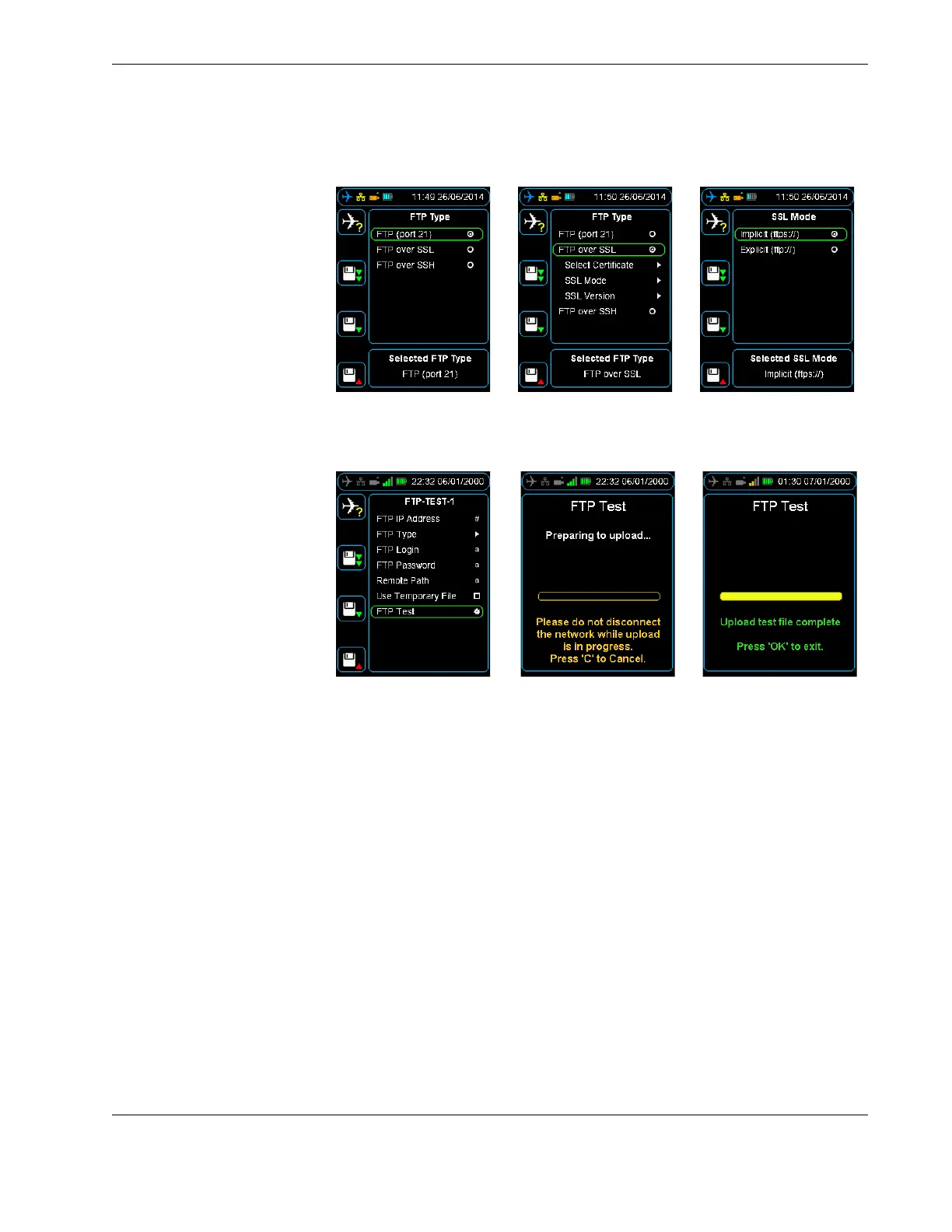
Figure 26.0 FTP type menus
Figure 27.0 Login, password, remote path and FTP test
5.3 Testing an FTP
server from the HHMPI
To test an FTP connection, from the FTP Servers menu, press down until you reach the
FTP server name you want to test, and then press right. Then press down until you reach
the FTP Test command, and then press right. See Figure 27.0, ”Login, password, remote
path and FTP test”, on page 37.
5.4 Setting up an FTP
connection from the
web interface
You can configure the HHMPI through the web interface in any web-browser. Using the
web interface is the easiest way to configure the HHMPI.
To access the HHMPI web interface:
1. Connect the HHMPI to the local area network (LAN) router or switch which will allo-
cate a unique IP address.
2. From the Main menu, press down until you reach the Network Operations com-
mand, and then press right. Then press down until you reach the View Wired
Address command, and then press right.
If the HHMPI is assigned an IP address it will now be displayed, if no link is detected
No Link Detected will be displayed.
3. Record the IP address. See Figure 28.0, ”Viewing the wired IP address”, on page 38.
▼▲
Main Menu > Network Operations > View Wired Address



 To Next Page