FT-111(D) Panel Weighing Indicator, Technical Manual, Rev.1.0.0, May 2019 Page 74 of 146
8.1 Digital inputs
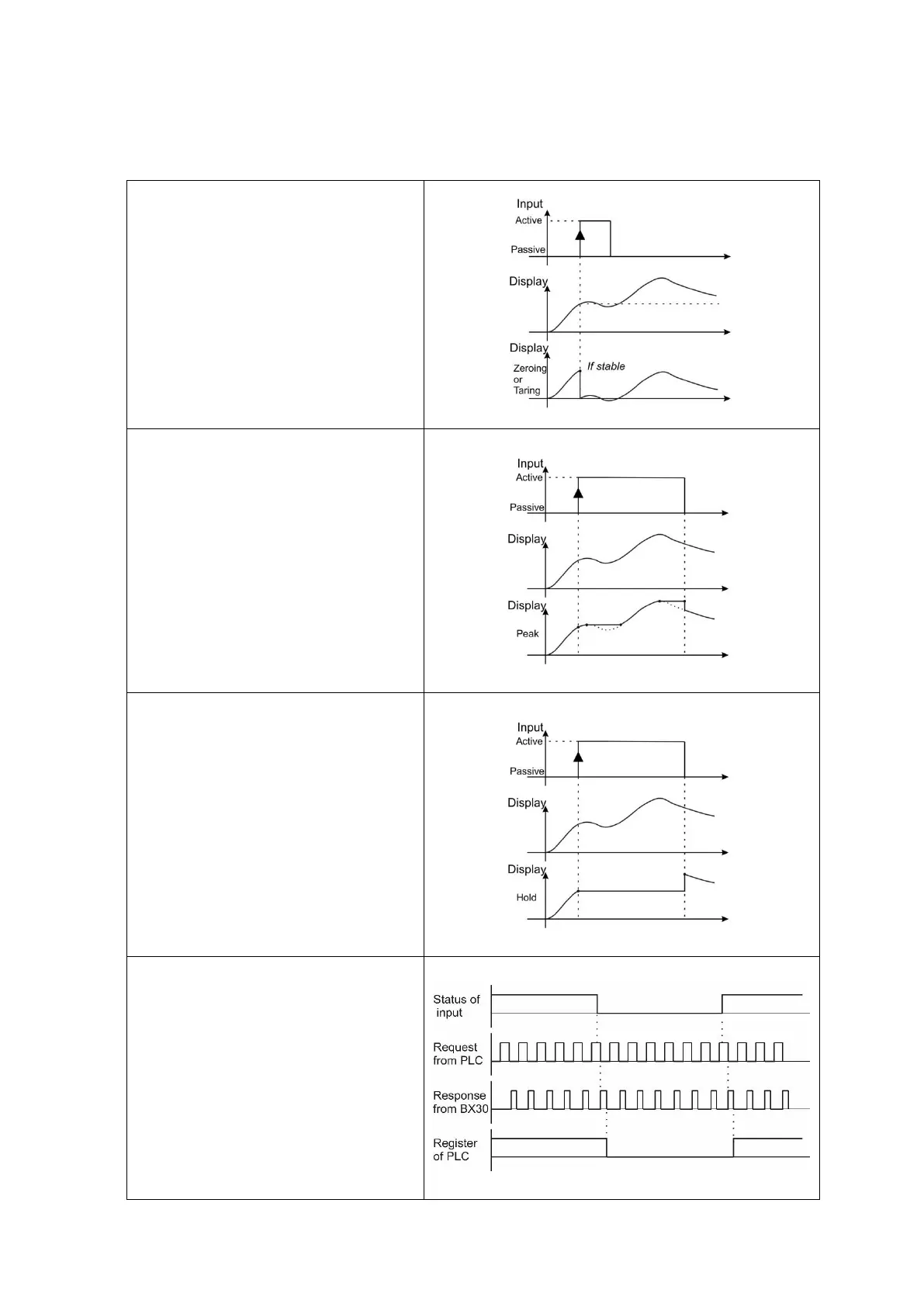
Digital inputs can be used instead of pressing keys for taring, zeroing, clear tare, transfer data etc. as seen below. Basic
Peak on the display and Hold display are the additional input functions.
Key functions via inputs
Zeroing, Taring, Clear, Print
The key functions are executed via digital
inputs. Taring via digital input is shown in
the drawing as an example.
Basic Peak
The instrument follows the peak of the
loading during the input signal.
Not for legal usage.
Hold
The instrument holds the weight indication
during input signal which help the
measured value to the operator for a
while.
Not for legal usage.
Remote Input over Fieldbus or BSI
The digital input(s) can be followed by
PLC as a Remote input, if the instrument
is equipped with any fieldbus option. Refer
to related fieldbus command table to
receive the status of inputs. This usage is
independent from the weighing process of
the instrument.



 To Next Page